New menu discoveries!

Hunter Hampton

Carbonite Member
So I have been digging through the menus and I finally got around to shooting some stills. To my surprise, when shooting in 16:9 aspect the "S" size jpeg is a perfect 1920x1080- and the quality is amazing! This is really good news because it sets up a perfect workflow for shooting timelapse for HD delivery, the 16:9 1080p stills can be imported strait into Quicktime pro and you dont even have to resize or re-crop to get HD time-lapse footage. Thats really a time saver!

The other cool thing I found is an in camera crop mode which can be set to x2 or x4, I have heard of people using this for wide angle c-mount lenses on the G1. But this means a lot for the HD mode- specifically when using the 2x crop mode your effective sensor size is about the same as 16mm film or 2/3", that means by using an adapter you can use all of the old super fast 16mm zooms- and ultra wide c-mount film and security lenses. More surprisingly, the image quality still looks pretty good even when using the 2x crop size (need to test this more). I think that this opens up a whole new world of lens possibilities for the camera, especially in documentary applications.

This camera is turning out to be a lot more useful than I thought, Now I just want to find that uncompressed 1080p button...
 
Neato about the use of 16mm glass. Would like to use one of my old Zeiss 10-100mm T3's on it, if the mount can support the weight and if I can find an arri-b to c mount adapter. Please let us know what you think about the quality of the crop mode once you test it.
 
Nice! I'd been waiting to hear about the second one.

Hunter, or anyone else with a GH1, would you might doing a test shoot in the 2x crop mode? If it's sampling exactly 1920x1080 from the middle of the sensor, and if the aliasing we're seeing in normal modes is a product of resampling, shooting this way might eliminate that.
 
It also mean we can (virtually) have 2 lens for the price of one, ie if you buy a 25mm f1.4 lens for the GH1, it could also be used as a 50mm lens in term of FOV.
And the default 14-140mm lens can go up to 280mm now :)
 
Saw this crop mode called "Extended zoom" or something like that on the Panasonic site. I'm keen to see if this affects the aliasing as well.

I think this experiment might confirm that the aliasing is coming from downrezzing the 4k frame, and also that the camera really is downrezzing a 4k frame.
 
Last edited:
Hunter, if you can, post up some examples. I had found the zooms a while back, did some quick recording and ... well you should just post them up.
 
I was wondering about the time-lapse possibility, being that it was a native 16:9 sensor effectively, but didn't really give the crop mode too much thought!! Nice find.
So here is a cam that will shoot nice looking 720p, with pretty much any lens you want and also simplifies time-lapse shooting. And, it fits in a small bag, nobody asks you for filming permits and it only costs 1500. Why are so many people complaining about it?
 
This is all the same still features with the G1...

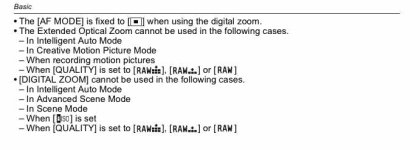
My complaint is that you can't do the 'zoom factor' while shooting raw! If this was the case I'd be extremely happy (because of the 16mm lens factor). But if your willing to lock your white balance and shoot jpg it's a nice option. I see no issue with zooming in post. It's not like it takes more than a few seconds to set that.

NOw... Does it do the zoom factor in the video mode?? This is what I really want to know!! In other words can you shoot 720p or 1080p with a 2x zoom factor effectively making wide c-mounts non-vignette-ed????? That would be a jaw dropping sweet feature!
 
NOw... Does it do the zoom factor in the video mode?? This is what I really want to know!! In other words can you shoot 720p or 1080p with a 2x zoom factor making the wide c-mounts non-vignette-ed?????

upshot, are wide c mounts vignetting? I've only seen a couple of examples so I don't know if that's the case.
 
Damn, that seems really odd that you'd have digital zoom in video mode but not EZ zoom. What's it doing if you put a 2X digital zoom on when the video mode is using the full sensor width? Reducing it down by a factor of 2 in resolution then blowing it up? Seems it would be much easier to pull the full frame, and then just crop it to the 1920x1080 pixels in the center.
 
Last edited:
Pretty much any c-mount less than 25mm (50mm full frame equivalent) will show vignetting, or worse, the image circle. It gets worse the wider you go.
 
upshot, are wide c mounts vignetting? I've only seen a couple of examples so I don't know if that's the case.

Definately. you may find this interesting The best two c-mount wides i've used so far are...

-Schneider Cinegon 16/1.4 with a 18mm image circle (extremely close to 16:9 coverage)

-Schneider Cinegon 10/1.8 with a 17mm image circle (this is the one with the black shaft and big front element)
 
Pretty much any c-mount less than 25mm (50mm full frame equivalent) will show vignetting, or worse, the image circle. It gets worse the wider you go.

That's somewhat true but not universal... Check the list we've developed in my last post.
 
Definately. you may find this interesting The best two c-mount wides i've used so far are...

-Schneider Cinegon 16/1.4 with a 18mm image circle (extremely close to 16:9 coverage)

-Schneider Cinegon 10/1.8 with a 17mm image circle (this is the one with the black shaft and big front element)

Thanks, that's really useful.
 
NOw... Does it do the zoom factor in the video mode?? This is what I really want to know!! In other words can you shoot 720p or 1080p with a 2x zoom factor effectively making wide c-mounts non-vignette-ed????? That would be a jaw dropping sweet feature!

Thats what I was trying to say, you CAN use it in video mode. It will still record a 1080 or 720 file with the crop mode on, It just seems to make the image softer. I will do a little test to see whats actually going on, but I can already see that the 2x crop mode is "usable"- whatever that means.

EDIT: I think Im using the 2x digital crop, not the "EZ" modes. Thats why it seems the picture is softer in 2x mode.
 
Last edited:
Back
Top