rbirnbaum
Well-known member
I have been trying to get the best results using all the LUT's I've found in the forum and I haven't been completely satisfied. So I created 3 new ones and would love to hear your feedback.
Shot on CineEI mode with a meter for exposure.
Here is how they were created:
3d LUT Creator - It's a great color LUT generator. If you don't know about it check it out.
In 3D LUT Creator I created a Transform LUT from Sony F35 to Arri which transformed individually
sLog to LogC
s-Gamut to Alexa Wide Gamut RGB
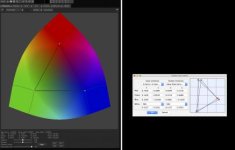
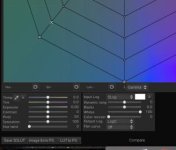
From here I created a Transform LUT - and imported it into Resolve.
In Resolve I added 4 nodes:
Node 1 had the new Transform LUT
Node 2 had the Standard Arri LogC to Rec709 LUT in Resolve (Thanks Hunter for the inspiration with UnThink)
Node 3 had Exposure adjustments to avoid black and white clipping
Node 4 had Saturation (very little)
And with that I created 3 different Luts
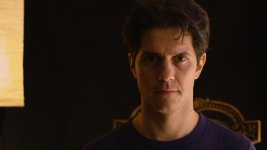
Key side underexposed by 1 stop
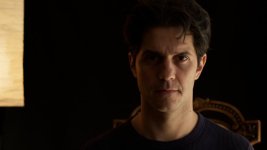
Key side exposed to meter
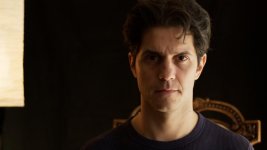
Key side overexposed by 1 stop (default caucasian)
Here they are. This worked for me for mixed lighting - Daylight/Tungsten.
https://www.dropbox.com/sh/i7u1fatyl0bdrl7/AABXKA11qZdZJazdjFN1kTbca?dl=0
Rick LUT
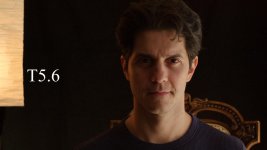
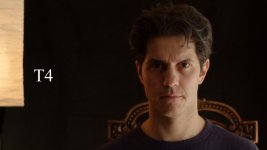
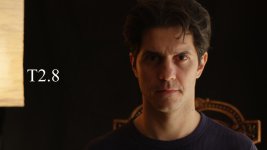
And here the un-touched 2.8 footage in case anyone wants to try it. Remember to select 'Full' Data levels in your clip properties.
https://www.dropbox.com/s/3rrq2f6sv66cwd0/T%202.8%20-%20Theoretical%20Caucasian%20%2B1Least%20Noise.mov?dl=0
Shot on CineEI mode with a meter for exposure.
Here is how they were created:
3d LUT Creator - It's a great color LUT generator. If you don't know about it check it out.
In 3D LUT Creator I created a Transform LUT from Sony F35 to Arri which transformed individually
sLog to LogC
s-Gamut to Alexa Wide Gamut RGB
From here I created a Transform LUT - and imported it into Resolve.
In Resolve I added 4 nodes:
Node 1 had the new Transform LUT
Node 2 had the Standard Arri LogC to Rec709 LUT in Resolve (Thanks Hunter for the inspiration with UnThink)
Node 3 had Exposure adjustments to avoid black and white clipping
Node 4 had Saturation (very little)
And with that I created 3 different Luts
Key side underexposed by 1 stop
Key side exposed to meter
Key side overexposed by 1 stop (default caucasian)
Here they are. This worked for me for mixed lighting - Daylight/Tungsten.
https://www.dropbox.com/sh/i7u1fatyl0bdrl7/AABXKA11qZdZJazdjFN1kTbca?dl=0
Rick LUT
And here the un-touched 2.8 footage in case anyone wants to try it. Remember to select 'Full' Data levels in your clip properties.
https://www.dropbox.com/s/3rrq2f6sv66cwd0/T%202.8%20-%20Theoretical%20Caucasian%20%2B1Least%20Noise.mov?dl=0
Last edited: