New iMac Pro!

Does anyone knows how many Terabyte of raid array with iMac Pro you advice for archive EOS C200's RAW Light?

As much as you can afford. I would look at something like this https://eshop.macsales.com/item/Areca/ARC8050T312/

For me personally, I use my RAIDs as an active editing solution, I archive and keep media that is not being edited off line on bare drives, only material that is being actively edited is kept on the RAIDs. If you do long form with the Cinema RAW Codec though, you will need a LOT of space to keep it on. It will make most sense to shoot 2k proxy, make your edit with that, then on-line using only the RAW shots needed. If you were working with say, 6 hours of Cinema RAW Light footage, that would be roughly 1024 GB per hour, right? So for six hours of RAW footage, with overhead, keeping enough open space for the RAID to function correctly, you'd be smart to own at least a 10-12TB RAID and better to own a 20 TB minimum so could work on more than one project at the same time. Fortunately 20 TB Thunderbolt 3 RAIDs have came way down in cost and aren't too bad. Also, remember you should be running RAID 5, so double your capacity that you need to work for redundancy.
 
Last edited:
Personally, I avoid LaCie drives at all cost. They have screwed me over numerous times in my career as a producer. I have lost multiple big projects on deadlines. If you want quality that is more reliable, check out G-RAID or Other World Computing RAIDs.
 
Thanks, but I think it's not so good because the HDD are just 5400 RPM. What do you think about LaCie d2 10 TB? Italian website : (http://www.lacie.com/it/it/professional/d2/)

Yes but slower drives fail less because they don't have to spin as fast. I always feel safer building server raids with 5400RPM drives. If you have a raid you likely have more than enough speed to really worry about the speed hit 5400RPM takes.
 
Thanks, but I think it's not so good because the HDD are just 5400 RPM.

Western Digital also make a faster 7,200 RPM version and they make a 10TB version, but these cost a lot more than buying their 8TB 5,400 drives.

WD RED PRO 8TB NAS Hard Drive : $360

WD RED PRO 10TB NAS Hard Drive : $460

When used in a large RAID array there is not much difference between the performance of the 5,400 RPM drives and the 7,200 RPM drives, so you are not getting much for drives that cost an extra 30 percent more. Also the 5,400 RPM drives run cooler and may last longer. ( I no longer buy 7,200 RPM drives because of this )
 
Western Digital also make a faster 7,200 RPM version and they make a 10TB version, but these cost a lot more than buying their 8TB 5,400 drives.

WD RED PRO 8TB NAS Hard Drive : $360

WD RED PRO 10TB NAS Hard Drive : $460

When used in a large RAID array there is not much difference between the performance of the 5,400 RPM drives and the 7,200 RPM drives, so you are not getting much for drives that cost an extra 30 percent more. Also the 5,400 RPM drives run cooler and may last longer. ( I no longer buy 7,200 RPM drives because of this )

dingo-

i didn't know this.

i have for year relied on western digital caviar black in various sizes.

occasionally, i have also used them in a raid setup.

i did not know that the 7200 vs 5400 speed pop doesn't show up in a raid.

is there some documentation on this or is this more common knowledge than i realized?

thanks for the share.

be well.

rob
smalltalk.productions
 
It looks super cool and impressive, but... it has the same issues as the trash can Mac Pro; limited upgradability and customisation... an iMac Pro would have made sense if it used regular processors and ram, but you could upgrade/add/switch graphics cards and maybe have more ram than the regular iMac, but still be fairly affordable. By using Xeon processors, ECC ram etc, it just becomes too expensive.
One of the main benefits (to me) of a upgradable machine is that you can by a cheaper version and then add more powerful graphics, more memory, new processor etc as you need them (or can afford them).
There's no way I'd pay $4999 for that.

But... the new regular iMacs look really good!!!

And... there's now macOS support for external graphics... which could be really great and makes a MacBook Pro a more viable option as full time editing machine.


I think it's meant more as an interim solution until they can get the Mac Pro reworked.
 
Personally, I avoid LaCie drives at all cost. They have screwed me over numerous times in my career as a producer. I have lost multiple big projects on deadlines. If you want quality that is more reliable, check out G-RAID or Other World Computing RAIDs.
Agree with this... I've moved from LaCie to G-Raid some years ago with better results.

As for the 5400 v 7200 thing.... I must admit this is news to me as well. I've always read that for video - the faster rpm helps keeps the buffer away.
 
dingo-

i didn't know this.

i have for year relied on western digital caviar black in various sizes.

occasionally, i have also used them in a raid setup.

i did not know that the 7200 vs 5400 speed pop doesn't show up in a raid.

is there some documentation on this or is this more common knowledge than i realized?

thanks for the share.

be well.

rob
smalltalk.productions

Kind of depends on just how badly you need to squeeze a few more MB/S out of a raid. With a single drive yes 7200RPM is faster but on a raid when you have many drives working together you are already at such a high amount of throughput that a little loss compared to a herd of 7200RPM drives will likely not be as painful as it would on a single drive. with a large enough raid you can also over saturate the connection and anything faster is lost anyway. For example a 2 drive raid with ESATA didn't really matter if you used 7200RPM or 5400RPM drives because ESATA could only handle so much and was the bottleneck. Thunderbolt has a boat load of bandwidth so you likely will not fill it up anytime soon but once you get to that level of throughout a few less MB/S really doesn't matter much. If your raid is pumping out 700MB/S vs 650MB/S does it really matter much?
 
Here is something to think about. By the time you add 1TB SSD and 32GB RAM to the regular top iMac to match closer to the specs of the iMac Pro you are up to $3,700. That is only $1,300 less than the base iMac Pro and for that $1,300 you get 8 cores vs 4 cores, a better GPU that seems like it will be faster than the dual D700s on the Mac Pro and you get 4 TB3/USBc ports instead of 2. Thats a lot of extra firepower for $1,300. Even if you only keep it for the three year warranty thats an extra $430 gig each year to cover the cost difference.

I also priced some components on Newegg to build a 8 core PC with 27" 5k monitor as closely matched to the iMac Pro as I could and I'm already up to $5,100 without a case, power supply, fans, cables, HD webcam, speakers and software like the OS.
 
i did not know that the 7200 vs 5400 speed pop doesn't show up in a raid.

It's not that it doesn't show up, it more that the difference is pretty small once you've got 4 or more drives all striped together into a RAID array.

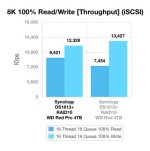
Here's a benchmark using the Synology DS1813+ eight drive RAID box that compares the performance between the 5,400 RPM WD RED 4TB drives and 7,200 RPM WD RED PRO 4TB drives.

WD_Red_vs_Red_Pro_Throughput.jpg

The READ speed is about 26 percent faster with the 7,200 RPM drives, but the WRITE speed is about 9 percent faster with the slower 5,400 RPM drives.

If you dig around the internet looking for new RAID benchmarks, you will see that the slower 5,400 RPM drives are already fast enough for video work.
 
Last edited:
I don't think the iMac Pro is a bad deal, and Apple is known to be more expensive, and you are paying for more than pure hardware with Apple.

The iMac Pro is a fine machine! I have no issues with their price point.

Regarding the PC build, if you pick the very most expensive components you can inflate the perceived price, but the benefit of building a PC is the ability to get 90% of the performance at 50% the cost and to select exactly where you want the allocate funds to. It would be easy to put together a highly comparable PC at half the cost.

Regardless, I think the iMac Pro is reasonably priced for what you get and a seriously impressive piece of hardware. You aren't just paying for parts when you go that route, and I think a lot of Pros will be well pleased by it. Especially today when modular upgrades are still nice as a pro, but not nearly as essential as they were 10-15 years back. Especially now that Apple has announced their Thunderbolt 3 external GPU solutions.
 
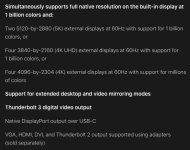
Apple should also upgrade the Mac Pro with the same hardware and sell it for $1,000 less since 27" is too small for many and using a 32" 8K monitor would be possible since the iMac Pro hardware is rated for two additional 5K monitors.
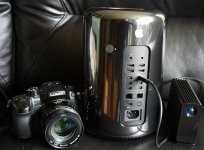
34979584922_8e8b1c7c25_z.jpg
 
Apple should also upgrade the Mac Pro with the same hardware and sell it for $1,000 less since 27" is too small for many and using a 32" 8K monitor would be possible since the iMac Pro hardware is rated for two additional 5K monitors.
View attachment 124147

Would be nice to have a headless iMac Pro. I myself love the 5k p3 10bit display but sometimes you really do want to choose your own displays. Well you can get the 8 core trashcan for $4,000 so there you go. Not as good as the new iMac Pro but it is headless and almost as good and it is a cool conversation piece when clients come over and ask what the heck is that thing.
 
Would be nice to have a headless iMac Pro. I myself love the 5k p3 10bit display but sometimes you really do want to choose your own displays. Well you can get the 8 core trashcan for $4,000 so there you go. Not as good as the new iMac Pro but it is headless and almost as good and it is a cool conversation piece when clients come over and ask what the heck is that thing.

Well, we know it's on the way at least. If you're in a pinch, the iMac Pro will serve a lots of people's needs and large companies have something to upgrade to, but the workstation is coming too.
 
Back
Top