new iMac config? (late 2012) - going crazy with too many options

ok, now I'm really confused. I just spent 30 minutes talking to an Apple Engineer who I felt like was really knowledgeable and he told me that the configuration I was ordering was way overkill. Here's what I ordered:

iMac 27"
i7
2GB graphics
regular 7200 rpm hard drive
24 Gigs RAM

He said the hard drive is the bottleneck and the getting the Fusion drive would help this system get its optimal performance since the programs would be using the super fast SSD part of the drive.

I explained to him that I was doing 30 minutes documentaries which I'll be shooting and editing myself so I won't be editing on a daily basis. His recommendation was this:

iMac 27"
i5
1GB graphics
1TB Fusion
8 Gigs RAM

According to him, the i7 and 2GB graphics are overkill, especially without getting the Fusion drive upgrade since the 7200 rpm hard drive would become the bottleneck. No real benefits using Final Cut Pro X (and to a lesser degree Logic Pro 9). He said 8 gigs would be more than enough unless I was working daily with very large projects and many file opened (which I don't be) in which case I could add another 8 gigs, but any more beyond that would be a waste. Final Cut Pro X would have no use for more. He also said that unless I'd be using 2 monitors, that the 2GB graphics card would be for nothing as far as any noticeable performance difference. He did recommend getting 1GB however. He said the real difference would be with the Fusion drive and explained how that worked.

Before I go and change my order, I'd love some feedback. This guy sounded like he really knew his recommendation was to downgrade and spend less so I'm inclined to think he was being straight with me.

Let me know what you think :)

P.S. he also told me that he felt there are a lot of editors who don't really have the experience of using the Fusion drive so don't really understand the advantage...
 
My thoughts.... Always buy the fastest computer you can afford, with the most RAM you can afford, and the most fast storage you can afford.

Are you going to be using any 64 bit apps that can take advantage of a large amount of RAM?

Are you going to be using any apps that can take advantage of the i7 hyper threading?

Are you going to be using any apps that can take advantage of the better video card like Premiere for example?

My thoughts on the Fusion drive... I'll pass due to its small size, as I already know my apps exceed the amount of SSD space provided. Plus I can wait the extra time for my app to load into RAM, it's not that big a deal to me. I would likely change my mind once they make 3TB SSD drives. To me it makes more sense to invest in fast Thunderbolt storage since the real bottle neck is your media read write times, not apps loading into RAM.
 
My thoughts.... Always buy the fastest computer you can afford, with the most RAM you can afford, and the most fast storage you can afford.

Are you going to be using any 64 bit apps that can take advantage of a large amount of RAM?

Are you going to be using any apps that can take advantage of the i7 hyper threading?

Are you going to be using any apps that can take advantage of the better video card like Premiere for example?

My thoughts on the Fusion drive... I'll pass due to its small size, as I already know my apps exceed the amount of SSD space provided. Plus I can wait the extra time for my app to load into RAM, it's not that big a deal to me. I would likely change my mind once they make 3TB SSD drives. To me it makes more sense to invest in fast Thunderbolt storage since the real bottle neck is your media read write times, not apps loading into RAM.

hmmm. didn't think about the 64-bit angle and ram requirements there. good point.
I don't know enough to know if I'll be taking advantage of hyper-threading in the i7. The Apple tech says I won't using Final Cut Pro X or Logic Pro X...
I may use premiere. yes.

I do wonder if I'll be able to get an SSD drive later and wether I'll be able to install programs on there?
 
By the way, I almost forgot to mention this but I've ordered my iMac through Powermax.com and am totally impressed so far with their handling and customer service.
 
based on my research I too had a hard time deciding on the fusion drive, and the more I looked the more I found that experts say that the benefit is not just loading the app faster, everything runs faster, if I am using after effects and some picture and music files are being used by the ssd then it's reading and writting faster, it will render faster to the desktop, etc. and yes you always wanna buy the fastest computer you can afford because next year there will be a better imac, so you wanna buy youself some time when you buy top of the line
I went with the 27 i7, 32gb of ram (from owc $200) 2gb graphics card and 3tb fusion drive, I already have the 12tb pegasus raid so it will plug right in
I am looking forward to more discussion on the impact of this "fusion" drive and the big difference in a professional workflow


My thoughts.... Always buy the fastest computer you can afford, with the most RAM you can afford, and the most fast storage you can afford.

Are you going to be using any 64 bit apps that can take advantage of a large amount of RAM?

Are you going to be using any apps that can take advantage of the i7 hyper threading?

Are you going to be using any apps that can take advantage of the better video card like Premiere for example?

My thoughts on the Fusion drive... I'll pass due to its small size, as I already know my apps exceed the amount of SSD space provided. Plus I can wait the extra time for my app to load into RAM, it's not that big a deal to me. I would likely change my mind once they make 3TB SSD drives. To me it makes more sense to invest in fast Thunderbolt storage since the real bottle neck is your media read write times, not apps loading into RAM.
 
It was my understanding that the most used apps and files loaded on your 3TB drive are automatically transferred to the 128GB flash storage area of the Fusion drive. Good concept but I just don't think it's worth the money at this point.
 
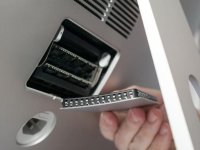
Other than one small screw, it can't get much simpler than the "old" (2010/2011) iMacs. Unscrew. Pop out old RAM (if you are replacing). Pop in new RAM. Screw. Done.

It's definitely easier on the new iMac but how often does one swap out RAM?
 
Other than one small screw, it can't get much simpler than the "old" (2010/2011) iMacs. Unscrew. Pop out old RAM (if you are replacing). Pop in new RAM. Screw. Done.

It's definitely easier on the new iMac but how often does one swap out RAM?
i posted this mainly because there was the discussion about ram exchange on the new models... 27" inch only though
 
Other than one small screw, it can't get much simpler than the "old" (2010/2011) iMacs. Unscrew. Pop out old RAM (if you are replacing). Pop in new RAM. Screw. Done.

It's definitely easier on the new iMac but how often does one swap out RAM?

In my case once!
 
Back
Top