
David W. Jones
Veteran
Thinking about a Pegasus R6 12TB raid for a Thunderbolt storage solution.

Follow along with the video below to see how to install our site as a web app on your home screen.
Note: This feature may not be available in some browsers.

My thoughts.... Always buy the fastest computer you can afford, with the most RAM you can afford, and the most fast storage you can afford.
Are you going to be using any 64 bit apps that can take advantage of a large amount of RAM?
Are you going to be using any apps that can take advantage of the i7 hyper threading?
Are you going to be using any apps that can take advantage of the better video card like Premiere for example?
My thoughts on the Fusion drive... I'll pass due to its small size, as I already know my apps exceed the amount of SSD space provided. Plus I can wait the extra time for my app to load into RAM, it's not that big a deal to me. I would likely change my mind once they make 3TB SSD drives. To me it makes more sense to invest in fast Thunderbolt storage since the real bottle neck is your media read write times, not apps loading into RAM.
My thoughts.... Always buy the fastest computer you can afford, with the most RAM you can afford, and the most fast storage you can afford.
Are you going to be using any 64 bit apps that can take advantage of a large amount of RAM?
Are you going to be using any apps that can take advantage of the i7 hyper threading?
Are you going to be using any apps that can take advantage of the better video card like Premiere for example?
My thoughts on the Fusion drive... I'll pass due to its small size, as I already know my apps exceed the amount of SSD space provided. Plus I can wait the extra time for my app to load into RAM, it's not that big a deal to me. I would likely change my mind once they make 3TB SSD drives. To me it makes more sense to invest in fast Thunderbolt storage since the real bottle neck is your media read write times, not apps loading into RAM.

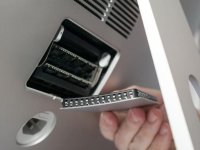
i posted this mainly because there was the discussion about ram exchange on the new models... 27" inch only thoughOther than one small screw, it can't get much simpler than the "old" (2010/2011) iMacs. Unscrew. Pop out old RAM (if you are replacing). Pop in new RAM. Screw. Done.
It's definitely easier on the new iMac but how often does one swap out RAM?
Other than one small screw, it can't get much simpler than the "old" (2010/2011) iMacs. Unscrew. Pop out old RAM (if you are replacing). Pop in new RAM. Screw. Done.
It's definitely easier on the new iMac but how often does one swap out RAM?
