New HyperDeck Shuttle Mounting Plate

CinemaElectronika

Well-known member
"HyperDeck Shuttle Mount Plate has been designed to provide you with an extremely versatile and flexible mounting solution for your HyperDeck Shuttle. Now you can easily secure your HyperDeck Shuttle to a camera rig with your choice of rail mounts, cold shoe mounts, articulated arms and a whole lot more. That’s because HyperDeck Shuttle Mount Plate features a variety of pre-drilled 1/4" and 3/8" holes, making it compatible with every mount accessory you’ll ever need. It also gives you the freedom to power your HyperDeck Shuttle from an external battery. Simply attach a V-Mount or Anton Bauer style battery plate and you’re good to go."

http://www.blackmagic-design.com/products/hyperdeckshuttle/
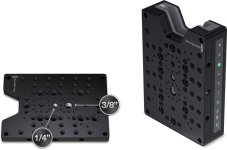
 

Attachments

  • mountplate.jpg
    mountplate.jpg
    62.2 KB · Views: 0
With the new plate the box now makes a whole lot of sense and a serious rival for the Ninja and Samurai recorders.
 
Few questions about this device:

-does it start recording once the camera start recording?

-where can I find the list of compatible SSDs?

Thanks.
 
I have looked into this...no, it is NOT triggered to start/stop from the camera.


...And that's where the story ends (for me) with this device... And the fact that minute of footage is >8GB. What ever you save on device, you will pay for huge capacity SSD...
 
No HDMI cable can trigger any recorder - it´s not in the specs.

You don´t need a lot of high capacity SSDs, you need two and just dump one to an external disc, while you shoot on an other.

Frank
 
Apparently they can do it with SDI since AJA does it with the KiPro.
I see the shuttle as being useful for VERY controlled shoots with VERY specific needs. (green screen, etc.)
Great idea at a great price point, but who REALLY wants to shoot uncompressed? Really?
 
I would love to shoot uncompressed all the time, as impractical as it is for storage space. Transcoding uncompressed to ProRes is a very quick process compared to transcoding H264 or Redcode footage. Edit with the ProRes, color correct the uncompressed Slog. But then we also do a lot of visual effects and it's hard to beat uncompressed for that.

For shoots that don't require uncompressed, I'll use the same SSD drives in a Pix 240 to record ProRes directly. But it would be idea if the Hyperdeck would be triggered by the camera.
 
I would love to shoot uncompressed all the time, as impractical as it is for storage space. Transcoding uncompressed to ProRes is a very quick process compared to transcoding H264 or Redcode footage. Edit with the ProRes, color correct the uncompressed Slog. But then we also do a lot of visual effects and it's hard to beat uncompressed for that.

For shoots that don't require uncompressed, I'll use the same SSD drives in a Pix 240 to record ProRes directly. But it would be idea if the Hyperdeck would be triggered by the camera.

Almost my plan exactly-- I just bought a 128gb SSD simply to test the Hyperdeck. I await the Pix (and SD told me at CCW that it is very soon) and have already bought a 256gb SSD for the Pix. The two drives give me maybe 35-37 minutes of uncompressed, which I would shoot where the situation would warrant. I'll normally shoot ProRes or DNxHD to the pix.

Ned
 
What is all this triggering thing all about?

What difference does it make, if I push the record button on the camera or on the recorder.

I mean, the recorder records even if the camera is in idle mode.
I remember that, since I had the Firestore, I haven't pushed the record button of my HVX in years.
Actually I think i never pushed the record button on the HVX at all - it´s a virgin button :cheesy:

The only situation I can think of is, if you have the camera on shoulder and you mounted the recorder somewhere way back.


Frank
 
Trigger is very important if you want an on-camera backup on the SxS.

I'm searching for a review on the HyperDeck (which i cannot find) to see how fast it is to transcode to Pro-res and backup 500gigs of footage on set on another external HD via firewire.
You cannot leave everything on the SSD.
 
Why don´t you try?
If you don´t have uncompressed footy, make generate some in AE or your NLE - it really depends on your computer specs and setup, how long it takes.
But why would you want to record uncompressed and than compress it?

Most NLEs work better and more snappy with uncompressed, than with any other codec.
Simple free software RAIDS work just fine. Throw a few TB of drives in your housing, make them a RAID 0 and you are golden.

Since disk space is cheaper than SR tapes today, just keep buying those HDDs as you kept buying tapes in the old days.

Frank
 
Why don´t you try?

But why would you want to record uncompressed and than compress it?

Frank

Because if you use shared storage like we do (gigabit ethernet), you can edit ProRes in HD realtime, but you can not do this with uncompressed. Also, even with 16 Tb of shared storage, if you had 5 artists all working with uncompressed projects, the space would be used up in no time. An artist can also take a ProRes project on a single drive and edit anywhere with a laptop. Uncompressed requires multiple drives which means more to carry, more to power, etc. In the offline process, uncompressed is definitely overkill.
 
Okay, I see - with your infastructure you are stuck with compressed formats.
We use portable SAS RAIDs here - when you want to move 8 TB to the office next door, sneaker-net is way faster.

But if you use ProRes anyway, I think a Ninja/Samurai would be the best bet.

Frank
 
Unless you are doing something REALLY high-end or unusual, I see no need at all for uncompressed. [oh, the gasps from the crowd]
All other things being equal, I'd challenge 99% of users/viewers to discern the difference between ProRed HQ and uncompressed.
 
Back
Top