
Navigation
Install the app
How to install the app on iOS
Follow along with the video below to see how to install our site as a web app on your home screen.
Note: This feature may not be available in some browsers.
More options
You are using an out of date browser. It may not display this or other websites correctly.
You should upgrade or use an alternative browser.
You should upgrade or use an alternative browser.
New GH1 firmware... June 22nd.
- Thread starter Hunter Hampton
- Start date
Barry_Green
Moderator
Yes the GH1 can be used as an external SDHC card reader.
JB_frenchy
Active member
thank you but now i tried it,
but the sdhc card (which has been formatted with the gh1) appears on my mac as a "No Name" volume which is "read only" when i hit command-i
so i cannot copy anything on it,
am i stupid or what?
but the sdhc card (which has been formatted with the gh1) appears on my mac as a "No Name" volume which is "read only" when i hit command-i
so i cannot copy anything on it,
am i stupid or what?
Last edited:
JB_frenchy
Active member
help anyone?

JB_frenchy
Active member
No, it doesn't work, i cannot change anything on the info window...
Do someone have a mac and manage to copy files on a sdhc card formatted with the gh1 directly using the gh1 as the card reader?
Do someone have a mac and manage to copy files on a sdhc card formatted with the gh1 directly using the gh1 as the card reader?
JB_frenchy
Active member
i know what you mean with the lock, it appears on any other folders or volume on my mac, but not on my sdhc card,
and i just checked on a usb flash drive formatted in fat 32 too, and there s no lock either but it says read and write...
and i just checked on a usb flash drive formatted in fat 32 too, and there s no lock either but it says read and write...
JB_frenchy
Active member
i could do that, but on the firmware update page, it is said that the sd card should be formatted by the gh1... don't know what to do...
JB_frenchy
Active member
nobody with a mac has done the firmware update?
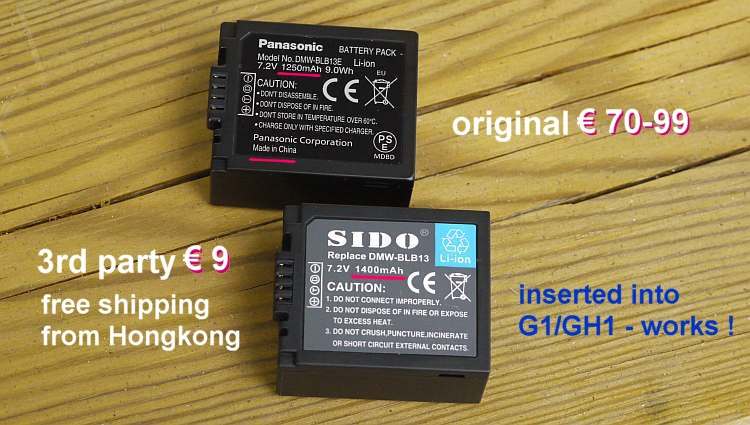
no I skipped the FW update until I resolve my battery problem cause I bought some copies
I advise you to spend the 5-9 bucks for a SDHC card reader! Its really not expensive and they are sold all over the place....I have one which is like a USB memory stick only that the memory is a SDHC card. Very comfy and works perfectly with GH! formatted cards on all my macs.
I advise you to spend the 5-9 bucks for a SDHC card reader! Its really not expensive and they are sold all over the place....I have one which is like a USB memory stick only that the memory is a SDHC card. Very comfy and works perfectly with GH! formatted cards on all my macs.
JB_frenchy
Active member
thank you, but are you sure i'll be able to copy files on the card with a card reader?
i tried on windows xp (bootcamp on my mac) and i cannot copy either... (always with the gh1 as a card reader)
i tried on windows xp (bootcamp on my mac) and i cannot copy either... (always with the gh1 as a card reader)

commanderspike
Carbonite Member
Key question that is 
The first cheap third party batteries that work around the firmware update will sell very well...
SIDO... is it true??
The first cheap third party batteries that work around the firmware update will sell very well...
SIDO... is it true??
thank you, but are you sure i'll be able to copy files on the card with a card reader?
i tried on windows xp (bootcamp on my mac) and i cannot copy either... (always with the gh1 as a card reader)
man I have the exact same problem.
I cannot mount that little biest in read/write mode.
I will have to test that on another computer, but neither Mac OS X nor Windows will mount it as r/w.
hope anyone can help me?
Also mounted that card with my other DSLR and I could access it.
Futhermore I couldn't get read/wirte by mounting the exact same card with my Canon Printer.
It is so f**king strange - I hate it. but maybe that's worth an own thread.
Will the English 1.1 firmware update apply to the Japanese hardware and possibly give English menus?
Or is there only one firmware update package and it chooses the right language and NTSC/PAL based on hardware ID?
A bit offtopic - will 1080p video played directly via mini HDMI to my Pioneer Kuro KRP-500AW look good without choppiness? Or would 720p be better due to these 'mud' issues?
Or is there only one firmware update package and it chooses the right language and NTSC/PAL based on hardware ID?
A bit offtopic - will 1080p video played directly via mini HDMI to my Pioneer Kuro KRP-500AW look good without choppiness? Or would 720p be better due to these 'mud' issues?
John Caballero
Veteran
What "mud" issues?
What "mud" issues?
The ones referred to earlier in this thread. Something about 1080p video recording not being quite right. I'm not totally familiar with the issue, perhaps an expert could elaborate.