HPX250: New firmware update available

zjrt02

Active member
FYI, I stumbled across this update released today (11/5/13) on the Panasonic site while looking for something else:

Ver 17.45-
+ Switching between PB/THUMBNAIL mode and CAMERA mode by a USER
button has been made possible without using the slide switch of Power
button.

and

+ Improving of the stability of Power/Mode switch

Richard Thompson
T4 Media
 
Pan just replaced the worn out rotary switch for free (under warr.). I'm not going to use the hair blow method. The newly replaced switch has a smoother feel to it. I guess Pana want few of the HPX250s as much as possible to their service center by implementing this.
 
I really like my HPX250 but that switch always bothered me. Maybe I should hope mine fails before the warranty expires!
 
I just successfully updated my HPX-250. One thing I noticed that was different is that there are two firmware folders and images in the ZIP file. With past updates there has only been a FW folder, this time there is an additional FW-NFR folder. Both contain a 22MB firmware image file with the same name, but the images are not the same.
 
I had my power switch replaced in the uk service center 2 months ago. will update this weekend and report. thanks for the link!!
 
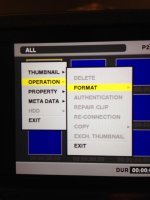
I'm having problems issues with this firmware update…..when in thumbnail mode, I select operation and noticed that there is not an option for "UPDATE"
I find that odd.
 
I've done 2 previous firmware updates. The last being the micro p2 update. Here is a picture of what I see, when I'm ready to update the new firmware
IMG_0406.jpg
 
Where are the files on the SD card? The only thing I can think of is that they are not in the correct location.
 
I mean that the directory structure is not correct and that the camera can't find the firmware image in the location where it is looking.

The VSI5378J.IMG file should be in \PRIVATE\MEIGROUP\PAVCN\SBG\P2SD\FW on a SD card that was formatted in the camera.
 
you can either format the SD card in camera or use a FAT 32 formatted card. it should be empty! unpack the .zip file and copy the resulting "private" folder to the SD card you now should have one singe "PRIVATE" file in the root of the SD card, nothing else and the FW update should work.
 
Ok…I formatted the sd card in the camera anI noticed it has files for video, audio and a last clip text files. I then, copied the private-2 folder onto the sd card. that didn't work, so I deleted the video, audio and last clip text file, copied the private-2 file and the same result… The camera doesn't give me the "UPDATE" option at all as per my photo. I'm also missing "SERVICE" . I called panasonic and they are perplexed by this issue. Basically my issue is the cam doesn't have "UPDATE" as an option.
 
I notice that both timbook2 and THoff call the folder PRIVATE and you call it private-2. Have you tried renaming to remove the -2 from the end of the folder name?
 
The VSI5378J.IMG file should be in \PRIVATE\MEIGROUP\PAVCN\SBG\P2SD\FW on a SD card that was formatted in the camera.

This is what you need to do. Forget everything else. Unzip that file and you'll get the VSI5378J.IMG file. Put it in the directory where it belongs. The only thing you need on that SD card is
\PRIVATE\MEIGROUP\PAVCN\SBG\P2SD\FW\VSI5378J.IMG

And it has to be exactly there. No changing of file names, no moving of directories.
 
Interesting.. When I download from the panasonic website I get, private-2/meigroup/pavcn/sbg/p2sd/fw/vsi5378j.img/fw-nfr/vsi5378j.nfr
 
UPDATE….I just downloaded the firmware using a PC instead of my mac, and low and behold! The extraction option on the PC made the difference. I now have success. Thanks guys for taking the time to help.
 
I'm guessing the Mac you used to download the firmware had downloaded and extracted firmware before and tried to resolve the naming conflict by adding a "-2" suffix to the folder name.
 
Back
Top