New EVA1 3.0 Firmware Updates Look Impressive!

I can’t wait to try this out. I’m nervous to have a “I can’t believe this still isn’t fixed?!?” Moment but I’m thankful to see progress and updates, and look forward to seeing what’s new!
 
Here's the release notes on all the changes in 3.0.

Ver. 3.00-

New Features

1. Additional Recording Format
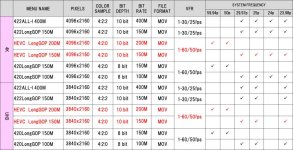
4K/UHD 59p/50p 420_10bit@200Mbps
4K/UHD 29p/25p/23p/24p 420_10bit@150Mbps
HEVC
hevc.jpg

2. IP Live Control
Please refer to our Website concerning the updates about operation checked products.

3. Capturing function (still image [jpg] from video) is added.

4. While recording or playback on HLG mode, Camera can convert HLG to SDR and then output it.
This works on LCD/SDI/HDMI respectively.
[Related menu] OUTPUT SETTINGS >
SDI OUT > SDI OUT HDR > [SDR/HDR]
HDMI OUT > HDMI OUT HDR > [SDR/HDR]
LCD HDR > [SDR/HDR]
- Assignable to USER SW (LCD/SDI/HDMI respectively)
- Status indication such as “HDR” or “SDR” on HOME MENU / EVA ROP

5. OSD displays Focusing point. (m/ft switchable)
"SDI / HDMI" and "LCD" can be set individually.
[Related menu]
OUTPUT SETTING > SDI/HDMI INDICATOR > FOCUS > [feet / m / OFF]
OUTPUT SETTING > LCD INDICATOR > FOCUS > [feet / m / OFF]

6. 2ch AWB MEMORY (AWB A/B switchable)
[Related menu]
CAMERA SETTING > WHITE > VALUE > [AWB MEMORY A / [AWB MEMORY B]

7. Increasing ease of use on system setting
Some functions assignable on USER SW
- “SETUP FILE” list popping up on display with pressing USER SW
- “VFR ON/OFF” switchable with USER SW
Selectable from SLOT 1 or SLOT 2 when loading SETUP/SCENE FILE

8. Canon lens “CN-E70-200mm T4.4 L IS KAS S” and EXTENDER can be used in combination.

Improvements

1. SD card setting operability is improved to detect the card correctly.
i. LED lighted as soon as inserting SD card
ii. Message modified to encourage reseating SD card
*「CHECK CARD」->「REINSERT or CHECK CARD」

2. Though in rare cases, some TV monitors couldn’t display the camera HDMI output. It is improved.

3. Audio menu configuration (CH1/CH2/STEREO/MIX) couldn’t be set to a built-in speaker output. This problem is fixed.

4. The TIME ZONE information on CLIP was displayed with the plus time difference even if it is the minus time difference at TIME ZONE. This problem is fixed.
 
So we have 4k 10-bit, but 4:2:0.

Glad to see a jump to 10-bit, but how does this compare in practice to 10-bit 4:2:2 in terms of color, grading, and ability to push/pull footage? I've worked with 8-bit 420 and 10-bit 422. But never 8-bit 422 or 10-bit 420. Sort of an "in-between" step up and wondering what we gain with the increase in bits, and what we don't gain with the lack of 422?
 
So, I'm really glad to see we have presets now, but this implementation is, frankly, upsetting.

It's tied to the SD card, so as soon as you remove the SD card and put in a new one - it's gone. As soon as you format the SD card - it's gone.

So on a shoot where you may go through 6 SD cards, you need to have this duplicate scene file copied to every SD card in your arsenal to keep the "Quick Switch" feature alive and well. And when you are done with a shoot, offload, etc. and go back to format in the camera after the cards have been dumped - which is the preferable way to do this - your file is erased. Which means you then need to go back to a PC, reload the copied text file, and do this with all your SD cards... wow.

Yes that's right, you can't actually load the presets onto the inboard camera memory and have them on an SD Card as well. You can only have it exist on the SD card.

I know that the official line will be that the camera is crammed to the gills with features and there's simply no internal memory room left to fit these presets on camera, to which I say, holy cow you guys the preset files are only 6kb each... maybe a tiny bit more margin on the EVA2 would go a loonngggg way. The architecture on this camera feels straight out of the 90s, if I recall, even on the HVX200 and AF100 you could load scene files onto the internal camera memory?!

Since I also want to be constructive, here are two ideas:

- Can you change the "format card" function to simply ignore the folder on the SD card including these presets? It would limit me to using SD cards in only the EVA1, but at least it wouldn't necessitate the complexity of "reloading" SD cards after every shoot with these presets
- Can you allocate 50kb of onboard storage to presets? I mean, I really hope the answer to this isn't "no" because that feels preposterous, but, it sounds like there is extremely limited wiggle room on the camera's onboard memory storage system

Sorry for the frustration, it's just after a year of waiting I was hopeful for a firmware that would implement some solutions which didn't cause additional headaches. I'm thankful for what we've received here, but TBH, I was really expecting more (including some better HD codec bitrates for VFR, auto dual ISO switch and/or quicker access, the persisting zebra issue, among many other small things).
 
Another option would be to only use slot 1 for recording and slot 2 for the scene files. Then swap cards before you run out of card space.

Keep card 2 write protected.

Good news on the 24p - 60p recording in 4K. With HEVC you can leave the codec in 150 and the EVA1 will swap to the 200mbps HEVC mode when using VFR
 
Another suggestion for Setup Files and Scene Files is to store them on an inexpensive basic SD card. Either keep that in one slot or use it whenever you want to switch files.

Your frustration is understood and the request was made. This is the current implementation because it is built off the structure already within the camera. To do what you ask would take a restructuring, and if it is possible (I don’t know) it would take much longer. Panasonic wanted to offer a solution rather than extend the process. Not promising that this will change in the future, just explaining the thinking.
 
On the question of 422 v 420, this is a very misunderstood distinction. In 422, for every group of four pixels (first digit), the secondary colors (red & blue) are sampled to two (second digit). For better accuracy in averaging of the color, the codec looks two rows up and down (third digit). This is because everything used to be interlaced video, and every other scan line was missing and/or temporally offset which could cause odd false color edges. But 4K is all progressive scan, so the codec can instead look just above and below each pixel for the averaging (a zero as third digit), thus 420. In practice there is very little difference between the two in progressive scan video.
 
Thanks Mitch, I understand things can be far more complicated than they seem on the surface - not just in engineering, but in allocating company resources, time, teams, etc. Thanks for putting in the word, and I understand no promises are way of knowing whats possible. Appreciate it!!

Interesting on 420. So essentially, with progressive scan video 422 vs 420 is a minor consideration, and 10-bit is the real point of interest?

As such, this would seem to make HEVC 10-bit 420 the, by far, preferred way of shooting? Completely ignoring 2k vs 4k, just codec, would you prefer HVEC 10-bit 420 *over* H.264 10-bit 422 due to the higher data throughput of HVEC then?
 
Correct, 10-bit is what’s key.

Honestly, good luck finding much of a difference shooting 10-bit 4K30p in LongGOP150 v All-I400 v HEVC150. It’s really more a workflow question than anything else. And if you need 4K60p then obviously HEVC’s 10-bit is better than LongGOP’s 8-bit, and once you’re shooting HEVC on a project you might as well shot the whole thing that way even for slower frame rates.
 
Yes, I'd be primarily interested in HEVC 10-bit for 4K vfr @ 36fps, 48fps, etc. So I'd select 150, shoot in a base of 24p, set to VFR, and then the camera would automatically select 200mpbs for anything > 30fps?

Resolution is less important to me than quality within those pixels since I am delivering these next projects at HD. I want to ensure that, ignoring resolution, the above ^^ is better than shooting HD 60fps 150mpbs LongGOP 10-bit 422 in terms of ability to push/pull the grade in post and have it stand up. Obviously I lose VFR options if I stick to HD, so just comparing at 60fps?
 
So we have 4k 10-bit, but 4:2:0.

Glad to see a jump to 10-bit, but how does this compare in practice to 10-bit 4:2:2 in terms of color, grading, and ability to push/pull footage? I've worked with 8-bit 420 and 10-bit 422. But never 8-bit 422 or 10-bit 420. Sort of an "in-between" step up and wondering what we gain with the increase in bits, and what we don't gain with the lack of 422?

Just due to the nature of what 10bit is vs 4:2:2 I feel like this is the better choice if there has to be a compromise. 10bit can directly affect grading because there just aren't samples to go around when it comes to some formats like log. You need a wide range of values to recreate an image of the scene without obvious artifacts. 4:2:0 on the other hand is a form of lossy compression but other than changing the ratio of chroma to luma pixels from a pixel the size of 2x1 pixels vs 2x2 pixels the image is still realistic. Grading also doesn't really affect that ratio very much unless you do some really fancy color isolations and even then 4:2:0 is not a massive loss with 4k. At the end of the day 4:2:2 is also a huge loss of chroma data and we act as if its pure 4:4:4 and it absolutely is not. It is one step between 4:2:0 and 4:4:4 but it's still a fraction of the chroma detail it should be.

I also tend to look at 4k 4:2:0 as basically the same amount of chroma detail as 2k 4:4:4. We have more of a luma bonus with 4k 4:2:0 as opposed to a chroma loss. If Hollywood has been grading 2k 4:4:4 for decades I'm pretty sure we can get pretty solid results with 4k 4:2:0. The 10bit however means the difference between fragile log or robust log. Not so much for pushing in post but to get even samples in gradations in camera. 32bit float grading is good enough to calculate gradations since steps between gradations are subtle. Math can do that sort of stuff very well. Where 32bit float can't help however is if the footage is already ruined with posterization. You can't inject missing samples into a visible wide gap without some fancy dithering. Dithering which would be so much more brutal to fine edge grading than 4:2:0 would ever be. 10bit gives us the range to make sure more frames are rendered as intended instead of leaving it to chance with 8bit. 8bit can be a solid format but it really has no place in a log world.

As much as I would love 4k 4:4:4 when it comes to a bayer sensor I still view 4k as a means to get a near perfect 2k delivery. Just too much "math" and artificial detail with a bayer sensor. Having 4k 10bit 4:2:2 would be awesome of course but I don't consider the 4:2:0 anywhere near as much of a show stopper as I do 8bit. Besides there's still the external route or even better external raw.

10bit 4:2:0 also opens up a lot more options for real life type footage that could be delivered as HDR. Thats one of the key areas where 4k 60p 10bit is more likely common. For cinematic production the camera has always had 4:2:2 10bit 4k. There are the folks that want it for slow motion and that's a valid need but not as critical as those that want 60p played at 60p but also want to be able to deliver HDR to clients. HDR is something very tangible to clients in the future and an obvious advancement for video vs 4:2:0 which 99% of people can't tell the difference. Heck I recall endless debates between pros trying to figure out if the HDMI on specific cameras was 4:2:0 or 4:2:2 and nobody could tell. It really is a very subtle form of image compression.
 
So I have done some tests with the new HEVC codec and it plays beautifully on my iMac pro. Very little cpu usage and plenty of headroom on the GPU in FCPX. 10bit h264 files are a lot harder on the system but also play smoothly. Waveform reveals the HEVC files have smooth gradients and look good. They do capture slightly darker then h264 files.

More importantly, they play much better on my 560 2018 laptop.
 
Then she washed the pants with reds too (assuming they are black since not all blacks contaminate the same).
 
:10 vs 1:10 the coloring shifts

Anyway...

interesting on the HEVC, I am looking forward to testing 4K VFR with this as well as editing performance on my system. Surprised that it plays better for you, that seems odd...
 
Back
Top