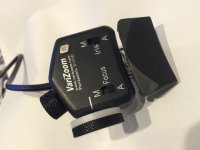
New controller for Panasonic Cameras from Studio 1 Productions

I have seen a couple of questions re how to manage the wires coming out of the Studio 1 Unit

A couple of miniature 4" ties worked for me.

Notice I replaced the Focus Knob with a 2 in diameter knob. This makes it easier to fine-focus, not quite as well as with much larger focus ring on the camera (as you might expect).

The real solution to fine focus would be a multi-turn helix potentiometer but these take up a lot of space so the box size would have to change. Hardware design often gets down to tradeoffs like this one.
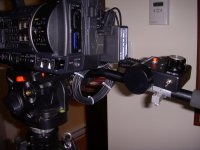
2013-04-07 02.47.50.jpg
 
Hi Walter, nice set of tests, I'm sure everone is grateful. I love the idea of changing the knob size too. My varizoom also has quite small controls so I will look at applying your mod to my unit.
Cheers!
Rod
 
Hi, Rod,

Subject to more testing, at short distances, given that I do not have an HD monitor, I have to rely on red-lining (Focus Assist). With the large camera focus ring you can index to 0.1 foot increments. I can't quite replicate this at the remote.

However, at a distance of, say, 25 feet, the redlining seems to be accurate only to +/- one foot. The new knob does allow you to get there without wild over/undershoot, so it's a big improvement.

I plan to look around for an even larger knob.
 
I'm a latecomer to this one, but I'd like to thank Walter for all his advice and information about this device. It looks like it could be a great solution for my AC160.
 
Got my zoom controller today, it took 3 days to get to the UK and 6 days to clear customs!

I haven't had a chance to play with it yet, but one thing of note - the cables are about a foot long now, which is much, much better for on-tripod use. Studio1 sells extension cables if you want to jib mount it.

Edit: and a very quick test shows none of the horrible bumping I was getting at the start and stop of very slow zooms with my Libec controller. Either Libecs are bit bumpy in Panasonic mode, or mine was defective. I like the "set and forget" constant slow zoom of the Studio1 device.
 
Last edited:
I don't have any formal review for this yet (been too busy), but I'm delighted with this zoom control. Bizarrely, I can't get iris or focus to work (probably doing something wrong), but I don't need those features so I haven't hurried into figuring things out.

For long, smooth zooms it's great. I just have to remember to centre the knob after the zoom ends, otherwise it's a bit of a fumble for the next zoom. That's just training, I've spent too many years with the spring zoom controls.
 
Mike, You need to have the camera on Manual, the Focus switch at "M" and the toggle at the remote has to be Down. I will check this out and update as necessary.

Curious to hear you don't need to use focus at the remote. For the stage events I do with the camera typically at 2.8, typical theatre lighting, from a distance of 50 feet with cast members sometimes at 52 feet, 56 feet and 65 feet, I find myself constantly changing the focus. Am I doing something wrong?

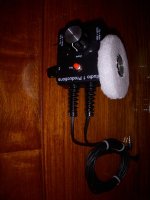
I have spent a lot of time trying to de-sensitize the focus at the remote. I replaced the focus knob for a larger one but the knob I was able to find did not fit well. My latest effort is shown below.

This is a soft foam wheel with a hole in the center that lets you press the foam onto the original knob.

My 'problem" with focus has nothing to do with the remote - it's just not possible with a remote at this price to compete with the huge focus wheel on the camera (you would need a multi-turn pot), so my "solution" has been to extend the diameter as much as I can. I expect all remotes have the same issues re focus.

The foam I used is fragile and shreds with age. I plan to either put some silocon around the edge or go to a more rubbery type of wheel.

I have only used the foam wheel once so the jury is still out on the effectiveness of this add-on.

2013-05-21 07.21.37.jpg
 
Walter,

Sorry, I missed this reply - I keep forgetting to check the "Other" forum!

When I say I don't use the remote focus controls, I'll try to explain. My style of tripod-based shooting has always been to use my right hand on the pan bar with a zoom control for use by my thumb, and use my left hand on the focus/iris. I'm never in a physical position that has those controls out of reach for me. I could see that being a necessity if the camera was on a tall tripod above my head that was out of reach, or if I had to use it sitting down to avoid blocking the view of people behind me, but that's not a requirement for me.

I'll have another go at the focus/iris controls based on your advice. I'm sure I've tried that configuration, I'm wondering if it's a camera problem. I used a multimeter on the 3.5mm jack on the ProZoom and it seems to be sending the right signals (or at least seems to be sending "something" at least), so it's not a fault with the cabling and probably not a fault with the Prozoom.

As an aside, the zoom on these AC cameras is scarily powerful. Even on my Vinten tripod it's a struggle to do anything smooth at over 600mm zoom!
 
Last edited:
Hi guys. I have a Varizoom Rock PZFI which has record, zoom, iris and focus. I also have the varizoom that doesn't have iris and focus, only record and zoom.
Anyway. With my hmc150s I can frequently but not always get a smooth start/stop zoom with them but the iris/focus doesn't work.

With this new controller can I get consistent smooth zoom starts and stops with my hmc150s and will the iris/focus work?

My ag dvc60s really spoiled me with their perfect variable zooms. If I could somehow get close to that again, it would be great! :)
 
Pros and Cons of Dial Zoom versus Toggle Zoom - Sports Example

Pros and Cons of Dial Zoom versus Toggle Zoom - Sports Example

I've had the opportunity now to use the Studio 1 controller on my ProAm USA DVC250 jib while video taping soccer games. The controller has been reliable and given excellent performance. However, given that the zoom dial/knob requires you to 'manually' return it to the neutral position, I'm considering getting a separate zoom controller (without the focus and iris control) that has the zoom toggle control that mimics the zoom 'rocker' on the camera itself.

Soccer is fast moving and almost constant motion. Although the difference is minor...I'm just not finding it as 'natural' to control the zoom with this manual approach for zoom control. The key to good footage in soccer is how you anticipate what will happen on the field. A series of passes up the near side of the field (close to the camera) can easily change with a kick to send the ball across the field...and this calls for a controlled zoom to maintain the relative size of the players in view...and again the difference is subtle...but easing on the rocker to start the zoom and easing off the rocker to stop the zoom is more natural to me then turning the dial to zoom and then turning the dial back to regain a netural postiion.

However, it may just be a matter of more experience with the Studio 1 and it will become easier...(so like the karate kid [wax on/wax off], maybe the dial-on dial-off approach will work out with lots of training).

Both types of zoom controls (the dial vs rocker) have their advantages...I love the dial when I want to set a zoom speed and know that the speed will not change. Maintaining a constant zoom speed with the camera's rocker requires good finger dexterity---one twitch and the zoom changes speed. And getting the same speed in two different shots should be on the short list for olympic sports abilities. With the dial it is a simple matter to put a mark on the case so that the same speed can be dialed in easily...

However, when you are zooming in (play at the far side of the field) and at the same time making a decision on how to pan the camera (to follow the soccer action) I've found it easy to 'forget' that the zoom is easing in and I end up too close to the action...and needing to adjust back. With the rocker control I find it more intuitive---my finger has lifted off the rocker, and thus the zoom stopped, almost before I'm aware that I've made the decision to stop zooming.

In any case, this controller is a tremendous value, and I'm just hoping that bringing this up will add one more criteria to consider when making a remote controller purchase decision...
 
Last edited:
Wish List For Controller Knobs

Wish List For Controller Knobs

Ok, now my wish list for the Studio 1 Controller:

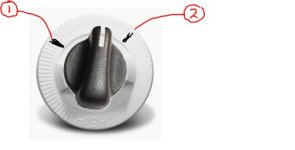
Zoom knob & focus knob...add a white ring to the base of each control knob so that whiteboard markers can mark places (like the #1 and #2 in the attached image) to pull focus and zoom for a shot. Seems like a minor mod that would easily raise the value of the controller...

I sent the suggestion to studio1@studio1productions.com and got a good response back from Dave at Studio 1 that they are considering this idea. Why not consider sending your own note...a few responses might provide more support to them following up on the idea.

Knob-WhiteRing.JPG
 
Last edited:
My problem with the controller is similar, Michael. I've used the sprung rocker controllers for so long, I tend to forget to centre the knob at the end of the zoom as well. It's also a bit of a fumble when the zoom starts, it's a bit less intuitive than just popping your thumb on a rocker. That translates into a wobble when you're at full zoom on the AC130/160.

On the plus side, the zooms are super smooth and you don't slip. I'm persevering with this to see if I get better with experience.
 
Further to my "wish list" comment above, got an e-mail back from Dave at Studio 1 and he has some sample knobs coming to him that might meet the need for 'markable' locations for the Zoom/Focus knobs.

He says it will take a few weeks to arrive...but hopefully we'll see an offering after he has a chance to evaluate the new control knobs...
 
Well, heard back from Studio 1...the knobs arrived, but were not sufficient quality to use...so they are looking at a custom designed knob...darn, no quick solution.
 
So I purchased the "Libec Zoom Controller for DV cameras", which has a zoom rocker, and the ability to swtich between LANC and Panasonic. The zooming during soccer matches is much more natural...so the Studio 1 will get a rest during soccer games, and come off the bench for my other production needs...!
 
Studio 1 Productions Mod (control dials) and VariZoom

Studio 1 Productions Mod (control dials) and VariZoom

Old post, but following up on my previous contributions I thought it worth adding the following info.

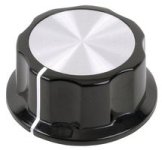
I recently had a screw fall out of the control knob for focus on my Studio 1 Productions controller (note to self, periodically check the set screws on all the knobs on the Studio 1 Productions controller). Anyway, this set off a hunt for a replacement control dial and fortunately I was able to locate one fairly quickly. The specs (in Canada) were knob diameter 33mm, shaft diameter 6.4mm Manufacturer part number MC21052 and the picture looked exactly like the knobs that came with the unit.
MC21052.jpg

But I started browsing and found that there was a whole range of knobs available, and I remembered that kwkeirstead had replaced one knob on his remote with a larger dial...to give finer control. I ordered one of the knobs just like the original, but I also ordered two additional knobs, one with the same style of the original knobs, but with a 45mm in diameter (Manufacturer part number MC21053) and the other a nice silver finish, with a smooth style and diameter of 38mm (Manufacturer part number MC21022). If you want to have a look, I think you should be able to find them by part numbers, and I purchased through Canada.newark.com so you can find them there (website stock numbers 10M7570/10M7571/10M7539 respectively).

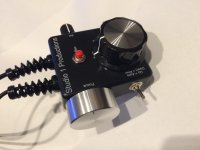
There were inexpensive (at about $3 each) and so I figured when they arrived I would try them out and decide if I'd stick with the originals or 'go big'. Anyway, they arrived today and after fiddling around this is how my Studio 1 Productions remote is now configured. Zoom controller got the large 45mm knob, and focus now has the silver 38mm knob.

The large zoom dial partially obscures the printed "Zoom" and "W" "T", but its all about usability and I think the larger dials will give better control...
Studio1ProductionsNewKnobs.jpg
 
Last edited:
And VariZoom still working well..

And VariZoom still working well..

Oh, and I continue to use the Varizoom as my controller for sports videography...but the Studio 1 Productions is a clear winner in studio situations, when shots are more planned and you are trying to execute similar controller zoom/focus over multiple takes. The Varizoom's focus control wheel has a white ring which can be used to mark where to start and stop movements for controlled focus pulling...the only feature that I wish Studio 1 had been able to add to their controller setup.
VariZoomController.jpg
 
I wish these controllers had a larger iris wheel. The moves are so tiny that it feels touchy. Iris is an afterthought but if you are shooting stage style shows you move the iris much more than focus.
 
Good to hear from you .. I continue to cut out white foam wheels 1/2 in thick and 3 3/4 in diameter for the focus. I cut out the center of each so I can press it onto the knob. The 3 3/4 in diameter is the largest you can go without touching the on/off switch.

The screws NOT to lose of course are the two big screws that hold the bracket onto your tripod arm. These have no stops and can come out easily.

I just checked the little screws - good idea to do that periodically.

It would be very nice to have a little white section on the focus wheel - i suppose with my foam wheels, I could actually mark them up with a black marker and have a supply of these.

My gadget list currently includes a Teradek VIdi- U, plus one of Danny Dodge's "cinerails" curved track sets. The problem with the latter is it's difficult to find space at events to put these things in place and if your shoot needs you to go from one room to another (art gallery etc) the actors give the impression of being impatient.

Then there is lighting, don't get me started on this, I hate my 300x 4 x 2 tungsten construction lights because you have to let them cool before each move. Even then, they rarely survive to the next event.

I would love to go to NAB but my wife will not let me - I know she is right, NAB is a very dangerous place to go.
 
Last edited:
Back
Top