
Navigation
Install the app
How to install the app on iOS
Follow along with the video below to see how to install our site as a web app on your home screen.
Note: This feature may not be available in some browsers.
More options
You are using an out of date browser. It may not display this or other websites correctly.
You should upgrade or use an alternative browser.
You should upgrade or use an alternative browser.
Neoscene 1.4 or 1.6 not working in Win 7 64 bit
- Thread starter Blackout
- Start date

Cavemandude
Well-known member
The trial version of Neo Scene worked fine on my Win 7 64bit Dell Quad Core a couple weeks ago but I'm now using VoltaicHD or TMPGEnc 4.0 Xpress instead so I don't get any crappy interlaced frames at the beginning of each clip.
Randy
Randy

Blackout
Veteran
Cave... I tried VoltaicHD and was very unhappy with the quality drop from my original avchd files it was an apparent loss and color shift to my eyes. Of course this was a few months ago perhaps it has improved. How does TMPGEnc express handle gh1 footage? It removes pulldown? what format does it transcode too?
Cavemandude
Well-known member
You can pick the CineForm AVI codec or the Canopus AVI Codec if you are using Edius. They should have a trial version to test out. You can even do some cut-only editing to trim out footage that you are not going to use or do batch rendering of multiple clips.
Ignore the "MPEG-2 Setting" at the top of image 2, since it isn't relevant to this.
Randy
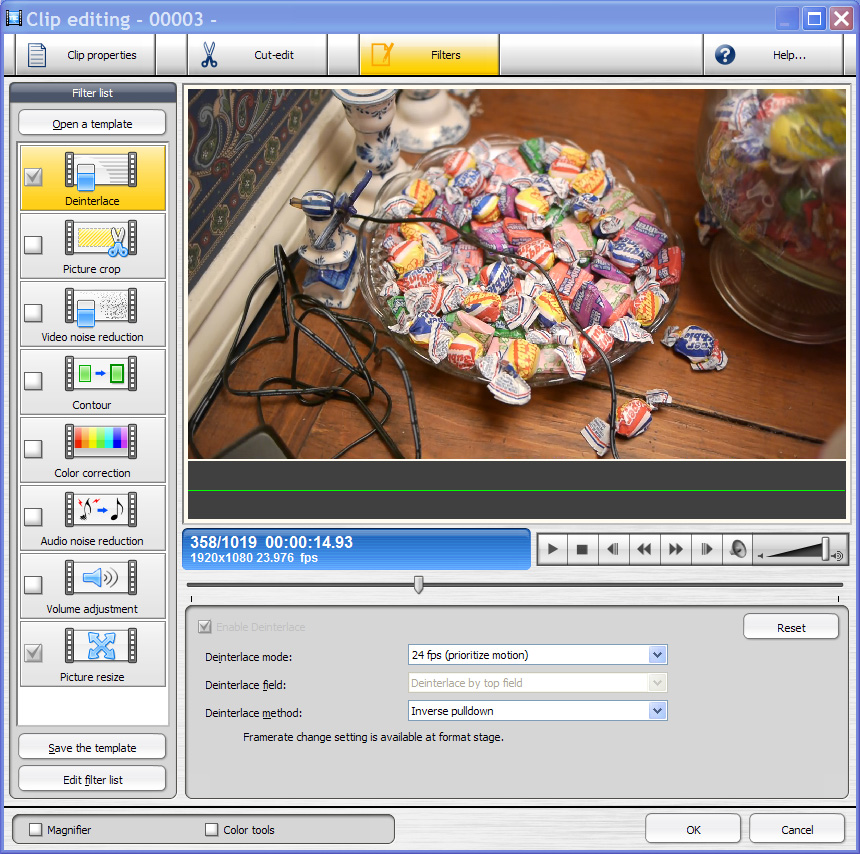
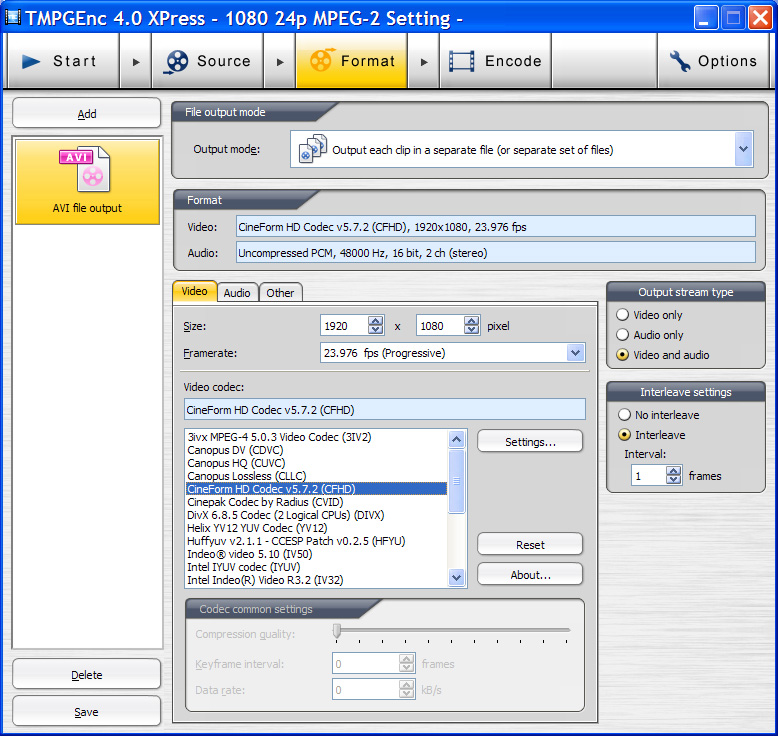
Ignore the "MPEG-2 Setting" at the top of image 2, since it isn't relevant to this.
Randy
Blackout
Veteran
Are you using this same program to take the 1920 x 1080 24p and make a 720 480 24p dvd?
I am trying but even on my 4 core i7 it's going slow as molasses.
One more question... it took the 24p hd files and added frames again making them 29.97 ntsc... not 24p progressive dvd.
Thats fine for now but I really would rather it make true 24p mpeg2s with flags. Do you know where the setting is for this?
I am trying but even on my 4 core i7 it's going slow as molasses.
One more question... it took the 24p hd files and added frames again making them 29.97 ntsc... not 24p progressive dvd.
Thats fine for now but I really would rather it make true 24p mpeg2s with flags. Do you know where the setting is for this?
Last edited:
noelsphoto
Active member
Slight off topic question but Windows 7/64bit related:
I have Folders converted by Neoscene. Approximately 200 unedited clips in each. Windows 7 is slow opening these folders compared to windows xp (which is instantaneous). I don't do a lot of editing. Just watch the video clips every now and then. The problem (with my Windows 7 / home edition/64bit) is that about the 40th clip the windows media player always crashes. Windows doesn't have a solution either. I bought a laptop with windows 7. It does the same thing. Spoke to Neoscene and the said to try Media Player Classic. Same story except it last longer til the 70th clip. I'm back to windows xp.
Does anybody else have this issue. If not, what type Windows 7 are you using?
Thank you.
And I apologize if i interrupted your post. Hate to start a new one since it's related to windows 7 and neoscene.
I have Folders converted by Neoscene. Approximately 200 unedited clips in each. Windows 7 is slow opening these folders compared to windows xp (which is instantaneous). I don't do a lot of editing. Just watch the video clips every now and then. The problem (with my Windows 7 / home edition/64bit) is that about the 40th clip the windows media player always crashes. Windows doesn't have a solution either. I bought a laptop with windows 7. It does the same thing. Spoke to Neoscene and the said to try Media Player Classic. Same story except it last longer til the 70th clip. I'm back to windows xp.
Does anybody else have this issue. If not, what type Windows 7 are you using?
Thank you.
And I apologize if i interrupted your post. Hate to start a new one since it's related to windows 7 and neoscene.
Blackout
Veteran
I am having serious issues with neoscene cineform codec on win 7 64 bit.
The converter program won't work, any files I convert from raw .mts gh1 1080p to true cineform 24p won't play. With win media player I click, hear the audio, and see one squooshed frame.
It will work through tmpenc oddly.... but the quality suffers.. I notic even in high HD mode that takes up insane disk space, it adds noise to the picture and shifts the color down a little.
This is upsetting as I still have no fullproof solution for 24p on the PC.
Last but not least i CAN not get tmpenc to make a true 24p mpeg2 from my gh1 .mts files... it makes them 29.97.... what gives...
why do I have to include pulldown? I want true 24p DVDs to save space and they look better.
The converter program won't work, any files I convert from raw .mts gh1 1080p to true cineform 24p won't play. With win media player I click, hear the audio, and see one squooshed frame.
It will work through tmpenc oddly.... but the quality suffers.. I notic even in high HD mode that takes up insane disk space, it adds noise to the picture and shifts the color down a little.
This is upsetting as I still have no fullproof solution for 24p on the PC.
Last but not least i CAN not get tmpenc to make a true 24p mpeg2 from my gh1 .mts files... it makes them 29.97.... what gives...
why do I have to include pulldown? I want true 24p DVDs to save space and they look better.
Cavemandude
Well-known member
Why do you want to play Neo Scene files with Windows Media Player anyways? Just use them in the timeline and edit. Are you actually using WMP to judge how well the software does the 60p-24p conversion?
You're just being too picky then since you've commenting how high in quality other people's videos are using the same conversion software that you say ruins the quality of your videos. How you can even judge this in the first place is questionable since you are viewing videos that have been compressed at least one more time to get on sites like Vimeo/YouTube for you to watch them.
Maybe you need to try and convert to full Uncompressed RGB since you think everything else sucks. If that also degrades the video in your eyes then there is no solution that will work that will meet your expectations, plain and simple.
Randy
You're just being too picky then since you've commenting how high in quality other people's videos are using the same conversion software that you say ruins the quality of your videos. How you can even judge this in the first place is questionable since you are viewing videos that have been compressed at least one more time to get on sites like Vimeo/YouTube for you to watch them.
Maybe you need to try and convert to full Uncompressed RGB since you think everything else sucks. If that also degrades the video in your eyes then there is no solution that will work that will meet your expectations, plain and simple.
Randy
Blackout
Veteran
Cave... I have downloaded the files.. I never judge anything from vimdeo or youtube since of course it highly compresses. I am talking about watching the original native mts file on a fuull 1080p monitor, then removing pulldown with these various codecs, then a/b ing those files to spot changes.
Neoscene cineform introduced slight increased noise detail in detailed areas such as a wide shot with peoples faces or a table cloth. I can see the difference. That's all I'm saying.
I am checking to see if other people spot this, have solutions, if there is some setting I can change to make it better.. ect. Why the angry tone? Isn't the whole purpose of discussion on this forum getting the best quality out of the tools we have?
One of the reasons I want the absolute quality possible is I am not using these for youtube videos.. they will be projected in an actual theater screen and you notice quality hits a lot more on a big screen.
Neoscene cineform introduced slight increased noise detail in detailed areas such as a wide shot with peoples faces or a table cloth. I can see the difference. That's all I'm saying.
I am checking to see if other people spot this, have solutions, if there is some setting I can change to make it better.. ect. Why the angry tone? Isn't the whole purpose of discussion on this forum getting the best quality out of the tools we have?
One of the reasons I want the absolute quality possible is I am not using these for youtube videos.. they will be projected in an actual theater screen and you notice quality hits a lot more on a big screen.

ATL Media Group
Veteran
There is no true 24p in the DVD spec. DVD only allows for interlaced with pulldown for 24p source. That's why it shows up as 29.97.
From the spec:
From the spec:
A disc has one track (stream) of MPEG-2 constant bit rate (CBR) or variable bit rate (VBR) compressed digital video. A restricted version of MPEG-2 Main Profile at Main Level (MP@ML) is used. SP@ML is also supported. MPEG-1 CBR and VBR video is also allowed. 525/60 (NTSC, 29.97 interlaced frames/sec) and 625/50 (PAL/SECAM, 25 interlaced frames/sec) video display systems are expressly supported. Coded frame rates of 24 fps progressive from film, 25 fps interlaced from PAL video, and 29.97 fps interlaced from NTSC video are typical. MPEG-2 progressive_sequence is not allowed, but interlaced sequences can contain progressive pictures and progressive macroblocks. In the case of 24 fps source, the encoder embeds MPEG-2 repeat_first_field flags into the video stream to make the decoder either perform 2-3 pulldown for 60Hz NTSC displays (actually 59.94Hz) or 2-2 pulldown (with resulting 4% speedup) for 50Hz PAL/SECAM displays. In other words, the player doesn't "know" what the encoded rate is, it simply follows the MPEG-2 encoder's instructions to produce the predetermined display rate of 25 fps or 29.97 fps. This is one of the main reasons there are two kinds of discs, one for NTSC and one for PAL. (Very few players convert from PAL to NTSC or NTSC to PAL. See 1.19.)
Because film transfers for NTSC and PAL usually use the same coded picture rate (24 fps) but PAL resolution is higher, the PAL version takes more space on the disc. The raw increase before encoding is 20% (480 to 576), but the final result is closer to 15%, depending on encoder efficiency. This translates to an increase of 600 to 700 megabytes on PAL discs compared to NTSC discs.
It's interesting to note that even interlaced source video can be rendered as progressive-structured MPEG pictures by a good encoder, with interlaced field-encoded macroblocks used only when needed for motion. Most film sources are encoded at 24 frames per second (the inverse telecine process during encoding removes duplicate 2-3 pulldown fields from the videotape source, and the remaining field pairs, although technically in interlaced form, can be re-interleaved by a progressive player). Most video sources are encoded at 25 or 30 interlaced frames per second. These may be mixed on the same disc, such as an interlaced-source logo followed by a progressive-source movie.
Blackout
Veteran
Wait a sec ATL... I thought DVDs are 24p with pulldown flags, and that the PLAYER adds the extra fields/frames if playing out to a NTSC tv. When I rip a commercial DVD to hard drive, I see 23.976 not 29.97
I know I have made a 24p dvd frome my dvx100 before.. just haven't done it with gh1 footage yet. Been making blu-rays.
I know I have made a 24p dvd frome my dvx100 before.. just haven't done it with gh1 footage yet. Been making blu-rays.
ATL Media Group
Veteran
Actually some player software will see the 24p flags in the 60i footage and just report it as 24p. In reality 24P native is not supported by DVD. Authoring software and encoding software ads the flags for the players to remove the pulldown to play progressive on progressive players.
I was looking for the same answer a while back and found out that ALL NTSC DVDs are 60i with 24p flags for progressive playback.
That's why in another thread I mentioned that GV or Panasonic could just ad the flags for the 24p to do the pulldown on the fly in Edius with the GH1 1080 footage.
I was looking for the same answer a while back and found out that ALL NTSC DVDs are 60i with 24p flags for progressive playback.
That's why in another thread I mentioned that GV or Panasonic could just ad the flags for the 24p to do the pulldown on the fly in Edius with the GH1 1080 footage.

JoeJITSU
Veteran
Im pretty new to this as well. Now when you say Edius....do you mean Edius Booster 2.5? I have that.......I heard that you can do pulldown with it....is this true?You can pick the CineForm AVI codec or the Canopus AVI Codec if you are using Edius. They should have a trial version to test out. You can even do some cut-only editing to trim out footage that you are not going to use or do batch rendering of multiple clips.
Ignore the "MPEG-2 Setting" at the top of image 2, since it isn't relevant to this.
Randy
Cavemandude
Well-known member
uh, no.
Randy
Randy
Cavemandude
Well-known member
24p DVD's exist, they actually allow more storage on the DVD.
http://www.dvfilm.com/maker/24Pdvd.htm
Randy
http://www.dvfilm.com/maker/24Pdvd.htm
Randy
ATL Media Group
Veteran
While you technically could make a disc out of spec and have it play on many players (especially with the newer players that also play xvid and other formats) the specifications for DVD video are pretty clear:
"MPEG-2 encoder can add flags in video stream to indicate scanning type, field order and field repeating. A DVD player uses these flags to convert progressive content into interlaced video suitable for interlaced TV sets. These flags also help reproducing progressive content on progressive-scan television sets."
http://en.wikipedia.org/wiki/DVD-Video
"The following formats are allowed for MPEG-2 video:
At 25 frame/s, interlaced (used in regions with 50 Hz image scanning frequency):
720 × 576 pixels (same resolution as D1)
704 × 576 pixels
352 × 576 pixels (same as the China Video Disc standard)
At 29.97, interlaced (used in regions with 60 Hz image scanning frequency):
720 × 480 pixels (same resolution as D1)
704 × 480 pixels
352 × 480 pixels (same as the China Video Disc standard)"
"MPEG-2 encoder can add flags in video stream to indicate scanning type, field order and field repeating. A DVD player uses these flags to convert progressive content into interlaced video suitable for interlaced TV sets. These flags also help reproducing progressive content on progressive-scan television sets."
http://en.wikipedia.org/wiki/DVD-Video
"The following formats are allowed for MPEG-2 video:
At 25 frame/s, interlaced (used in regions with 50 Hz image scanning frequency):
720 × 576 pixels (same resolution as D1)
704 × 576 pixels
352 × 576 pixels (same as the China Video Disc standard)
At 29.97, interlaced (used in regions with 60 Hz image scanning frequency):
720 × 480 pixels (same resolution as D1)
704 × 480 pixels
352 × 480 pixels (same as the China Video Disc standard)"
Cavemandude
Well-known member
ATL,
I guess you erased one of your posts that I read via email but you skipped over where it says in TMPGEnc to do the following AFTER selecting the preset format which was DVD, NTSC, High Quality (720 x 480, 29.97 fps), and CBR Linear PCM Audio.:
"Then click on settings, go to the Video Tab, make sure it says MPEG-2 Stream type,
720 x 480, frame rate of 23.976,
Constant bit rate (CBR) of 8000 kbits/sec, 3:2 pulldown when [during] playback, DC component precision = 9 bits, Motion estimate search (fast). The settings for Rate control, bitrate, motion estimate, etc are OK to be be changed by advanced users.
Then go to the Advanced Tab, and turn OFF the inverse telecine option if it is selected (this tries to remove 3:2 pulldown from the source movie - not good).
Turn OFF the 3:2 pulldown option if it is selected (this adds pulldown BEFORE playback - not good).
Basically all of the Advanced option check boxes should be deselected, Make sure on the Advanced Settings it says Video source Type = Non-interlace, Field order (doesn't matter) Source aspect ratio 4:3 or 16:9, 525 line NTSC.
Save and close settings and hit Start to start encoding.
You know when you have done it correctly when the movie plays back smoothly on the TV, and you can step through the frames on the DVD without seeing duplicate or missing frames vis-a-vis the original 23.976P Quicktime."
Randy
I guess you erased one of your posts that I read via email but you skipped over where it says in TMPGEnc to do the following AFTER selecting the preset format which was DVD, NTSC, High Quality (720 x 480, 29.97 fps), and CBR Linear PCM Audio.:
"Then click on settings, go to the Video Tab, make sure it says MPEG-2 Stream type,
720 x 480, frame rate of 23.976,
Constant bit rate (CBR) of 8000 kbits/sec, 3:2 pulldown when [during] playback, DC component precision = 9 bits, Motion estimate search (fast). The settings for Rate control, bitrate, motion estimate, etc are OK to be be changed by advanced users.
Then go to the Advanced Tab, and turn OFF the inverse telecine option if it is selected (this tries to remove 3:2 pulldown from the source movie - not good).
Turn OFF the 3:2 pulldown option if it is selected (this adds pulldown BEFORE playback - not good).
Basically all of the Advanced option check boxes should be deselected, Make sure on the Advanced Settings it says Video source Type = Non-interlace, Field order (doesn't matter) Source aspect ratio 4:3 or 16:9, 525 line NTSC.
Save and close settings and hit Start to start encoding.
You know when you have done it correctly when the movie plays back smoothly on the TV, and you can step through the frames on the DVD without seeing duplicate or missing frames vis-a-vis the original 23.976P Quicktime."
Randy