Need to hear about your experience actually shooting with the Røde Video Wireless Lav

Awesome info, Puredrifting. Thanks so much for the recommendations! I'm very happy with the Rodelink so far, and this week I'm shooting a corporate presentation which will use the wireless kit on the speaker as he/she delivers a PowerPoint slideshow, so I'll post about my experience here.
 
Finished an 8 part outdoor shows with 1 sennheiser g3, 2 rode wireless filmmaker kit - observations

- Obviously being outdoors and in nature, interference would not be an issue for both kit.

- The rode is a tank. We dropped it twice in water while it was on, we dropped it on rocks from a couple of feet, and it still works perfectly. From my personal experience with G3s, they cant take that much punishment.

- Unquestionably the most annoying thing about the rode is that when the signal goes off for a while, the receiver pack turns off in order to save battery. This was quite annoying as i had to ask the talent a couple of times to re-open his transmitter. If the transmitter had been attached to his back(with a harness) like they do in fiction, this would have been a major pain in the ass.

That aside, the g3 and rode sound practically the same and have similar range.
 
Thanks for the user experience adaptation. I am using mine tomorrow on their first client gig. I have not used mine much beyond a few tests at home but I am a bit unclear on something you wrote? If the receiver goes to sleep, at least mine still function fine, it's just that the display goes to sleep. Are you saying that besides the receiver display going out, they actually turn themselves off if not used for a certain period of time? Also, not sure what you mean by "had to ask talent to re-open their transmitter"? If the talent didn't touch their transmitter and was just walking around talking and the receiver turned itself off, wouldn't just turning the receiver back on allow it to establish the link with the already on transmitter? Or does the transmitter turn itself off also if the receiver turns itself off? I will probably discover some of this tomorrow as I used them for the first time but was curious what you are experiencing.
 
He means that if the transmitter is turned off the receiver will turn off automatically after a little while. They will stay on as long as there is battery power in both units since they communicate. The displays do shut off after a little while to conserve power, you have to hit a button to get the display at on again to show levels etc. one really nice feature is ability to turn on/off mute from receiver. If talent forgets to unmute you can do it.
 
What wbrock001 said - if the transmitter loses signal of the receiver pack for a few minutes, it automatically shuts off to save battery. You then have to re-open it. If your doing interview type stuff, theres no chance that you will break signal, but if the talent goes off to the bathroom or far from the receiver pack(therefor losing the signal), his transmitter pack will turn off in order to save battery. I understand the intend, but when your dealing with people who go in and out of signal range constantly(bathroom breaks, going to eat, wardrobe change), it can become quite problematic.
 
Thanks for the clarification. I didn't know that the receiver would shut down if the transmitter does, interesting. I am at the trade show now, it's a zoo here, very noisy, but so far the Rodes are behaving great.
 
Just a last minute follow up. My shoot with the Rødes at the trade show could not have gone smoother. The environment really was incredibly noisy with two huge booths right next to the main one I was shooting at. Both had big PA systems with loud music blasting, announcers, etc. I shot sit down and stand up interviews perhaps ten feet away from all of this cacophony and the Rødes were flawless. No UHF hits, high frequency shuttling or cut outs, I turned them on, they just worked. The sound quality of the stock Røde lavalier was good with excellent detail and a real clarity that cut through the horrendous background noise that was everywhere. I recorded Ch1 with the lavs and Ch2 with camera mic. Brought them into the editor yesterday to separate them and listen to then separately and the lav channel sounded pretty great. They passed their first test with flying colors, highly recommended. I just ordered four of the Røde Vampire clips for the two systems as the dorky tie clip they come with looks pretty lame on camera. The client didn't care if I hid the mic and we were moving fast so I didn't use the Rycote Overcover system, I just clipped to the talent's jacket and went for it. I am interested to try hiding the Røde lavaliere under clothing though to see what it sounds like. They are higher frequency biased so I think they will cut through clothing just fine. I also just picked up a new lavaliere mounting system that uses tape like the Rycote Overcover system but instead of the fuzzy dead kitty to cover the lav element, these use a sort of transparent cloth, they are made by a new company called Bubblebee Industries. I'll report back on them eventually when I can do a shoot out between them and the Rycote Overcover system.

Rycote Overcover System

Rycote Overcovers.jpg

Bubblebee Industries System

Bubblebee.jpg
 
Last edited:
I've been using my pair of Rode wireless lavs for about a year now. Most of the time I shoot inside the building of our 2nd biggest telecommunication operator in the country. With all of the antennas on the roof and many other interferances in the air the Rodes perform without any flaws. Never had any problems.
 
Rode wireless operates on the 2400mhz frequencies - similar to wifi routers so you should rarely get uhf interference, only interference from wifi routers. However i have never had a problem, even in crowded wifi space. I have heard once that the rode wireless created problems for the wifi(but we are not on the receiving end of that problem meaning we can keep on shooting!)
 
Rode wireless operates on the 2400mhz frequencies - similar to wifi routers so you should rarely get uhf interference, only interference from wifi routers. However i have never had a problem, even in crowded wifi space. I have heard once that the rode wireless created problems for the wifi(but we are not on the receiving end of that problem meaning we can keep on shooting!)

Funny, in a shoot I did at a retail shop the other day, we had our talent, wearing the Røde, standing about a foot away from the shop's wireless router. Didn't hear any issues, wonder if we were blocking the router though?
 
I used 4 Rodelink kits on a corporate video shoot this past week. They all worked flawlessly. I plugged them into my new Zoom F8 recorder using the Rode VXLR adapters, as well as directly into my C100. Excellent audio quality, super easy to set up and use, and zero interference issues.

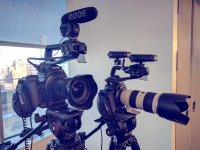
Here are two of them on my C100:

IMG_20170217_120537_175.jpg

The only problem I have with the kit is the lavalier microphone wire itself. It's flimsy, and I can't get it to straighten out. It came coiled tightly with a twisty tie and it's completely crooked. The wire on my Sennheiser G3 units is thicker and straightens out quickly when I open it up, but the Rode wires are all crinkled and look ugly. This doesn't affect the sound quality, but it's annoying to me.

Anyone have any thoughts on how to straighten out those wires?
 
Last edited:
"Anyone have any thoughts on how to straighten out those wires?"
- Hang the cable from a ceiling hookor door frame with some weight on the downward end (a roll of gaffer tape for instance). Warming the cable over a radiator prior helps some. Leave it there for a few days or a week. I do this frequently with all kinds of new cables.
However 90% of my audio cables (lots) have been switched over to Canare w/ Neutrik or other HQ connectors. Relatively low-cost if you can make them yo'self. I recommend the Canare L-4E5C Mini-Star quad for receiver outputs and weight/space interconnects. The L-2E5 mini is another good option and a little easier to terminate/solder. Both are around $0.50 per/foot.
 
"Anyone have any thoughts on how to straighten out those wires?"
- Hang the cable from a ceiling hookor door frame with some weight on the downward end (a roll of gaffer tape for instance). Warming the cable over a radiator prior helps some. Leave it there for a few days or a week. I do this frequently with all kinds of new cables.

I'll try this out this week and see how it goes. Thanks.

However 90% of my audio cables (lots) have been switched over to Canare w/ Neutrik or other HQ connectors. Relatively low-cost if you can make them yo'self. I recommend the Canare L-4E5C Mini-Star quad for receiver outputs and weight/space interconnects. The L-2E5 mini is another good option and a little easier to terminate/solder. Both are around $0.50 per/foot.

That's a great suggestion, but I have no idea how to rewire lav microphones (nor do I have soldering equipment) unfortunately. Anyone know somewhere I could take the cables to get switched over to the Canare cables in New York City? Or would it be easier/cheaper to just buy different lav mics for use with my Rodelink?

Also, I'm interested in the audio cable that goes from the lavalier microphone to the transmitter. That's the one that's all crooked. I have no problem with the coiled cable from the receiver to the camera.
 
Last edited:
What are you all using for alternative lavs on the RodeLinks, if anything? I have a Tram TR50 with the TRS connector that seems to work okay, but it'll start getting what sounds like terrible interference or something of that nature that I *think* I've isolated to be coming from some interaction with the RodeLink TX. I also have a COS-11D arriving tomorrow that I'm eager to try, hopefully it doesn't have the same issue!
 
"I'm interested in the audio cable that goes from the lavalier microphone to the transmitter. That's the one that's all crooked."
Lavaliere mic cables usually can't be replaced, the same goes for when the cable connection breaks at the element.
 
My understanding (that I --think-- is correct) is that the lav bundled with the RodeLink kits isn't the standard Rode Lav. So maybe do what you can to straighten the cable on that lav, but consider it a backup/safety lav for times when you just need a mic and care less about how it looks, how comfortable and hide-able it is, etc.

For lavs, I hang with the Sanken, Countryman, and DPA crowd. But at a lower cost, you could consider Oscar SoundTech (which run around $100-$150, depending).

So I guess I'm saying I don't know if you'll be able to do much to fix that lav cable (other than trying Rick's trick...don't forget strain relief so you protect the mic-cable connection), and look towards some other mics.

Ya, who wants to spend money?

Good luck and let us know what you end up doing!
 
I have the same kinked up cables on my Rødes, the jacket is supposedly made of Kevlar or some heavy duty material, I read somewhere when I was researching them? Why sweat it, you hide the cable on your talent by running it up their shirt or blouse don't you? I don't care what the cable looks like or how it lays it if I can't see it.
 
Welp I might've made a mistake in assuming that the COS-11D hardwired for Sennheiser TRS would work with the RodeLink, or I'm doing something terribly idiotic (I usually assume the latter). Plugged it in to the RodeLink TX whose RX is on my H5, and there's a signal coming from it but it's incredibly weak (around -32Db) and that's with the +20Db gain turned on with the RodeLink TX. Same thing with the COS-11D plugged directly into the H5 via my Senal phantom power adapter :(
 
Yesterday I got two new RodeLinks from Amazon UK.
Both of them are faulty so I ordered replacements which arrived today, and one of these is faulty too.

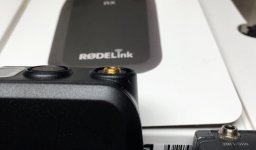
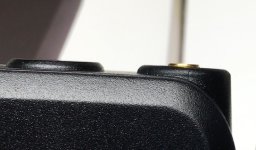
The problem is with the 1/8th inch locking thread on the TX's.
On two of the TX units the thread is so short that the threaded collars on their lav mics won't catch.
On the third TX (which was the second one to arrive) the collar thread went on but now won't come off and it just spins with the socket inside it.

The fourth TX has a tiny bit more thread - perhaps half a turn, so the law mic will lock on, but only just.
My ancient Sennheiser G2s have twice as much exposed thread as these RodeLinks so the mics lock on easily.

I've also got some Rode Micon1 plugs with 1/8" locking rings and these will lock on OK, but the supplied mics must have a different thread depth.

So I've got to send three of these back, but perhaps they should all go back?
Their serial numbers are all very close, the one good unit has the highest serial number so it must be a bad batch.
A different supplier will no doubt have a different batch, but Amazon is much more convenient for returns here in the UK.

I've compared mine to an original RodeLink which does seem to have a little more thread.
It's worth mentioning that the Lav mics that Rode used to supply were a 'real' Rode Lav mic with detachable Micon1 Plugs and removeable cabling.

Rode now supply the RodeLink with a one piece moulded Lav mic and cable. Non serviceable. And it's quite a bit longer that the original Lav capsule because the moulded strain relief is really long. Such a bad idea. I own a proper Rode Lav and it's appears so small and tidy compared to my Sennheiser ME2s, but these bundles Rode Lavs seem quite big, because they are taller. Odd.

Screen Shot 2017-06-17 at 12.37.43.jpgScreen Shot 2017-06-17 at 12.39.49.jpgScreen Shot 2017-06-17 at 12.40.09.jpgIMG_0749.jpg
 
Last edited:
Back
Top