GH13 Need advice unwanted light in Kava Offering video

rambooc1

Well-known member

I shot this hand held with GH13 Mjpeg mode with 20mm pancake and Canon FD 50 f1.4 under two different lighting conditions. I decided to shoot with auto WB and correct in post. Audio is from the in-camera mike.

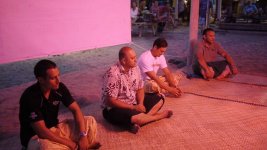
Problem is the location had two completely different lighting color temps, one was a high mounted Halogen lighting the entire area, the other was a single bright pink Fluro under the hut ceiling.

I've color corrected for the pink light but now i have a green tint from the external halogen (see the sand on the ground). Anyone have any advice on how to get rid or tone down the green, without effecting the white balance i've already done? Was edited in Sony Vegas Pro 10.

Below is a still showing the original clip before white balancing.
P1040850.jpg
 
Last edited:
For handheld shots like this in my experience it will be very difficult. But for what it's worth, the green background looks ok to me. It really keeps your eye looking at the foreground. Depending on what you're doing with it, you could easily pass it off as an intentional lighting effect.
 
For handheld shots like this in my experience it will be very difficult. But for what it's worth, the green background looks ok to me. It really keeps your eye looking at the foreground. Depending on what you're doing with it, you could easily pass it off as an intentional lighting effect.

You are correct. Uneven color balance is usually not a problem unless the boss or a client makes a big deal out of it.
If it does become a big deal then look at that tutorial on secondary color correction for After Effects.
That green cast can easily be done away with.
 
Thanks guys, i just felt it was out of place colorwise. HVX, that correction was better than what i had, must try again with AF.
 
Back
Top