Need advice on how to setup a scene

bobafet1

Active member
Ok, so I'm editing a commercial and I'm trying to figure out what is the best way to add rectangular boxes on the top/bottom of the screen so that I can display static information. Kind of like the old school larry parker commercials.

http://www.youtube.com/watch?v=0hVbCpv1eCg

any info would be great.

Thanks,

Mike
 
Your best bet is to create them in Photoshop (or After Effects if you want to animate them). While possible in FCP, a graphics oriented program is much better suited for this.

If you don't have access to PS or AE, I would assume you have Motion if you're working in Final Cut. That is another alternative.
 
yeah, I did some googling and saw that people where using FCP. So, I threw something together to test it out. I have motion but wish I knew how to use it. It would be nice if my background was animated. I wish the logo looked better too. Anyone got ideas on how to dress this up? I'm going to be adding video to the left of the talent to display what she is talking about.
Here's a screen shot.
SCFSscreenshot.png
 
Sorry just wanted to drop this in. Is this for TV boradcast? If so you have a lot going on outside your 4:3 safe areas.
 
yes, its for TV. I have it set to 16:9...is that wrong? I figured everyone has widescreen tv's by now . I'm still learning so any and all info is greatly appreciated.
 
yes, its for TV. I have it set to 16:9...is that wrong? I figured everyone has widescreen tv's by now . I'm still learning so any and all info is greatly appreciated.

Not everyone has a 16:9 set. In fact, there are still many 4:3 sets out there. The truth is, you need to be in touch with the broadcast facility, and to ask them what their standards are.

Here's the other challenge: in theory, stations should be letterboxing 16:9 for their SD feeds, but in practice the frame often gets cropped to fill out the 4:3 frame.
 
Sorry just wanted to drop this in. Is this for TV boradcast? If so you have a lot going on outside your 4:3 safe areas.

One of the first things I learned in school was this. To the op you need to get all graphic and text inside of the "safe zone" which it clearly is not.

Second you need to better Key your subject as you can see the green all around her. Also why are you going to add video? I would just frame that shot better and use the video she is talking about as b-roll.
 
Ok, here is another shot for critique please. I'm still working on cleaning the key up.

So, is the safe zone the inner square on the canvas window?
Sequence2.png
 
The more I look at this the more blah it becomes. Looks like its missing something and I'm not so sure on the color scheme. What do you guys think?
 
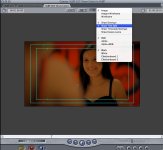
You'll have two boxes on your overlays. The outer box is "action safe." The inner box is "title safe." But working in 16:9 for broadcast, especially for local broadcast, you're much safer keeping most content centered to a 4:3 work area... just in case they decide to crop instead of letterbox for their SD feed.
 
ok, so from what I'm gathering it would be best to contact the cable company to find out how they are going to display this so I can plan accordingly. I may just have this play in movie theaters as well so I'm going to have to figure their stuff out also. thanks again everyone for the info.
 
ok, so from what I'm gathering it would be best to contact the cable company to find out how they are going to display this so I can plan accordingly. I may just have this play in movie theaters as well so I'm going to have to figure their stuff out also. thanks again everyone for the info.

Yes, and I mentioned that in a previous post. Contact the broadcast (or in this case, cablecast) facility and make sure you have their specs.

For the theater, you'll probably need a different cut anyway. First, audio for TV is going to deafen a movie theater audience, so you'll need a mix with a little more dynamic range. Second, they will display true wide-screen and you won't have to worry about 4:3.
 
WOW! now I really wish I knew how to use Motion. I was checking out some templates and they look freakin slick! I can't find one that goes with my theme yet but oh how I wish I can spice up my add with some Motion.
 
Just a heads up in case you werent sure how to get your title safe areas up in FCP see image.
 

Attachments

  • Safe.jpg
    Safe.jpg
    80.8 KB · Views: 0
WOW! now I really wish I knew how to use Motion. I was checking out some templates and they look freakin slick! I can't find one that goes with my theme yet but oh how I wish I can spice up my add with some Motion.

?

I don't think anyone knows hot to use /learned a program without trying. I suggest you take the whole weekend and work in Motion and see what you can come up with, the headaches that your going to deal with are going to make you more valuable as an editor.
 
And... motion is fairly straight forward for composoting - youde be surprised how far you can get in a few days. Search for some motion tutorials online, there's many.
 
So, I bit the bullet and have got my feet wet with Motion. Now I feel like I should have learned this program a long time ago. It adds that extra bit of polish that I've been looking for. Here is another clip.

Any suggestions on how to reduce the shine on the talents forehead?
newlook.png
 
Back
Top