Nano with EX1 vs. HV20 tested...

Duke M.

Veteran
Years ago (I sound old) I tested a Black Magic Intensity card for live capture of HDMI and saw an increase in resolution.

Question: If the Nano bypasses the codec and 1440 limitations in the HV20, will it come close to the EX1 resolution?

I know it seems stupid to put a $2,800 accessory onto a $400 camera, but the idea is to have a camera with a full raster chip put into a full raster recording. My testing will be to see how the quality compares to the EX1 in full light. (Of course full manual controls on the EX1 would be a tie breaker no matter what.)

The EX1 is a 1/2" sensor. The HVx0 is 1/2.7".

FYI, this will not work the same way with an XH-A1 because it is a 1440 sensor, therefore not full raster (though that is still a great camera.)

Nor will it work the same with the HF series since those are higher resolution chips down rez'd and produce some aliasing (stair stepping).

 
Test results - comments?

Test results - comments?

I gave the tests a whirl yesterday.

TEST CONDITIONS:
  • Both cameras were on the same tripod, the same distance and the exact same lighting.
  • Both cameras were set at 24p with pulldown automatically removed by the Nanoflash.
  • The HV20 was connected by HDMI and the EX1 connected by HD-SDI. (That part shouldn't make a difference.)
  • The HV20 was set to Cinemode. The EX1 was set to a picture profile color balanced on a scope. (I should have turned sharpening off on the EX1. I didn't but its turned way down. It was a setting to approximate unsharpened that I've been experimenting with. There is evidence of some sharpening though, so I guess I need to go back to doing it in post on the EX1.)
  • To make long GOP fair I recorded on the Nano at 100Mbps Long GOP, then I grabbed the clearest frame (the I frame) from each camera's time line.
  • The HV20 was simultaneously recorded to Nano and to tape. (Don't tell me the first one is unfocused. Its simultaneous.) The tape was later captured by firewire. The EX1 was simultaneously recorded to Nano and to SDHC via an MxM adapter.
  • The chart was printed at 1800 dpi on white paper. I set both for daylight WB. The lights were five cheap CFLs about a foot away, which probably accounts for the green tint on the EX1.
  • The lossless (PNG) files were blown up 300% to show the difference.
  • The chart was printed smaller than the intended size, so numbers are meaningless other than comparing against each other in this test.
  • Cropped sections were uprez'd 300% to show details. There is an opportunity for photoshop to have influenced the results during the uprez, but since the same program was used for the same amount of uprez I consider that influence minimal.
Look at all four and tell me what you think. The labels should tell you which is which.

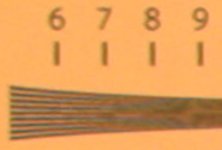
HV30 on Firewire:
attachment.php


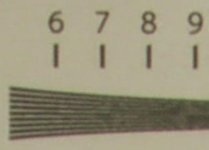
HV20 with Nanoflash:
attachment.php


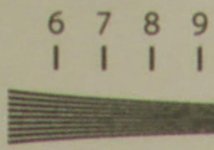
EX1 without Nanoflash:
attachment.php


EX1 with Nanoflash:
attachment.php
 

Attachments

  • HV20FirewireCU.jpg
    HV20FirewireCU.jpg
    6 KB · Views: 0
  • HV20NanoCU.jpg
    HV20NanoCU.jpg
    7.7 KB · Views: 0
  • EX1MxMCU.jpg
    EX1MxMCU.jpg
    7.4 KB · Views: 0
  • EX1NanoCU.jpg
    EX1NanoCU.jpg
    7.9 KB · Views: 0
Last edited:
Test interpretation...

Test interpretation...

Where you notice a large difference with the Nano on the EX1 is with many things are moving at the same time, like leaves, sparks, waves and grass, or a pan across a busy pattern. This is a static picture.

In answer to a question, yes I did try to select an HV20 frame that didn't have as many aliasing artifacts. Long GOP, which I used for both cameras, has an "I" frame (a full picture) followed by many frames where the codec tries to keep track of changes in the picture. Lots of things moving can overwhelm a less robust codec. That's why the Nano does better with movement. It has more room to record those changes.

You can compare numbers between the EX1 and HV20 because its the same chart and same distance (even though you can't compare against cameras not in the same test.)

Here's the way I read the results, YMMV
HV20 alone: ~550
HV20 Nano: ~670
EX1 alone: ~780
EX1 Nano: ~780

The first question in my mind was; Did the HV20 equal the resolution of the EX1. You can make excuses for the lens, settings, etc, but in absolute numbers, no.

Mathematically the 1440 wide HDV codec is 25% less resolution than full raster 1920. In this case 550 (HV20 alone) divided by 780 (EX1 alone) is 70%, so that's pretty close to what I would expect. I think that other 5% is just a range of interpretation of the charts.

(For the following keep in mind that a quirk in mathematics is that 1920 decreased to 1440 is 25%, while 1440 increased to 1920 is 33%.)

For the HV20 though going from 550 up to 670 is a almost a 22% increase in apparent resolution. (Stated the other way from 670 decreased to 550 is an 18% loss of resolution by not using the Nano.)


Why is there still a difference between the HV20 and the EX1? Some possibilities that come to mind:


  1. The HV20 is a single chip camera, and therefore has a debayer filter algorithm that reduces pixels available in order to assign colors. The EX1 is a three chip camera and doesn't have that debayer filter or inherent resolution loss.
  2. The EX1 has a much bigger and more expensive lens capable of more resolution.
  3. Maybe the HDMI on the HV20 is before the codec but not before 1440 width is applied, but that seems like an awful lot of increased resolution just from a better codec.
Any one else have any ideas?
 
Last edited:
I think there are a variety of things going on.

1. The Nano didn't add anything to the static image on the test because the codec is not the limiting factor on the EX1 with a static image. This is why this camera looks SO stunningly good on interviews and the like.

2. The change in resolution with the nano on the HV clearly shows that the codec is a huge limiting factor. Once that was removed, the camera performed much better.

3. The HV can't touch the EX1 for numerous reasons. The EX has better glass, it likely has better A/D converters, it's not having to debayer, etc. Sometimes there really is a reason for the large gap in price between cameras.
 
I don't disagree with any of that. :) I'm leaning towards the debayer filter, single chip ideas as the most likely cause, though the HVx0 sensor itself is actually oversized for that resolution, which I had hoped would be an offset. Apparently not.

(That sort of reinforces my thoughts that the Scarlet will be a 2.2-2.3k image hiding in a 3k format, then down converted to 2k files. And therefore not much different than the EX1, but we will see on that one.)

I'm also assuming that the Canon XF300 results will be very similar.
 
Last edited:
I wouldn't put as much on the debayer process as I would the glass. I'd wager the piece of glass on the EX1 costs more at wholesale, than the entire HV20 cost at retail. It's a massive difference.

This kind of difference is easily seen with something like the DSLRs. A comparison of the stock glass and improved glass shows similar kinds of gains.
 
There I will partially disagree with you. At DSLR video resolution the glass is so much better than the output the glass makes little difference. Even at photograph resolution the $99 50mm canon lens at f1.8 is only a little slower than the $2,000 50mm f1.2L lens.

Its the same glass per their rep only the coating make it faster. In those you're paying for a stronger metal body, faster/quieter motor and better coatings, etc. The $99 50mm lens still looks fabulous at photography resolution.

At video resolution those two lenses produce indistinguishable images (in most instances including a test chart.) I will agree that the HV20 glass probably isn't up to the same level as a nifty 50.

Plus this test was a static shot with simultaneous recording. Therefore there were no focusing differences and no focusing advantages for a faster more accurate motor.
 
Last edited:
Umm,

In relation to the DSLRs, I wasn't talking about their video resolution. It's too poor to show up the difference in the glass. But taking a full size still will still show it up.

And yes, you're right about the 50, but of course you chose the absolutely EASIEST glass to optimize! Try comparing a cinema quality 18mm to a basic SLR 18mm and see what the difference look like!

I'd wager the HV20 glass isn't up to spec for any modern SLR glass. Not a prime anyway.
 
We are still in agreement. However, I might point out that the HV20 isn't shooting high resolution photos. It only needs to handle 2k resolution, so I don't think the glass on it is going to be a big a limiting factor as the debayer and optical low pass filters.

If they had used the filters on the full sensor resolution of 2.5k, and then down rez'd, the filters wouldn't have much effect. But if they masked it off first, then applied the filters you'd get this loss of resolution.
 
Last edited:
I'd like to see a comparison between and EX1 with out nano, and with nano, but in a situation of panning over a high detail scene. I think you can get both shots at once too right? With the card and the nano recording simultaneously?

Anyway it seems like my EX1 softens up when panning due to the CMOS chips, and I want to see if throwing 3 grand at it would help.
 
Well, I would also be buying the Nano for extended recording times. SxS cards are still pretty expensive, so the Nano wouldn't be purchased just for a quality bump. It wold be nice to see a comparison to see what kink of difference there is.
 
I'd like to see a comparison between and EX1 with out nano, and with nano, but in a situation of panning over a high detail scene. I think you can get both shots at once too right? With the card and the nano recording simultaneously?

Anyway it seems like my EX1 softens up when panning due to the CMOS chips, and I want to see if throwing 3 grand at it would help.


This has been done, and the footage posted. I don't have links right now, but when the Nano started shipping, all kinds of tests like this were done. A lot of the EXx owners who needed to meet broadcast bought the units and did testing. The difference was significant.
 
Right on. Good to hear. Not that I have 3 grand at the moment. The nano still has me drooling. I have two EX1s, and occasionally I have the chance to do live shows, but at the moment I only have 3 hrs of SXS. What I have looked for and couldn't find, is if the Nano will also record in just the normal 35mbps. I hear about 50, and 100, which is great. But if a guy just wanted to max out the length of time he could record, could you go lower like 35, or even 25mbps? Occasionally I have these 6 hour math seminars. At 35mbps, the file size is not much more than SD.

Sorry If I derailed the thread... It is good to know that the HV cameras are greatly improved with nano. I have an HV20 from work that could be used. One thought I just had: What about DSLRs and nano? Hmmmmm
 
Right on. Good to hear. Not that I have 3 grand at the moment. The nano still has me drooling. I have two EX1s, and occasionally I have the chance to do live shows, but at the moment I only have 3 hrs of SXS. What I have looked for and couldn't find, is if the Nano will also record in just the normal 35mbps. I hear about 50, and 100, which is great. But if a guy just wanted to max out the length of time he could record, could you go lower like 35, or even 25mbps? Occasionally I have these 6 hour math seminars. At 35mbps, the file size is not much more than SD.

From the NanoFlash User's Manual:


CODEC (Long GOP / I-Frame)

This option selects the XDCAM 422 CODEC format. Long GOP supports the bit rates at 18,
35, 50, 100, 140, and 180 Mbps. I-Frame only allows recording at 100, 140, 180, 220, and
280 Mbps.


One thought I just had: What about DSLRs and nano? Hmmmmm

None of the current HDSLRs output full HD from the HDMI port during recording. So if you wanted to record SD with the unit that would be fine. Or if you wanted to record HD with the "stuff" on the screen that the cameras have, you could do that. But you cannot record a clean 720 or 1080 screen.
 
I'd like to see a comparison between and EX1 with out nano, and with nano, but in a situation of panning over a high detail scene. I think you can get both shots at once too right? With the card and the nano recording simultaneously?

Anyway it seems like my EX1 softens up when panning due to the CMOS chips, and I want to see if throwing 3 grand at it would help.

From what I've seen the EX1 codec gets overwhelmed with the number of details it needs to record in a situation such as panning over trees, causing macro blocking and softness. Then it sharpens up when you stop and the codec catches up. Higher bit rates help that.

As mentioned DSLR's currently don't work with the Nano. As I recall Moldcad also had an issue with his Nano footage being noisy in shadows. I don't know if he ever finished testing that against another Nano.

I'm am sometimes of the impression (not that I know) that the Nano footage is unfiltered, so turning everything like sharpening off is necessary or its accentuated. Do everything in post. But I wouldn't call myself a Nano expert by any means.
 
Why do you say this? It would definitely help. Whether it would help 3 grand worth or not, is the question.

Sorry for my answer being so terse :)

As all of you guys know, the SDI signal is sent before the EX1's own codec, but after its DSP. Meaning all settings of the current PP (including Detail) is applied to the signal that the nanoFlash then encodes.

So, if Chadfish likes it sharp, he will still observe the edge definition drop during fast movement - even using the highest nanoFlash bitrates. The EX DSP is just not fast enough, and the result will be recorded by the nanoFlash as is.

Disclaimer: This is how I understood Chadfish'es question (sharpness drop at panning, due to edge enhancement delay in DSP). If on the other hand he meant the artifacts, arising from straining the EX1 encoder (like macro-blocking, mosquito noise, etc) - then of course the nanoFlash WILL help a lot (I recommend Long-GOP at 100, or I-Frame at at least 220 Mbps). Not to mention the very obvious impovement in color resolution.
 
Last edited:
Back
Top