GH4 Nailing Exposure Quickly on the GH4

gh4_storyteller

Active member
Almost all of the work I do is run and gun. While I like to think I've always exposed correctly in the field, every time there's hiccups. One of the things that drew me to the GH4 is the inclusion of tools that could help me get a clean shot faster than I could with any other DSLR. I've started this thread to aid myself and others in attempting to use the GH4s exposure resources to their fullest potential in order to correctly expose as fast as possible.

There's not much documentation on the GH4s zebras; at least from what my Google results have yielded. So, from what I have found, others recommend using 85% Zebras for general usage, and 70% Zebras for skin tones. While I've used zebras before, it's a little bit of a foreign beast on the GH4 to me. Also, some say that you should slightly underexpose on the GH4, so I don't know how dialing in percentages would comply with that.

Any objections? Recommendations? Should I forget about zebras and just follow the Histogram? :)
 
Last edited:
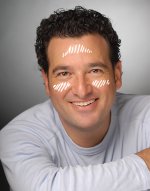
This has served me well re- zebras: adjust exposure until the 70% zebra just begins to show up on the brightest highlights of the person's face, then stop. Don't let large sections of face highlights show up in zebras. A light "dusting" as it were. Sort of like this, but maybe even a bit less:

7976d1213967807-zebra-75-face-set-exposure-zebra-face.jpg

As as far as general non-talent related exposure, set your second zebra to 90% and adjust the iris until you see this zebra start to peek through on the brightest parts of the picture i.e. a wall, sky. Then stop, this will ensure you are erring on underexposure. I find histograms much less useful in video applications.

or you can try setting the second zebra to 100% and adjust exposure until you see this zebra- then back it off until you don't. This ensures that nothing gets overexposed, but it gets tricky as you risk under exposing important parts of the shot. Like an INT shot with a window in it to the outside. Then it's a judgement call on what blown highlights you're willing to live with to get proper exposure on what's critical. In run-and-gun situations there is always give and take when tackling exposure.
 
Last edited:
I have no idea on how the GH4's zebras work, but what Ed says is true for me as well: Histograms are less useful in video. For me there are just too many things going on to have to try to interpret a histogram on the fly as well!
 
Use the scene exposure tool bottom middle of screen. I like to get it right around 0 +- 1/3 of a stop. Never have had a problem with exposure on GH2, 3, 4.
 
Use the scene exposure tool bottom middle of screen. I like to get it right around 0 +- 1/3 of a stop. Never have had a problem with exposure on GH2, 3, 4.
This is my exact method. I've not had any problems with 95% and bringing exposure down till they disappear. It will usually result in underexposure by that amount as stated above. 70% for skin tones is general for skin tones and I've been doing that since the pd-150 days.

I really like that you can program the GH4 buttons to your liking. I have it setup as close to a real video camera without having to fumble through menus to toggle the focus peaking on/off and same with the zebras(I have them set to 70 and 95%).
 
Last edited:
I've always done as Ed Kishel suggests, except I was taught (and everyone I've ever worked with uses, and even most cameras seem to some with as a default) 80% as the proper exposure for skin tones using zebras.
 
I've always done as Ed Kishel suggests, except I was taught (and everyone I've ever worked with uses, and even most cameras seem to some with as a default) 80% as the proper exposure for skin tones using zebras.
This may explain why a lot of the GH4 footage online seems overexposed. To the best of my knowledge, 80% zebras for skin tone is too high. Those numbers come from the Standard Definition REC 601 days when cameras had 5 to 6 stops of latitude. Skin tone had to be pushed up that high.

But now that we have roughly 11 stops of latitude on the GH4, I believe the common wisdom for skin tone is to set key exposure to about 60% with highlights hitting 65-70% on faces. In the Zone System, caucasian skin is Zone 6, right above middle gray at Zone 5. Zone 5 is 50% Zebras (and with Cine-D it is even lower than that).

One technique I used in the GH1-Gh3 days (before the zebras of the Gh4) was to set the meter to Spot Meter, aim the crosshair at the face and adjust exposure until the meter was one tick (1/3 stop) above what the camera considered proper exposure. This would place skin tone 1/3 stop above middle gray. For fair skinned people, I'd set it 2/3 stop above.

Of course, this is somewhat subjective and each camera operator has his own taste.
Also, this can vary widely depending on what dramatic effect you are going for. Scripted drama vs. documentary talking head vs. a high key fashion video may all have different exposure requirements.
 
Last edited:
I did a video today using the 70% values on the subject's skin tones. It turned out really well. I'll post it after the final export (probably tomorrow).

EDIT: Ah what the hell... here's a screen grab. Hope you like the grade.

Main Sequence.Still005.jpg
 
Last edited:
Speaking to using the scene exposure tool; I use that to get an overall average of the entire image. While I don't use it for every shot, it comes in handy when I need to expose for scenes that I'm going to pull or push luma in post.
 
You have something weird going on in your background.

Here I over emphasized it so you could see the majority of what I'm talking about.
 

Attachments

  • Main Sequence.Still005 copy.jpg
    Main Sequence.Still005 copy.jpg
    72.1 KB · Views: 1
It's not the grade but how the camera is setup.

I suspect you've pushed the Master Pedestal &/or Highlight/Shadow too far. What are your settings?

I've made similar mistakes on other 8bit cameras & it's easy to spot the problem on a gradient like your background.
 
Back
Top