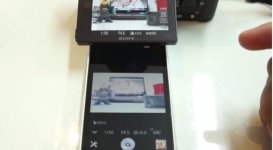
Mystery Sony app for the A7s...every function can be controlled, where to download???

Screen Shot 2014-07-19 at 9.55.55 PM.jpg

When you search for the Sony Play Memories app in the app store, you get a bare bones app with no functions except stop/start record.

yet this Sony app seems to be by the same name, yet has every function you can imagine. Does anyone know where you can download this?

I didn't find it on Sony's web site. Check it out here:


https://www.youtube.com/watch?v=_I02qAaG2cM
 
I think this is the one I installed: https://www.playmemoriescameraapps.com/portal/usbdetail.php?eid=is9104-npia09014_00-f00002

According to my camera it is called Smart Remote Control vers. 3.

I can control white balance, iso, shutter, etc. It works in movie in photo mode. It was free.

On another note, I've yet been able to get the Playmemories website to "verify" my camera by connecting it by usb. This is making it difficult to install the time lapse function, which you need to pay for. I've tried a few times with no luck.
 
Hi Swink, after downloading the latest version, I can now control ISO, shutter speed, and aperture which great!
But I still don't have access to remote autofocus. When I touch my iPhone screen in the Play Memories app, nothing happens. Yet in the youtube video above, the person is able remote control focus inside the iphone app. I must be doing something wrong.
 
I wish I could shed some light on that, but I don't have a lens that auto focusses with the A7S.
 
I wish I could shed some light on that, but I don't have a lens that auto focusses with the A7S.
I have the 24-70 FE and it will AF with the touch on the phone. You have to set up the controls in the APP section of the camera when connected.
 
Hi Dustylense and Arturo,

I did download the most recent version of the remote control app (3.0), but I still have no focus ability remotely on my iPhone 5.
When I go into the Sony app on my iPhone, there's no adjustable focus setting.
No matter where I tap on my iPhone screen, the green focusing target square just doesn't show up on the app.

I wish there were some youtube tutorial I could find on this app. It can't be that complicated but it's just not working for me.

This guy has a tutorial, but I'm not seeing the "tools icon" on my smart remote app like he has:
In fact my "tools" icon appears only for a split second and it's shaded (non-accessible)

https://www.youtube.com/watch?v=peEM9aB58f0
 
Last edited:
Update: I'm able to focus only in photo modes (Full auto mode, Shutter Priority, Aperture Priority, Manual),

No remote focus ability whatsoever in "movie" mode, is this normal???
 
If you look at the developer's API for Sony Cameras, you'll see that Sony DOES NOT allow the developer to control EVERY feature.
 
Back
Top