My take at matching the AF100 and GH2

Barry_Green

Moderator
Inspired by lpowell's matching work in this thread, I decided to take another stab at matching the AF100 and GH2. I had previously tried and given up in frustration because of the inaccuracies of monitoring GH2 footage (its HDMI output is just plain incorrect), but a recent acquisition of some new hardware made the whole process a lot more practical. I picked up a Grass Valley ADVC-HD50, which let me take the live feed of the AF100 directly into Adobe OnLocation. OnLocation is capable of importing GH2 files (including LPowell's FlowMotion-hacked GH2 files) directly and displaying the scopes with the recorded footage, so I was able to have an accurate, recorded reference file and an accurate live image, and that made the matching process much easier.

Another reason I wanted to explore this is, while I think LPowell did a fine job, I don't necessarily shoot in the ways that his profiles would require -- specifically, his profile is based around using the 5.6k daylight preset, and I never use presets if I can avoid them. I don't find the presets terribly accurate, and even if they are accurate in terms of red/blue, there's no provision for them taking into account the green/purple shift that can happen when using various types of "daylight" lights. And I use a lot of daylight lights, I've got many different fluorescents, HMI's, and LED's, and using a preset just isn't all that practical because "daylight" lights really don't usually match each other all that well. To me, whenever possible, manual white balance is mandatory.

So my goal was to get a reasonable match in terms of gamma, color, and sharpness, using LPowell's basic GH2 setting as a starting point (meaning, I figured one of the leaders of the GH2 hack movement's settings were probably well representative of what would make for good-looking GH2 footage, and matching the AF100's noise/sharpening/coring to that baseline should prove acceptable).

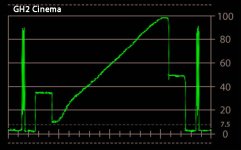
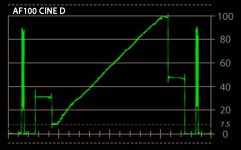
What I found though, in my testing, is that the GH2's gamma curves are just so different, so boosted, there really isn't a comparable corollary between the GH2 and the AF100 with any of them, except one. One gamma curve is such a close match, that it seems obvious to me that if you want to be able to use an AF100 and a GH2 on the same shoot, there's really only one solid choice, and that's Cinema mode on the GH2, which is a very close approximation of CineLike-D on the AF100.

Here's what I did -- I used a DSC Labs VF/X chart, which has a gradient sweep from black to white, and I put the waveform monitor on single-line mode, and isolated a line within that gradient sweep. That gave me a nice smooth line from black to white. I then took a screenshot of both cameras in every gamma mode with the exposure set as identically as possible (for white clip), and then compared the results, and far and away the best match by a mile was Cinelike-D matched to GH2 Cinema.
 
Last edited:
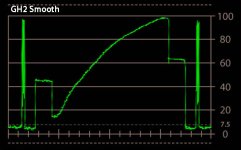
To show how different they are, here's the GH2's "Smooth" gamma, and then its "Cinema" gamma, and then the AF100's "Cine-D".
GH2 Smooth Gamma.jpg


GH2 Cinema Gamma.jpg


AF100 Cine Gamma WF.jpg

When it comes to tonal rendering of brightness, to me it's obvious at a glance that Cinema is a much better match to Cine-D. None of the AF100's other gammas are shaped anything like the GH2's other gammas.

(Note: at all times I used the exact same lens on both cameras. Every comparison shot was taken using the exact same lens. Sometimes I used the Zeiss 35mm, sometimes the 50mm, sometimes the 85mm, depending on how large the chart was, but whenver the 35mm was used on the GH2, I would also use the same 35mm lens on the AF100, etc. So in all side-by-side shots, the exact same lens was used.)
 
Last edited:
Once I had exposure and gamma sorted out, I then started working on color. And this is where I am not 110% thrilled with the results. I think they are a reasonably close match, but frankly, they're not an exact match and can't be exactly matched. In my experimentation I was able to get about 10 of the 12 colors on a 12-color chart to basically line up with each other, but the blues just aren't the same, and the cameras don't offer enough controllability to dial in an exact match. But I think most people would find them reasonably closely matched. What you'll really see different here is the black levels; on the GH2 it's a contrastier camera... on the AF100 I lowered the master pedestal to -5, but LPowell took it as far as -9. I think that throws away a bit of the usable range of the AF100 unnecessarily, but if you want the most exact match between them you may want to use a lower master pedestal than my recommended -5.
GH2 CamBelles.jpg

AF100 CamBelles.jpg

Regarding detail, sharpness, noise, and aliasing -- I set both cameras to 400 ISO, I used LPowell's starting points of -2 on the GH2 for sharpness, and -7 coring and -2 detail on the AF100, and found that yes, they were a pretty equal match. In the early days of the AF100 there was a lot of hysteria about "noise" so we countered with the recommended -4 detail, +2 coring to eliminate all noise. However, that does obviously make the image softer too. Sharpness is improved, and noise brought up to match the GH2, with coring at -7 and detail raised; I found that -2 to -1 was tough to decide between. I tried as high as +5 and as low as -7, and eventually settled that I would be content with either -2 or -1, so -- adjust to your taste.

I decided to use my perennial favorite, the Wringer, to show sharpness/aliasing. In this comparison, with color and exposure reasonably accurately matched, you can see that they're putting out fairly comparably sharp images, although the GH2 is a little sharper; the big difference is in the amount of aliasing, which is one of the fundamental differences between the GH2 and AF100 and something that you simply can't "match" -- the AF100 has an OLPF in there that eliminates aliasing and softens the image slightly, the GH2 has no such filter and so it is a little sharper and more aliased. Can't do anything about it, other than maybe de-focus the GH2 very slightly I guess.


What I noticed in there, however, is that in an attempt to match the color on the vectorscope, I needed to add a little red to the AF100's image to match more of what the GH2 was doing in the skin tones, so I used -1 on the COLOR TEMP setting. However, looking at the Wringer, the blacks don't quite line up, the AF100's blacks look a little redder. In retrospect, if I had to do it over again, I'd probably ditch the -1 COLOR TEMP setting, set that at zero, preserve the blacker blacks, and let the color differences play out as they may.

Summary:
This scene file combination produces reasonably matched images between the cameras, although not exactly matched. The scene files are flexible in that you can use them under daylight, tungsten, or mixed lighting conditions, as they allow for manual white balance -- and in fact they require manual white balance. They are not a perfect match, but I think they're close enough that you could use a GH2 as a B-camera on an AF100 shoot. The AF100 has wider latitude, so even when exposed the same for the whites, the AF100's blacks aren't as dark as the GH2's. LPowell compensated for that by dropping the master pedestal to -9, which in my opinion unnecessarily throws away some of the AF100's usable range; if you want the closest match between them you can consider lowering the master pedestal a little more than I did.

Many thanks to LPowell for digging back into this after I'd abandoned it long ago, and for coming up with some excellent matching in his thread, and I hope this proves useful to folks who have to use both of these cameras.

GH2 PICTURE PROFILE:
Manual white balance
Film Mode CINEMA
1080/24H mode
FlowMotion 2.02 Hack
Sharpness -2
Contrast -2
Saturation -1
Noise Reduction -2


AF100 GH2-Match Scene File:
Operation Type FILM CAM
Rec Format PH 1080/24P
VFR OFF
Detail Level -2 *if you like it sharper, you can try -1, it's still very close to the GH2
V Detail Level -2 *if you like it sharper, you can try -1, it's still very close to the GH2
Detail Coring -7
Chroma Level 0
Chroma Phase -1
Color Temp Ach 0
Color Temp Bch 0
Master Ped -5; lower to taste
A. Iris Level 0
DRS OFF
Gamma Cine-Like D
Matrix NORM2
Skin Tone DTL OFF
B/W Mode OFF

Note: the KNEE setting is ignored, because when cinelike-D is chosen, the knee is disabled. So it doesn't matter what you set it to.
 
Last edited:
Thanks for sharing this!
I just wish this was available a couple of days ago- Had a shoot with those very cams on Monday night, would have saved me some headaches in post.
 
if i try these settings on my gh2 / hpx170 will i be able to get close?
You can try but I wouldn't be overly optimistic. The hpx170 has totally different sensors and as such, it just isn't going to look the same. But you can try and see, maybe it will be close?
 
Impressive results, Barry, and thanks for the props! Your technical analysis of the two cameras' gamma curves graphically illustrates the dilemma I wrestled with in my own attempt to match the AF100 to the GH2. On the one hand, I could see that the steep highlights of the GH2's Cinema mode were a good match to the AF100's Cine-Like D highlights. The dilemma was that I, and I think most other GH2 shooters, greatly prefer the broad highlight rolloff of the GH2's Smooth mode. By choosing Smooth over Cinema, I consciously decided to forego a closer match in highlight handling in favor of approximating the GH2's shadow and midrange dynamics on the AF100. That probably also accounts for the much lower -9 Master Ped in my settings, which gave me more highlight headroom on the AF100, as well as matching the shadow detail cutoff and mimicking the midrange slope on the GH2 Smooth gamma curve. To my eyes, your choice of -5 Master Ped looks like a good match to the GH2 Cinema gamma.

I also found your sharpness evaluation interesting with respect to choices I made in optimizing Flow Motion v2 on the GH2. In addition to using finer quantizing factors in its AVCHD encoding, I emphasized the finest details in the luma channel while smoothing the finer details in the chroma channels. My intent was to take advantage of the eye's greater sensitivity to differences in monochromatic contrast, versus its relative insensitivity to purely chromatic details. My theory was that this would help minimize artifact and chroma fringing on high-contrast edge details, and from the look of your Wringer chart, it appears to have worked!
 
Good stuff guys. I will give them a go myself and report back. By the way Lpowell, your flowmotion v2 hack is simply the best I've loaded. I've thrown every card and lens at it and it just is stable as all can be. It's the first advanced hack that I can actually trust.
Thanks for the write up Barry. This is the kind of thread that makes me come here to DVXuser.
 
Your technical analysis of the two cameras' gamma curves graphically illustrates the dilemma I wrestled with in my own attempt to match the AF100 to the GH2. On the one hand, I could see that the steep highlights of the GH2's Cinema mode were a good match to the AF100's Cine-Like D highlights. The dilemma was that I, and I think most other GH2 shooters, greatly prefer the broad highlight rolloff of the GH2's Smooth mode.
Totally understood. I think we are serving complementary purposes here, because I think we approached it from opposite perspectives. If I'm understanding you properly, your goal was to make the AF100 look more like the GH2 image that you already like. So you choose good-looking GH2 settings, and tried to match the AF100 to that. Whereas I was approaching it from "The AF100 is my go-to camera, now can I get this GH2 to look more like it so I can use it as a B-camera more successfully..." As such, I think you were matching the AF100 to the GH2, and I was matching the GH2 to the AF100...

After seeing how different the gamma curves are between them, let me just say that I am amazed and really impressed with how closely you got the two to look. I never would have expected that. Well done!
 
If I'm understanding you properly, your goal was to make the AF100 look more like the GH2 image that you already like. So you choose good-looking GH2 settings, and tried to match the AF100 to that.
Yes, exactly. I also had a need to match the GH1 and the Nikon D5100/D7000 to the GH2, both of which lack the GH2's Cinema Flim Mode. The technique I used was to bracket a series of exposures on each camera to explore their dynamics. That gave me a head start on matching the gamma curves of the best exposures.

As you pointed out in your initial post, my settings are designed to match the GH2's sunlight White Balance preset to the AF100's 5.6K preset. When shooting in natural light, I prefer to capture its available-light look rather than attempt to normalize each shot to a technical white balance standard. With artificial lighting, I expect your settings would produce more consistent results over a wide range of color temperatures.
 
How are each of you transcoding the AVCHD from each camera?
I import the MTS files directly into Premiere or After Effects CS5.5. I'll be upgrading to CS6 soon, but I don't think my basic workflow with change. Flow Motion v2 uses 3-frame GOPs with 8-10 key frames per second, very smooth for scrubbing.
 
Thanks Barry. I tried lpowells settings and found them to be really close. In fact they resurrected my intention of using the GH2 as a bcam with the AF100. This is great! I'm looking forward to trying these.
 
Same here, no transcoding, drag and drop into Premiere Pro CS5 or into Sony Vegas.

I use native AVCHD on the AF100 97% of the time. For some of the hard-core testing stuff I'll use the Nano, as it removes the codec from the equation (as an example, the Wringer shot was an attempt to isolate what the sensor is doing, not the codec, so I used FlowMotion on the GH2 and Nano on the AF100). But in general I use AVCHD on the AF100, drag & drop into CS5 or into Vegas 11.
 
Seeing the test, I might just pick up a resale AF100 as a big brother to my 2 GH2. I'm glad that AF100 and GH2 can finally be happy siblings. There are good deals for AF100 now.
 
Thanks for all this. This is fantastic.
Would these settings make sense also in a non-hacked GH2?
I Have this question too. Am going to test these settings later but I'm reluctant to hack GH-2 until I have time to head scratch and trouble shoot...
 
Back
Top