My AF102 has suddenly gone dark

evanrm

Active member
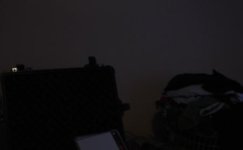
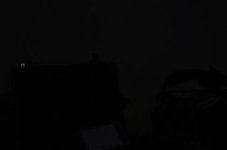
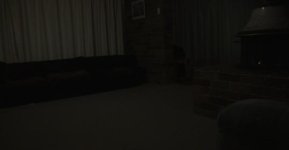
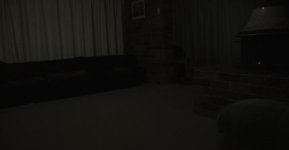
Maybe it's just me, but it seemed like last night my AF102 went really dark. Has anyone else seen this or am I just mad? Here are some screen shots:

Shot 1 is from a few weeks before, showing the actual light levels in the room, although I don't recall what the ISO setting was, but it gives you an idea of what the light looks like to my eyes:
Night_unknown.jpg
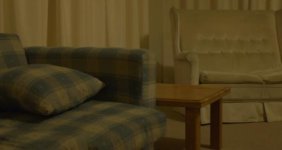
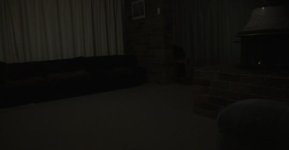
Shot 2 with lights on, ISO 200, and even a fire (in the fireplace), about 10pm, same room. That is incredibly dark. Surely this is not normal.
Night-ISO200.jpg
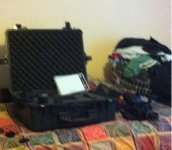
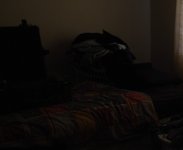
Shot 3 is at ISO 320, f2.8, about 11am, natural light through the curtains and the lights are on (single fluro bulb). This too is very dark.
Day-ISO320.jpg
Any ideas? It seems too dark to me, and I don't recall it being like this before. I did some outside shots, and they looked okay, but there's a lot of light out there. Previous to this I was taking some time-lapse shots at the lookout.

I'm going to look into sending it back to Panasonic to get fixed. It's useless like this.
 
Last edited:
What is the shutter speed, the shutter angle, the f-stop, the fps.....?

Hi Shooter,
Shutter speed is 1/60 (I think, whatever the factory setting is). Angle, no idea; I haven't adjusted it. F-stop was 2.8 on a Canon 24mm prime. FPS was 25 (VFR off, MHz 50).
 
I'm not an AF100 user as I have an HPX170 and stumbled onto this post. However, there are a few things that could have gone wrong.

The obvious questions to get out of the way are:
1. Are the shutter speeds the same or have they changed recently?
2. I'm not sure if this option is there, but is there an ND filter setting that may have been changed?
3. How about the aperture on the lens itself? Accidentally knocked around?

I'm not trying to give you the obvious IT guy answer of "reboot your system". Im just trying to clear out the obvious questions so that the more seasoned AF100 users can help better. I hope you figure it out. :D

EDIT: and it seems I was beat to the punch while writing out my reply, haha. Sorry.
 
Last edited:
As the MythBusters say, "well, there's your problem!"

Turn it to 1.

Ahh, not so simple! I'll demonstrate. I have wondered if the ND filter was incorrectly set. Here's the filters in order, according to the numbers on the wheel:
ND #1
ND1.jpg

ND #2
ND2.jpg

ND #3
ND3.jpg

And ND #4
ND4.jpg

And for what it's worth, a pic from my iPhone (although it is brighter than it really is)
Iphone.jpg
 
I'm not an AF100 user as I have an HPX170 and stumbled onto this post. However, there are a few things that could have gone wrong.

The obvious questions to get out of the way are:
1. Are the shutter speeds the same or have they changed recently?
2. I'm not sure if this option is there, but is there an ND filter setting that may have been changed?
3. How about the aperture on the lens itself? Accidentally knocked around?

I'm not trying to give you the obvious IT guy answer of "reboot your system". Im just trying to clear out the obvious questions so that the more seasoned AF100 users can help better. I hope you figure it out. :D

EDIT: and it seems I was beat to the punch while writing out my reply, haha. Sorry.

That's okay. I appreciate all the help regardless.
1. Shutter speed is 1/60, and then I pressed the shutter dial and it says "Shutter off".
2. Well, after some test shots and Barry's reply, I wondered if the little ND filter wheel has been incorrectly set, as ND #2 is the brightest. ND #1 is almost completely black.
3. The lens is fully open at 2.8
4. Well, I am an IT guy, and a reboot sometimes works - well, for Windows that's the default answer - unix just keeps going and going :D
Do any more experienced AF100 guys know if there's a straight reset button?
 
The number that is on the side of the wheel is the one that indicates which filter is in place, i suspect you are looking at the number that is on top.

Ahh, not so simple! I'll demonstrate. I have wondered if the ND filter was incorrectly set. Here's the filters in order, according to the numbers on the wheel:
ND #1
View attachment 35469

ND #2
View attachment 35470

ND #3
View attachment 35471

And ND #4
View attachment 35472

And for what it's worth, a pic from my iPhone (although it is brighter than it really is)
View attachment 35473
 
The number that is on the side of the wheel is the one that indicates which filter is in place, i suspect you are looking at the number that is on top.

Hi,

Yes, that is what I am doing. However, even if that means I'm thinking I'm using ND2, but it's really ND1, it still doesn't explain why it is so dark at the correct filter setting.
 
What lens and adpter are you using?

I now suspect the lens aperture control is "stuck" or mis adjusted by the adapter. Thats my best guess.
 
What lens and adpter are you using?

I now suspect the lens aperture control is "stuck" or mis adjusted by the adapter. Thats my best guess.

Hi Shooter,
I am using the Novoflex adapter for Canon FDs. The aperture control is working okay. I can see the iris opening and closing as I manually adjust it.

I'm really quite annoyed by this whole thing. I've only had the camera about 2 weeks and it wasn't cheap.
 
May have something to do with this about the Novoflex: "The control ring needs to be rotated to the fully open position (counter-clockwise for K and Alpha mounts, Clockwise for Nikon, before a lens is mounted. From this point, rotating the ring stops-down the aperture."
 
May have something to do with this about the Novoflex: "The control ring needs to be rotated to the fully open position (counter-clockwise for K and Alpha mounts, Clockwise for Nikon, before a lens is mounted. From this point, rotating the ring stops-down the aperture."

I'll check later tonight. However, I haven't had any issues with the adapter before.
 
May have something to do with this about the Novoflex: "The control ring needs to be rotated to the fully open position (counter-clockwise for K and Alpha mounts, Clockwise for Nikon, before a lens is mounted. From this point, rotating the ring stops-down the aperture."

Hi tflak,
I just tested it with the adapter, making sure that the control ring is at the highest (2.8) setting. Same issue.
 
just out of interest have you looked at the waveform monitor, just to confirm little light is hitting the sensor
 
just out of interest have you looked at the waveform monitor, just to confirm little light is hitting the sensor

The waveform shows light when pointed at the light bulb or the curtained window. Other than that, it's just a flat line. Outside, it shows plenty of light coming in, so obviously light is getting to the sensor. However, in a brightly lit room (two light bulbs, and a decent fire burning), 24mm Canon FD, f2.8, ISO200, this thing records like it's, well, like this
Night-ISO200.jpg
 
The iPhone picture is noisy, & shaky, indicating low light levels. Your AF100's setting seem low too, so I wonder what your using to determine the AF100's exposure?

Yes, the iPhone picture is rubbish. Keep in mind it's a particularly bad picture, due in large part to my poor skills at taking a non-shaky image. The room isn't that lowly lit. The picture is certainly brighter than in reality, but not as unnaturally so as the contrasting picture from the AF102. The only setting on the AF102 that could be considered low is the ISO200 setting, as far as I know. Everything else is pretty standard. What I'm using to determine the exposure is that in a brightly lit room (with 2 light bulbs - flourescent, on for an extended time, a fire burning) the camera records it like so
Night-ISO200.jpg

I think your problem may be user error.
That's rather unhelpful. If it is user error, then what's the answer? I have to use a minimum ISO setting of 500 in a brightly lit room to get it to look averagely lit? Does the above image look like the sort of image this camera should produce? Does this camera need ultra bright lights to perform at a basic level? I haven't noticed it being this dark in any other shots til now.

Can someone else with an Af100/2 take a screen shot in their house, at night, with lights on as you'd normally expect, and see if it's as crazily dark as mine is?
 
Last edited:
Back
Top