droliff
Active member
Hi all,
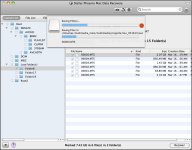
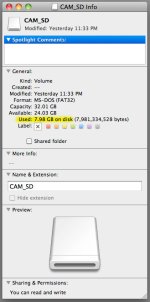
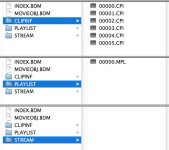
Let me preface this by saying that I only have myself to blame for this predicament. My AVCHD workflow became sloppy and now I am facing the music. I did a search of the forums and found various and somewhat similar situations but still had some questions. I shot some b camera footage on my Panasonic HMC40, which also included the good audio, for a one minute scene, that was recorded into the camera via Rode NTG-2 mic. I took the SD card, plugged it into my SD card reader and then plugged that into my Mac Pro. Rather than copying the original files from the card onto another drive, which I will always do in the future, I proceeded to do a 'log & transfer' process into Final Cut Pro. In the middle of the transcoding process, the SD card somehow lost it's connection to the computer and I received a warning popup indicating that the device was disconnected without unmounting. I didn't know how to remedy the situation other than to reboot the computer. There were now no .mts files in the STREAM folder on the SD card ( i believe there were six clips ). I tried recovering data with a free software called MiniTool Mac Data Recovery v2.0 and it came up with six jpeg files that looked like the first frame of each clip. No .mts files. When I do a 'get info' on the 32 GB SD card, it indicates that 7.98 GB are used leaving 24 GB available ( see reference jpeg below ). Could this mean that the .mts files are still recoverable? See the contents of the CLIPINF, PLAYLIST and STREAM folders in the reference jpeg below.
Thanks for any insight.
Let me preface this by saying that I only have myself to blame for this predicament. My AVCHD workflow became sloppy and now I am facing the music. I did a search of the forums and found various and somewhat similar situations but still had some questions. I shot some b camera footage on my Panasonic HMC40, which also included the good audio, for a one minute scene, that was recorded into the camera via Rode NTG-2 mic. I took the SD card, plugged it into my SD card reader and then plugged that into my Mac Pro. Rather than copying the original files from the card onto another drive, which I will always do in the future, I proceeded to do a 'log & transfer' process into Final Cut Pro. In the middle of the transcoding process, the SD card somehow lost it's connection to the computer and I received a warning popup indicating that the device was disconnected without unmounting. I didn't know how to remedy the situation other than to reboot the computer. There were now no .mts files in the STREAM folder on the SD card ( i believe there were six clips ). I tried recovering data with a free software called MiniTool Mac Data Recovery v2.0 and it came up with six jpeg files that looked like the first frame of each clip. No .mts files. When I do a 'get info' on the 32 GB SD card, it indicates that 7.98 GB are used leaving 24 GB available ( see reference jpeg below ). Could this mean that the .mts files are still recoverable? See the contents of the CLIPINF, PLAYLIST and STREAM folders in the reference jpeg below.
Thanks for any insight.