Movcam cage (or other rigs). No mention of 4K inside here...

As you may know, the FS700 Movcam rig comes in two versions, what I call regular and one that mounts on a Sony VCT-14 plate. The problem (for me) with the VCT-14 version is that the Sony VCT-14 plate alone weighs 2 lbs. That's no problem for a studio tripod, but a little much for a travel tripod, monopod, Stedicam, etc. The "regular" Movcam plate plus shoulder mount (but minus the side and top cage) weighs 1lb 8.1 oz -- just a little over a pound and a half. I don't find it's particularly comfortable--I may need to modify the shoulder mount. But to me it's the best value of the lightweight rigs. (Price was a definite factor for me.) It supports rods forward and back. It comes in silver or black. I'm using the Edelkrone EVF holder to support my Alphatron EVF.
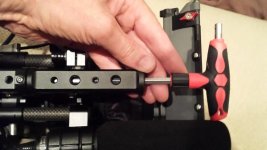
 
Question: How do you remove the front half of the top handle? I can see there's screws, but mine won't come off and I'm not about to start yanking at it. Thanks!
 
Awesome! That's what I thought but I was really hoping I could unscrew the few screw and pull... Guess I'll have to add another tool to carry around! Thanks!
 
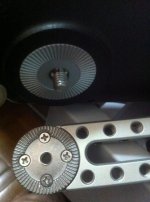
Hi all, I recently buy a Mocam grip reloactor, but I I can not attach the sony fs700 grip into the rosette because the screws are different. The sony one is a little bit bigger then the Movcam ones. guys do you use other rosette spacer?

AlM0uAF.jpg
 
I have the movcam top handle now but not had a chance to rig it up, it looks exactly as i want it though which is great.

I believe the fs700 rosette might be a little different to the standard arri one, there's an adapter from vocas that might be what you need to change it. There is a great vimeo video from Sony https://vimeo.com/72344423 which is a doco about shoulder mounts from a very respected DOP. It's worth watching because he points out obvious problems that still exist.

One area that he points out is that the handle should have an expand focus button more than a start stop which is so true. So i was looking at using the fs700 grip which does have that function, however it dawned on me that the button on there would only change the 700s LCD not the EVF or external monitor. So that does beg the question about getting this functionality onto a handle to drive a monitor. I think i'll email Dan... :)

Can someone who has the movcam normal bottom plate tell me how much it weighs? So i can compare it to the tilta one i have already to see if it's worth it. I do have a number of VCT14 base plates but anything to lighten the load is always worth thinking about.

cheers
Paul
 
Chris-T: Yes, the movcam extension arms are 6mm, and the FS-700 takes 1/4-20. There are various solutions to this problem (other than bugging 16x9, the American distributor). One is to drill out (or retap) the holes on the arms and purchase 1/4 -20 knobs from Ebay or Amazon.

Paul: As I mentioned in an earlier post, the movcam non-VCT bottom plate (excluding side and top plate), including shoulder pad, but no rods, weighs 1lb, 8.1 oz.
 
Last edited:
Our walnut CineGrip has EXPANDED FOCUS. David included it the above discussion very favorably but he did not get a fully electronic version before press because we were upgrading at the time. We've had EXP Focus working since 2012 when Sony first demonstrated our grips on the FS700 at their NAB Booth in 2012. We were also on the F65, 55 and 5 at Sony Booth this year. We do EXPANDED focus, Display AND Camera ASSIGN 1-3 under your thumb for FS 700 . In the clip referenced above we are at 24:56 https://vimeo.com/72344423

View attachment 76035

More info at web site below and some early video demo here https://vimeo.com/channels/shootingmachine

have a peek
 
Caleb,

That's great to know. Although at the moment the expanded focus i assume can only expand the FS700 LCD, there's no 'standard' to trigger expanded focus on various EVFs and LCD monitors which most people are using handheld. I don't know how programmable these things are or whether the screens accept trigger inputs.

I did mention to Dan at CD whether in the future some kind of trigger was possible. I think they have a bluetooth/wireless connection to the O7 but i don't know how fast or reliable that is in real life scenario.

cheers
Paul
 
The Kinotehnik EVF has an expanded focus function on it and the 7Q seems to have an incredibly extensive focus assist function on it.
 
The Kinotehnik EVF has an expanded focus function on it and the 7Q seems to have an incredibly extensive focus assist function on it.

Sure i know that but my question is whether a trigger button on a hand grip can control the expanded focus features of 3rd party monitors, or rather is there a way of doing it.

The focus expand button is probably one of the more useful functions when shooting, the ability to turn it on and off whilst shooting and without moving a hand would be ideal. One hand on a grip, the other focusing. So how do you expand focus??? :)

I believe some emount lenses can trigger this when the focus barrel is turned but you'd kind of want to make the decision when (and where) yourself...

cheers
Paul
 
Kinotehnik are supposed to make a wired remote control for their EVF - it's listed as an optional extra on their website. I own the Kinotehnik EVF and I have messaged the company as I don't see the remote for sale anywhere, asking them for details. I am hoping that I can clamp the remote control where my left hand rests on my rig and use that as a substitute to the expanded focus button on the Sony grip. Hopefully they'll reply and let me know.
But I agree with you that it would be much better if the Sony button could activate the feature on any monitor or EVF attached to the HDMI out.
 
One more comment on the Movcam extension arms for the FS-700: If you re-tap them to 1/4-20, they will still work just fine if you ever want to go back to m6. They will retain the M6 screws that come with the arm.
 
Paul,

Hey there. We control the FS700 internally so when you press EXP Focus on our grip it activates the camera. Any EVF will then reflect the 4X/8X magnification. You press once for 4X. again for 8X and again for clear. What I really like is also having display under the thumb button on our grip. Same thing as EXP Focus, hit once for ALL info, again for half info and again for CLEAR SCREEN. With this under the thumb I am often shooting in clear screen - its like shooting with a film camera- it's a refreshing field of view.

Caleb
 
Paul,

Hey there. We control the FS700 internally so when you press EXP Focus on our grip it activates the camera. Any EVF will then reflect the 4X/8X magnification. You press once for 4X. again for 8X and again for clear. What I really like is also having display under the thumb button on our grip. Same thing as EXP Focus, hit once for ALL info, again for half info and again for CLEAR SCREEN. With this under the thumb I am often shooting in clear screen - its like shooting with a film camera- it's a refreshing field of view.

Caleb

Hi Caleb,

Is this the case on a FS700? I'm just saying that both the HDMI and the SDI outs don't expand the view when the expanded focus is pressed on the 700 body. After all if you're running to an external recorder then you don't want the view being expanded. It seems that the expanded focus is a function unique to each EVF or external monitor.

The expanded focus on a Small HD DP6 expands the signal on the monitor and can show 1 for 1 pixel. This will be complicated more with 4K, for example i don't know whether anyone knows yet what the O7 will show with a 4K RAW input - will it expand 1 to 1 on a 4K image? Who knows.

Either way the triggering of the expanded view appears to be a function unique to each external EVF or monitor and the internal FS700 button wouldn't trigger anything...

Am i wrong?

thanks
Paul
 
Paul. You're right. I just tested on my FS100 with a Marshall monitor. Our Cinegrip does trigger EXP Focus through the camera menu -- exactly the same as depressing the button on the side of camera. It does not reflect through the HDMI OUT though. My mistake. I thought that when DISPLAY was set to "ALL OUTPUT" it did pass that signal. Sorry for the confusion.
 
Back
Top