Hello everyone,
A few weeks ago I went to film some test shots at a nearby observatory. The purpose of the test was to capture high dynamic range images and learn to color grade them in Assimilate Scratch. I am a beginner in color grading and need to practice and learn the tools and techniques and, through experience, the eye for good color.
I am rather pleased with this project and I am posting it here because I would appreciate the feedback from this fine community and it's very talented members. Positive feedback is naturally appreciated, but constructive feedback pointing out the flaws will help me learn more.
Here are is the link to the video on Vimeo. Please download the video file (735MB) if you can for highest quality viewing.
https://vimeo.com/126753628
Following are all the details of the shooting, editing and color grading of this project:
Equipment used:
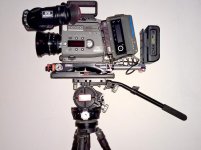
Sony F35 Cinealta Camera
Red Pro Zoom 18-50
Carl Zeiss Jena Biometar 120mm f2.8
Tiffen Full Spectrum 1.2 IRND
Codex Onboard M Recorder
Camera Settings:
Cine Mode (SLOG, SGAMUT)
White balance set to DAYLIGHT
450 ISO (Native ISO)
800 ISO (only last three shots)
24fps
Uncompressed 12-bit 4:4:4 DPX
Edited from proxy Quicktime files (generated with LUT applied by Codex Desktop Transfer Station)
Edited in Adobe Premiere Pro CS v7
Music by Kevin MacLeod (http://incompetech.com)
Song Title "Destiny Day"
Color Grading and Finishing with Assimilate Scratch v7
Input LUT used "macgregor_12.cube" (http://www.dvxuser.com/V6/printthread.php?t=288192&pp=10&page=101)
Graded by manipulating the primary colors (values of LIFT, GAMMA, and GAIN), secondary colors (very rarely), curves, and, in a few instances with extreme highlights, masks and qualifiers (RGB or LUMA selection masks)
Output directly from Scratch to Apple ProRes 4444 (4.87 GB file)
Compressed for Vimeo in Apple Compressor v.4.1.3
Thank you for your comments and feedback.
Igor
A few weeks ago I went to film some test shots at a nearby observatory. The purpose of the test was to capture high dynamic range images and learn to color grade them in Assimilate Scratch. I am a beginner in color grading and need to practice and learn the tools and techniques and, through experience, the eye for good color.
I am rather pleased with this project and I am posting it here because I would appreciate the feedback from this fine community and it's very talented members. Positive feedback is naturally appreciated, but constructive feedback pointing out the flaws will help me learn more.
Here are is the link to the video on Vimeo. Please download the video file (735MB) if you can for highest quality viewing.
https://vimeo.com/126753628
Following are all the details of the shooting, editing and color grading of this project:
Equipment used:
Sony F35 Cinealta Camera
Red Pro Zoom 18-50
Carl Zeiss Jena Biometar 120mm f2.8
Tiffen Full Spectrum 1.2 IRND
Codex Onboard M Recorder
Camera Settings:
Cine Mode (SLOG, SGAMUT)
White balance set to DAYLIGHT
450 ISO (Native ISO)
800 ISO (only last three shots)
24fps
Uncompressed 12-bit 4:4:4 DPX
Edited from proxy Quicktime files (generated with LUT applied by Codex Desktop Transfer Station)
Edited in Adobe Premiere Pro CS v7
Music by Kevin MacLeod (http://incompetech.com)
Song Title "Destiny Day"
Color Grading and Finishing with Assimilate Scratch v7
Input LUT used "macgregor_12.cube" (http://www.dvxuser.com/V6/printthread.php?t=288192&pp=10&page=101)
Graded by manipulating the primary colors (values of LIFT, GAMMA, and GAIN), secondary colors (very rarely), curves, and, in a few instances with extreme highlights, masks and qualifiers (RGB or LUMA selection masks)
Output directly from Scratch to Apple ProRes 4444 (4.87 GB file)
Compressed for Vimeo in Apple Compressor v.4.1.3
Thank you for your comments and feedback.
Igor