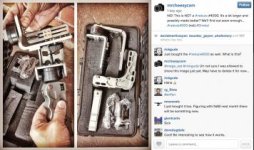
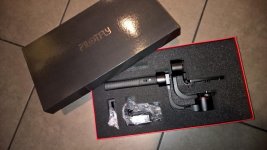
Micro Gimbal for GH4, BMPCC, A7s - $699 USD

I've moved on from the Nebula to a used gimbal that happens to have a similar Basecam 8 bit board. It uses the same GUI to set it up. One thing I've learned is that vibrations, gyrating, etc are nearly always caused by high motor power or P values. Basically you zero out the power on two axis and work on the remaining one, raising the power and "P" value until it starts to oscillate, then back off a bit. Then you can go about setting the "D" (dampening) value. The I value on my unit starts the camera shaking if you raise from 0 to even .1 on any axis, not sure why. I can only access with USB as mine has no Bluetooth board, but so far it's worked fine.
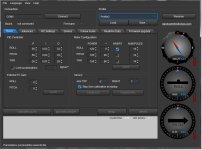
 
Here are my PID and motor power settings for Profile 2, if anyone's interested. These settings work great for my BMPCC in a MOVCAM cage, with SLR Magic 12mm T/1.6 lens (see a photo of this rig on the previous page). Since this setup is heavier than the other one using a Nikon 20mm F/2.8D lens with Speedbooster and no cage, the notable change was more power required going to the motors. Note the pretty high P and D values on the ROLL and PITCH axis. .simpleBGC_basic_settings_2.jpg
 
Ah, gotcha. I recommend buying from Camera Motion Research for anyone who wants one of these things but hasn't ordered yet. They test all functions and balance a camera on every unit before shipping them out, and they provide great support.

There are three basic calibrations relevant to your issues: accelerometer, gyroscope, and motor polarity/poles. To avoid the issue with motors shaking during the ACC and GYRO calibration, shut off the motors using the software. Make sure the surface you're using is level and that you've procured two small wood blocks (or anything similar that does not contain magnets) to prop up the camera mounting plate on the pitch axis. If you happen to have an iPhone, go into the compass app and swipe left, revealing a great leveling app. You can initiate both calibrations from within the software since it's unclear whether the menu button is working.

Next, calibrate the motor polarity and number of poles. Stand the unit upright and balanced, powered on, with motors active, then push "AUTO" under "motor configuration" in basic settings. The motors will slowly turn one at a time, counting poles. The important thing will be getting the polarity correct ("INV" checkbox next to each motor). If anything other than 14 poles is detected, enter "14" manually.

After you get through that, you can move on to figuring out if your settings are causing any residual noise and vibrations, or if the unit is faulty. I'm happy to help while all of this is still fresh in my mind after my two week "Nebula tuning" binge.


Yes, Camera Motion Research was out of stock when I went on the site. But I was thinking about returning this one and buying from their next week when it come back in stock.

When I attempt to calibrate I turn off the motors but after it sounds all of the beeps the motor comes back on automatically.

When I ran the poles the only axis checked inverted was roll.

I see 11.3v near my battery indicator.
 
(sniping without having read the last few pages of the thread; this may be useful, or nonsense; judge yourself)

* If you do a full reset you lose the configuration, the only way to recover after this, for me, was to ask here for somebody to upload a file with their profiles, and tune from there.
* The high pitch sound can happen because of the PWM calibration, there was an option somewhere that magically killed the sound on mine when set to "high" or "fast" or something like that (it came set correctly, I had to re-set it after my accidental full reset).
 
Tried to go into software and tinker with PID settings for the first time and I get an error saying GUI vs board version mismatch connecting via USB cable. Tried Bluetooth on another computer and Andriod device and it just hangs in connecting and nothing happens!! Any ideas?
 
You need to be running the same version of the GUI as installed firmware version on the Nebula. My Nebula came with firmware v2.40 b6. Your version of SimpleBGC should match the firmware. Since you probably don't know which firmware you're running, go to the basecam electronics page and download a couple of versions of SimpleBGC (8-bit) until it works (2.40 b6 is very likely, or b7 which is the latest version).
 
Hi i just received my nebula 4000 can someone share with me is pid setting for gh4 and 12 mm olympus
thanks a lot
 
I just used my Nebula 4000 Lite on a job for the first time a few days ago and it worked out quite well. I calibrated it and tested it a bit in the past few weeks so I can pop my A7S on it with the 28-70 lens and be ready to fly within a minute or two. They also had a DJI ronin flying a C300 that seemed to take a lot of tweaking to get running, but I think it's because they were balancing and calibrating it with a rental camera on the day. Anyway they seemed pretty impressed that I could just whip out the A7S and start flying it almost immediately and get similar shots with a rig that's 1/10th the size and weight. Actually I imagine the single-handed operation may be more flexible in some ways since I had a lot of reach and stamina with it without straining myself too hard.

The AF on the A7S is pretty impressive and smooth when it works but seems to focus on backgrounds too often if it cant detect faces because they are in profile or turned away or something. I wish it would just always focus on whatever is closest to the camera, but maybe I need to dig into the AF options further.

Anyway I was having an issue with my Nebula where in profiles 2 and 3 it would have a different roll level than in profile1 and no accelerometer or gyro calibration would fix it, in fact it would even show in SimpleBGC that the camera was not level and everything was calibrated right but it would try to keep the camera rolled slightly to the left. Seemed like it was somehow connected with having tilt/roll disabled in those profiles, and the workaround I found was to rather than set it to disabled I set it to follow the non-existent external remote controller. Not sure how to avoid that. When I was first setting it up, it seemed like it would get the correct orientation from profile2-3 from my last position in profile1 which seemed like a great way to work, but at some point that just stopped happening and profile2-3 kept their own default orientations that were just not level. Anyway I found the workaround before my job this week and everything worked as I hoped.

I'll be sure to post the video when it is posted/airs.
 
Yes, please share your findings.

Will calibrate and test this weekend. Only had time to pull out of box and plug in to charge. First impressions: very light, solid build. One interesting point - there is a hard stop preventing any axis from rotating more than 360 degrees - this has been reported as a problem for the Nebula 4000 in this thread.
 
Does anyone have any tips on tuning the yaw motor? I've balanced the sled as well as possible (given that there are only 3 fore/aft positions), but I'm still experiencing jitter at the when the yaw motor starts and stops a movement.

As you can see from the realtime data, the beginning and ending of the yaw movements are quite chaotic.

View attachment 98263

Any tips or suggestions would be appreciated.

This was the main issue that frustrated me for the first two weeks. I figured out how to resolve it after watching YouTube user SimpleBGC's 2 hour long tuning video. The key was to dial down the power to around 85, enter 80 for the additional power field (my roll and pitch are 110/0 and 125/20, respectively), and most important of all, under RC Settings, I increased the LPF (low pass filter) from 3 to 5. In that same section I dialed the speed down from 10 to 9. There's a tiny bit of jitter when the yaw motor starts, stops, or reverses direction, but now it doesn't show up in my footage like before. The curve in the real-time viewer is very smooth. See if that does the trick for you.
 
@metaprofessor - I tried 2.40 b6 and 2.30 still no connection ....

I'm on Win7 64-bit and I had to install some drivers to get the USB to connection to work the one time I had to connect that way. The drivers are basically a serial to USB "bridge," and they are referenced on Dave Dugdale's page as well as in this thread a few pages back. I don't have the link handy, and not sure what system you're on, but that could be part of your issue. Even when I had b6 I was able to use the b7 GUI, so it can partially function if they're close.
 
Will calibrate and test this weekend. Only had time to pull out of box and plug in to charge. First impressions: very light, solid build. One interesting point - there is a hard stop preventing any axis from rotating more than 360 degrees - this has been reported as a problem for the Nebula 4000 in this thread.

The yaw motor appears to be smaller than the other two. Very interesting, if that's the case. Is there a way to balance the camera with respect to the yaw more easily than with the Nebula?
 
This was the main issue that frustrated me for the first two weeks. I figured out how to resolve it after watching YouTube user SimpleBGC's 2 hour long tuning video. The key was to dial down the power to around 85, enter 80 for the additional power field (my roll and pitch are 110/0 and 125/20, respectively), and most important of all, under RC Settings, I increased the LPF (low pass filter) from 3 to 5. In that same section I dialed the speed down from 10 to 9. There's a tiny bit of jitter when the yaw motor starts, stops, or reverses direction, but now it doesn't show up in my footage like before. The curve in the real-time viewer is very smooth. See if that does the trick for you.

Thanks for this. I'm trying to eliminate the "sudden wobble" from the Yaw and Roll axis as well. Especially obvious when I am reversing from a previous move.

What about the deadband settings (degrees and expo curve) and the motor offset/speed settings below it in the software? What does it do?
 
Thanks for this. I'm trying to eliminate the "sudden wobble" from the Yaw and Roll axis as well. Especially obvious when I am reversing from a previous move.

What about the deadband settings (degrees and expo curve) and the motor offset/speed settings below it in the software? What does it do?

The deadband is important to set based on how you plan to use the gimbal, because it determines the amount of movement you can make before triggering the follow response. I've been setting it to 15-20 degrees because I don't want the camera to start turning in reaction to every small movement I make. I recommend downloading and reading the SimpleBGC manual, especially the section explaining the PID settings and a process for tuning (link: http://www.basecamelectronics.com/files/v10/SimpleBGC_manual_2_4_eng.pdf). Here's a quote from the SimpleBGC manual about those other settings:

• Deadband, degrees: you can set the range where the rotation of an outer frame does not
affect the camera. It helps to skip small jerks when you operate gimbal by hands.

• Expo curve: you can specify the strength of the control when outer frame declines from neutral
position. For example: when the expo curve is enabled (i.e. is not flat), small or medium
declination of an outer frame will cause very fine control even if I-term is configured high. But
the strength of control exponentially grows when angles of declination becomes close to 60
degrees. It gives a big freedom in camera operation: from fine and smooth control to very fast
movements.

• OFFSET: it is a very important to properly configure the initial position of the motor's magnetic
poles, because all further calculations use this information. For YAW axis it allows to fine adjust
a camera heading relative to a frame heading. For PITCH and ROLL axis there is an option to
calibrate offset automatically. To do this, power on system, hold frame leveled, and press AUTO
button. Don't forget to write setting when finished.
If the camera after power on is not leveled, you need to adjust the offset setting.
 
Is there anyone who can do a simple SimpleBGC tutorial video for the Nebula? For the life of me I can't get this gimbal to work. I returned the messed up version and just received a new one. It's not as unstable as the previous version I had. That gimbal was deemed faulty but this new gimbal still vibrates on it's original profile. I have not pressed Use Default and I have saved the original profiles. I have a sony a6000. When I have the original profile installed, I can move the gimbal and the camera will stay fairly steady. There is just this rough vibration happening, a vibration you can hear.
 
Last edited:
Is there anyone who can do a simple SimpleBGC tutorial video for the Nebula? For the life of me I can't get this gimbal to work. I returned the messed up version and just received a new one. It's not as unstable as the previous version I had. That gimbal was deemed faulty but this new gimbal still vibrates on it's original profile. I have not pressed Use Default and I have saved the original profiles. I have a sony a6000. When I have the original profile installed, I can move the gimbal and the camera will stay fairly steady. There is just this rough vibration happening, a vibration you can hear.

Download the SimpleBGC manual in my link above, and pay special attention to the PID section that describes a simple process for tuning the gimbal. In general, you want your P and D values as high as possible, but you should lower the motor power values as those values increase, and vice versa. If you think your settings are close, but one of the motors is vibrating, decrease the D value in increments of 3-5 and see if that alone does it, then carefully increase or decrease the other values to test limits.
 
Back
Top