Mexico look..?

theKMD

Active member
I am in pre-production on a film that is set in Mexico, and need some of your opinions on this. I tend to do more in-camera then in-post, but cannot really make up my mind here. Would you recomend keeping presets at 0 and leave CC/Magic Bullet to create a bright, desolate look, or take my chances in-camera and only adjust what I don't like in post. (or possibly a mix of both) I fear that if I use the normal setting I tend to use for a film look, then later on Magic Bullet will nake it look too overdone. Any feedback would be great!
 
Presets at 0 does not mean maximum flexibility in post. Sharpening artifacts are basically impossible to undo. Crushed blacks and clipped whites can't be fixed. Usually it's a good thing to understand the look you are going for a shoot some tests. See what you can do in-camera and what you want to save for post. Plan it out. Test it.
 
Hey man, go for the look as much as you can while shooting. I've shot a good deal of photos and some video in mexico, and am also shooting a doc there this year. Dont trust magic bullet to get your look, get it as much as you can, eg high contrast, as much black detail as you can, and then use post to simply enhance what you were shooting for.
 
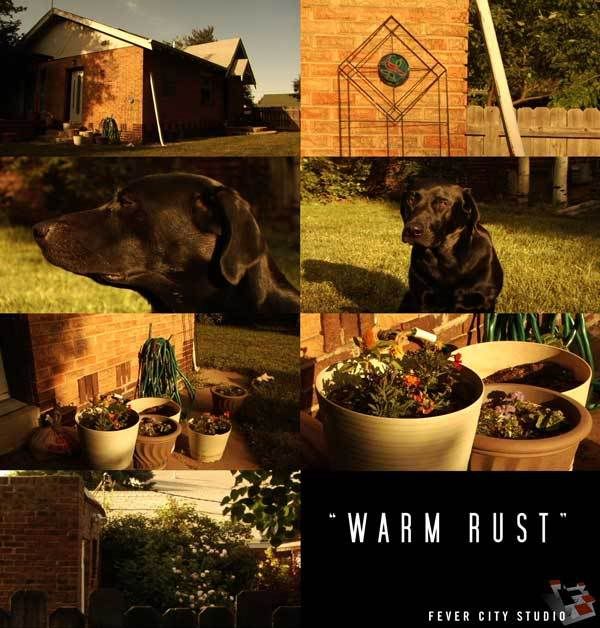
I was experimenting earlier today and thinking about your Mexico shoot for some reason. Granted - I'm in Colorado, not Mexico, but the sun is high & harsh. I'm getting closer to where I like some settings for contrast, leaving the color spectrum for playing around occasionally.

The idea with these settings ("Warm Rust" - lame name.... couldn't think of anything else) was to pull out most of the chroma and then warm it. Obviously, you can't pull ALL chroma out, so there are still hints of what's there. The idea is that late afternoon sun bouncing around, like you might get off some of the brown dirt and sand out here (or in Mexico maybe). Fact is, this is a very lush and green spring / summer in Colorado so that did not affect these settings. White balance was clean with no filtration up front. Any and all input appreciated.....

"Warm Rust"

DETAIL -3
V DETAIL +2
DETAIL CORING +2
CHROMA LVL -7
CHROMA PHASE 0
COLOR TEMP -5
M. PEDESTAL -6
A. IRIS -2
GAMMA CINELIKE V
KNEE (n/a)
MATRIX CINELIKE
V DTL THIN
SKIN DTL OFF
24pA

WARMRUST2.jpg
 
I was experimenting earlier today and thinking about your Mexico shoot for some reason. Granted - I'm in Colorado, not Mexico, but the sun is high & harsh. I'm getting closer to where I like some settings for contrast, leaving the color spectrum for playing around occasionally.

The idea with these settings ("Warm Rust" - lame name.... couldn't think of anything else) was to pull out most of the chroma and then warm it. Obviously, you can't pull ALL chroma out, so there are still hints of what's there. The idea is that late afternoon sun bouncing around, like you might get off some of the brown dirt and sand out here (or in Mexico maybe). Fact is, this is a very lush and green spring / summer in Colorado so that did not affect these settings. White balance was clean with no filtration up front. Any and all input appreciated.....

"Warm Rust"

DETAIL -3
V DETAIL +2
DETAIL CORING +2
CHROMA LVL -7
CHROMA PHASE 0
COLOR TEMP -5
M. PEDESTAL -6
A. IRIS -2
GAMMA CINELIKE V
KNEE (n/a)
MATRIX CINELIKE
V DTL THIN
SKIN DTL OFF
24pA

WARMRUST2.jpg


These are great! A lot along the lines I am looking for, I've been testing a lot of it and adjusted some things here and there, but its looking the way I envisioned it. Thanks for the help!
 
Happy to help out. I've found it's much easier to experiment when you have a goal in mind (like your Mexico shoot). My stuff is usually on the warm side anyway but I liked that there were still just hints of the chroma there but that the warm tones kind of permeated throughout.

I think the V.DETAIL needs to come down a little bit. You could also play with the CHROMA LEVEL to determine how much you want to 'see through' the warming. Post some grabs if you get a chance!
 
Got some screen shots from the first day of shooting, went REAL warm because this is both set in Mexico and is a flashback. (I'm planning to follow a similar setup to warm rust for the present day scenes) But anyways, I'm pretty happy with how they came out, will be back with more as they become available. Thanks for all the input! Would be great to hear more


62r3mm0.jpg


5y19cvb.jpg


6ez72ir.jpg


6by3wvs.jpg
 
Last edited:
Nicely done. Looks good - and 'really warm' as you mentioned.

Thanks for sharing the grabs too. I'll also be curious to see how your modified 'Warm Rust' turns out. Very cool.......
 
Fevercity...

You have come up with some good looks! How about a 'horror/thriller' setting? Something from the film 'Seven' or 'See no evil'?
 
Hey, thanks, Lake Films! It is appreciated. I've been trying to have some fun w/ it.

Isn't "See No Evil" with that wrestler-guy? Kane? something like that.......

And "Se7en"... man, I haven't seen that in a long time.

It always helps to have a viewer's impression... what do you think of as "horror" for these looks.... dark, desaturated, 'grungy'. I'm just trying to figure out an approach short of going out and renting 7. As always - any input appreciated.

I'm just about done cooking up something for the very obscure "Reflections on a Golden Eye". Don't ask. It's just bizarre. Warner Bros. made John Huston re-release it because of the lab 'look' he cooked up in '67.
 
Hey. Yes exactly, 'dark, desaturated & grungy' is the look. With the new 'Texas chainsaw massacre' the look is one of 'bleach bypass' more on the yellow side, that's also a great horror look...

And yes 'see no evil' stars 'Kane'
 
Yes - you are correct. Apparently, there's been quite a bit of discussion about Darius Khondji's bleach bypass procedures on "Se7en". I'll look into a 'look' but I might have to surrender to our friends at Red Giant (Magic Bullet).

As I mentioned, it has been a while so I'll have to see the film again. There's a lot more going on than is in the trailer alone. For starters, seems like it's chroma-down & yellow-ish. Curious........
 
Thanks for the 'rusty warm' look settings. It looks good.

The really warm mexico looks great for mexican flashback.

I used to do minor adjustments while shooting and then get my specific look in post, incase I decided I didn't really want to go that route or use something different, but now I tend to do more in camera adjustments and minor tweaking in post. I'm not too sure which I prefer yet. I did notice that the in camera adjusting, takes a lot longer and i find myself adjusting more often.
 
Back
Top