Matching different Cameras

funkmusicinstitute

Active member
I know there is no perfect answer to this question. However, doing a live concert shoot over the next few days.
The lead camera (and handheld) will be my FS100, but we will also have other cameras in the mix, including:

--hpx500 (tripod)
--hpx170 (handheld)
--hmc150 (static)
--5D
--7D
--Sony EX1

Unfortunately, the crew will have very little time to try and calibrate their cameras to each other before the show starts.
Any suggestions on how to "roughly" match in camera?

I like using my FS100 on Abelcine's AB Range profile, and would like to get close to that for the other cams.
Will be shooting in 1080/24p on all cams, and will have decent studio lighting, minimizing the reds.
Any suggestions greatly appreciated, as always!
 
I know there is no perfect answer to this question. However, doing a live concert shoot over the next few days.
The lead camera (and handheld) will be my FS100, but we will also have other cameras in the mix, including:

--hpx500 (tripod)
--hpx170 (handheld)
--hmc150 (static)
--5D
--7D
--Sony EX1

Unfortunately, the crew will have very little time to try and calibrate their cameras to each other before the show starts.
Any suggestions on how to "roughly" match in camera?

I like using my FS100 on Abelcine's AB Range profile, and would like to get close to that for the other cams.
Will be shooting in 1080/24p on all cams, and will have decent studio lighting, minimizing the reds.
Any suggestions greatly appreciated, as always!

without a fair amount of time its going to be very difficult to match all of those cameras

on the dslrs i would suggest setting contrast and saturation to 0, seeing as how dslrs tend to crush blacks pretty heavily

also as an aside i would swap your static hmc 150 with the ex1, you'll be getting a much better backup image that way
 
The HPX 170 & 150 & 500 can share the same scene file /settings so at least when you grade they will be starting from the same point. Some people have been able to tweak the EX1 to match the Panasonic "look" and you may find someone here with settings for them. But I recently shot with an HMC150 and EX1 and found myself grading a lot. Can't help you with the 5D and 7D but others can. If it is a concert with "stage" lighting and effects then it probably won't be as much of a problem as it would be in a balanced light situation. Sync will be an issue however,hope you have a comfortable chair in the edit suite.
Best
Brian
 
and try to shoot a color chart with all camera's - filling the frame and under the final(ish) lighting, i would use those to build a base CC for each camera as a starting point for gradeing

d
 
I would say the most important thing would be to white balance them together. But be careful, panisonic 3,200 might be different than sony 3200 kelvin. So I would try to get them as close as possible before the grade. The good news is with magicbullet looks, and colorista, you can pretty much match any cams with work. It does take time though. Good luck with the shoot. Is your audio covered? That will be just as or more important than the visual aspect.
 
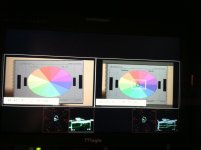
A reasonable match of all of the cameras can be achieved. My approach would be to setup the 7D and 5D to the same setting Sharpness 0 Contrast 0 Saturation -3 Colortone neutral or -1. Dial in your color temp. Then proceed to match the other cameras that have more handles to the Canons. The Canons have the least amount of picture profile flexibility so they will be the baseline. Then one at a time bring the other cameras in to the mix by A/B with one of the Canons on a monitor with a vectorscope, preferably shooting a color chart. Watch the color shift of the chart as you switch between the two cameras when there is very little wiggle and similar color vecotor levels your in the ball park bring in the next camera wash rinse and repeat. It should look something like the photo. The Canon 7D is on the right the FS100 is on the left. By the way this process takes a little time, if possible try to figure out a way to get the cameras together before your show the extra time spent in preproduction will pay off big time in time saved in post.FS100_7D.jpg If you know a DIT or a good video tech hire one to help you out. That is what we techs do so the camera people can create and not be bothered with this sort of thing. ;-)
 
Back
Top