Mark III Color Shift after Transcoding

I'm having trouble with my Mark III footage after transcoding to ProRes 422 in Compressor.

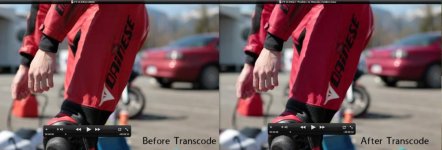
There is a color shift that is affecting the reds only. Gamma seems to be fine, it's purely the reds that are getting 'redder' or looking more magenta.

I've attached a photo to show what I mean. I've done various tests with different footage and have narrowed down the problem to the reds only. Skin tones are only affected if there is red in them (which there always will be to various extents).
mk3_transcode.jpg

The image on the left is straight out of the camera. It looks similar to what I saw on my camera LCD while filming. The image on the right is after being transcoded by Compressor using the default values for ProRes 422.

The original footage was shot on iFrame Compression, Faithful Picture Profile (default except sharpness to zero). 1920x1080 24p.

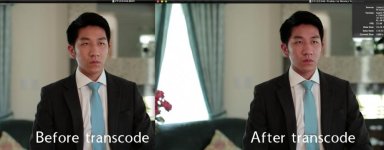
Anyone else have this problem? The Canon EOS Plugin for FCP does not yet recognize the Mk III footage. The easiest way to demonstrate this is if you recorded a plain red image. Then transcode to prores 422 via compressor. The red will look much more magenta.

My Mk2 footage when transcoded the same way (or even via EOS plugin) does not have this problem. I think the problem lies in Compressor or Apple's implementation. What else can I do to transcode instead?
 

Attachments
  • mk3_transcode2.jpg
    mk3_transcode2.jpg
    43.6 KB · Views: 0
Last edited:
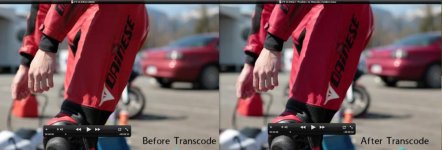
Here's one more example with mostly red to illustrate the difference. It's really messing my footage up.

Look at the color of the suit as well as the car in the background.

mk3_transcode2.jpg
 
colour space issue, MKIII footage now uses rec709 space, some softwares can't interpret it correctly
 
rosso_corsa- I found the same issue with Compressor (version that shipped with FCS 3). Have you tried the new version released around the same time as FCPX?
Have you tried editing the ALL-I files without transcoding?
I haven't used FCP7 since Premiere CS4, however FCPX can edit the ALL-I files in real-time (did not check for color shift, though). I work mostly in Win7x64 PPro CS5.5.x.
Have you tried 5DtoRGB? It has a list box for rec709 (however when tested on Windows transcoding to ProRes, it stopped short on a least one file (works on OSX too)).

Any issues transcoding IPB? I have done extensive testing and have found IPB has less artifacts vs. ALL-I (and also lower noise). PPro CS5.5 also does a poor job decoding ALL-I (Compressor does a much better job, other than the color shift). I have also found issues with chroma upsampling, especially visible with red (PPro CS5.5.2, ALL-I): little horizontal lines with gaps between them (should be continuous, smooth gradient).
 
Thanks jcs. I just tried 5D-to-RGB using the rec 709 selection. The color shift still occurs, but is less than previously with compressor. At least my footage looks more usable now. I'd really like to find something to make it just work though. I don't really like editing natively.

I've been resisting FCPX but maybe it's time to make the switch. Thanks for the tip about IPB. I did see your thread but have not gone through it yet.
 
Jcs, I actually tried again with 5d to RGB. This time I selected 'full range' instead of 'broadcast range'. Everything seems to be fixed!!!! Thanks so much.
 
Do the colors look OK when you edit natively?
I haven't used FCP7 in a long time, but you can probably make a preset of some sort to quickly deal with the color issue.

Given the variation I have seen in decoder behavior, it's clear a standard should be created so that codecs can be validated against a test dataset.

The only issue with IPB I am aware of is it's harder to edit on slower machines (native editing). Straight out of camera, ALL-I can look better, but after sharpening, grading, and noise/grain IPB has less artifacts and looks more like film. Let us know if you see the same results, or if you find any issues with IPB (that we can examine with a screen/frame shot, etc.).
 
Cool! If you have time to test IPB, would appreciate your feedback (I'm shooting critical shots with both; still trying to understand if ALL-I can outperform IPB under any condition).
 
Ok, I'll do that. You've gotten me curious too.

Only problem I'm having with 5D to RGB now is that it doesn't support batching. I have to select one file at a time. :/
 
Thanks.

I'm having another problem. After editing the correctly transcoded footage in FCP7, when I export I'm pretty much stuck with the same codecs as compressor. Even using X264 Encoder, I'm getting an output that's gone all red again, and my dynamic range also gets crushed.

How is everyone exporting their FCP7 footage from the Mark III?
 
I've found FCP7 does not display footage correctly. However, If you edit in aLL-i on timeline, then send it to apple color, grade, and export as ProRes422 the contrast is correct again.
 
it's a luma range issue, 0-255 vs 16-235.

That's why I strongly suggest using an reliable and robust intermediate codec for editing, for PC the best is Cineform, don't know much about Mac, but I think Avid DNxHD would be a good choice. works with Avid and Premiere.
 
I've found FCP7 does not display footage correctly. However, If you edit in aLL-i on timeline, then send it to apple color, grade, and export as ProRes422 the contrast is correct again.

Thanks, but after you have your final ProRes422, what are you using to convert it to an H264 file for web?
 
it's a luma range issue, 0-255 vs 16-235.

That's why I strongly suggest using an reliable and robust intermediate codec for editing, for PC the best is Cineform, don't know much about Mac, but I think Avid DNxHD would be a good choice. works with Avid and Premiere.

Thanks, I may need to start using something else.
 
Thanks, but after you have your final ProRes422, what are you using to convert it to an H264 file for web?

I must confess i haven't tried that. Perhaps you could try using Quicktime 7 and see how it turns out? I imagine that once you have your correct ProRes, making a H.264 with quicktime shouldn't be a problem.
 
Back
Top