GH3 Manual exposure shift - please help

blake2404

Well-known member
So, I've been trying every which way to lock the exposure compensation during manual video mode so that I can take shots on a set which are exposed identically from one take to the next. is there any other way to seize manual control of exposure compensation. Even on shots where I'm sweeping across varying dark and light objects the constant up and down of the exposure compensation is driving me crazy. The physical +/- button doesn't seem to activate anything and the on-screen counterpart is grayed out.
I'd appreciate any input you might have.
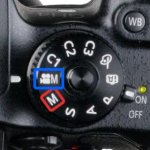
 
Yes I am, I've tried every mode in the book so to speak, nothing works. But I am most definitely in manual everything/movie mode. Also tried native (m 4/3) and nikon af/g as well as manual ai lenses, makes no difference.
 
Try going to the first page of the Motion Picture Menu. Make sure Exposure Mode is set to "M". I think it is set to "P" when it arrives from the factory, which would make your exposure change as lighting conditions change. If that's not the problem, I'm not sure what it could be.
 
Exposure compensation is not available in manual mode. Because you are fully manual, it is expected that you will make the exposure compensation degree you desire with the camera setting controls. If you determine a 2/3 stop under is what you want you will have to set that by the meter for each "take", with either the aperture control or the ISO. I assume that like me you will want to leave the shutter at 1/60th (if in NTSC region) or at 1/50th (if in PAL region).
 
I think you might be mistaking the screen auto-brightness for exposure compensation, I don't think you can turn off the auto-brightness though which is annoying. Notice that the whole display brightens and darkens, including the text and icons etc.
 
I think you might be mistaking the screen auto-brightness for exposure compensation, I don't think you can turn off the auto-brightness though which is annoying. Notice that the whole display brightens and darkens, including the text and icons etc.


What ukfilmer said.

Not really.

I've seen this question on other site forums.

See for yourselves, select M for manual (or manual exposure mode in motion picture mode) and press the exposure compensation button on top (right of the ISO button).

Nothing happens.

Now change to S, A, or P on the dial on top and press the exposure compensation button. A scale appears at the bottom of the screen marked in f stop increments (1/3 stop if you have that set in the configuration menu). Turning the rear dial left or right will move a marker and allow you to set the under or over exposure compensation degree you want.

The OP's complaint is that apparently Panasonic has decided since in M or manual exposure mode in video allows us to make exposure changes directly, we don't need exposure compensation in those modes.

Has nothing to do with screen brightness.
 
Not really.

I've seen this question on other site forums.

See for yourselves, select M for manual (or manual exposure mode in motion picture mode) and press the exposure compensation button on top (right of the ISO button).

Nothing happens.

Now change to S, A, or P on the dial on top and press the exposure compensation button. A scale appears at the bottom of the screen marked in f stop increments (1/3 stop if you have that set in the configuration menu). Turning the rear dial left or right will move a marker and allow you to set the under or over exposure compensation degree you want.

The OP's complaint is that apparently Panasonic has decided since in M or manual exposure mode in video allows us to make exposure changes directly, we don't need exposure compensation in those modes.

Has nothing to do with screen brightness.

Exposure compensation has no place in video, so it's understandable it's not included in manual video mode.

The OP is I think (as I did the same) mistaking the screen brightness shift for auto exposure compensation changing (which look fairly similar at first glance).

Get your GH4 with the flip out screen and point it at a bright scene, as you move it to a darker scene the brightness will change. If you do the same thing using the viewfinder it won't change.
 
You do have to make sure you are both in manual mode (dial) and ensure you are set to manual exposure (menu). With both of those set, the camera won't mess with exposure. (You can verify this looking at an external monitor. As others have stated, the internal monitor adjusts with the scene.)
 
Back
Top