making ADR sound like outside

scorsesefan

Veteran
I had to record some ADR dialogue to replace some recorded outside (on a beach) that was ruined by poor wind protection.
The subject was in a room within a larger room, facing the exit, with the door open:
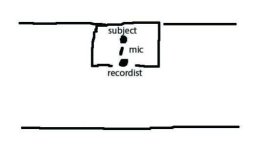
adr.jpg

The dialogue sounds kind of "canned", for lack of a better word. I went back to the beach and recorded some tone there to lay under. Both ADR session and location sound recorded with Rode NTG-3.
Can anyone suggest how to make it sound more like outside?
 
In the ADR recording is there any reverb from the room you recorded in ? ( i.e. Was the room properly treated for audio recording ? )
 
There are ZERO reflections, near or far, in dialog recorded outdoors in an open space (like on the beach).
I would be willing to wager that your indoor-recorded dialog, using an (inappropriate) shotgun mic contains the kind of telltale near reflections one expects to hear from indoor speech.
Without the ability to hear a sample, I would imagine that your ADR tracks would be perfectly fine for an indoor scene.
But you don't expect to hear ANY reflections when the subject appears to be outdoors.

As Mr. Dingo suggested, eliminating reflections by using a more appropriate microphone, and by acoustic treatment of the space would be the expected remedies.
 
Thanks, guys... is there any reverb from the room you recorded in ? Yes, there does appear to be reverb. No, in retrospect, I did not properly treat the room... and yes, Richard, the beach is probably the least "reflective" environment you can shoot in (except space)
... but moving forward is there anything I can do filter wise? Here is a link to one of the files: http://we.tl/pYAwGmUeKw

Thanks!
 
The only way I have really gotten out door ADR to sound good short of doing it in a proper ADR stage is to actually record it out doors. Recording outdoors has worked great.

You can try things like De-Verb, there is another one also I can't remember, and they will suck out some of the room sound. Otherwise your best bet is to bury it. That is hard unless you are doing a pretty full sound post, but if you are then just start adding sound for the location till you can mask out the room tone.

You probably have a performance issue also. Originally they would have been fighting the ambient noise and when you ADR'd it they probably didn't match that "push".
 
There are ZERO reflections, near or far, in dialog recorded outdoors in an open space (like on the beach).

Right here, yo!
That's it.

If one is doing ADR for dialog meant to be outside, especially any large open space, then it has to be TOTALLY dry and free of reverb and reflections.
Cuz that's how it happens in the real world.

When in doubt about your booth - get a bunch of mic boom-stands and set them all the way high in a "T" position and drape any and all heavy fabric you can get over them. Blankets, mover's pads, curtains...all of it. And place these all around your mic about 1-2 feet away. I've had to do this many times in a pinch in rooms I didn't build...made it VERY dead-dry every time. It's not pretty...but it works.
 
Thanks, everyone for the great advice. My mistake was not posting this query before I did the session, which would have saved me a lot of headaches... and you're right, Scott, there was a performance problem (which is my fault)... mcnys, are there any limitations on the trial of that plugin (ie. can I treat these files with the trial)?
 
There is one other way that is kind of a kludge used with dialog but when your stuck...

You could "worldize" it. Get the lines you want and pipe them to a good speaker that is outside in a quiet location and rerecord it. The roominess should go away. The catch is that you are loosing a generation and running it through speakers. You are going to lose some clarity but it might be worth it. Usually we would do this with sounds or music not principal dialog.

This trick BTW works well for putting any sound in a "space". We needed a bunch of goose chick chirps through a bathroom door. That is a hard sound to create, though Speakerphone will do a remarkable job now - this was in the dark ages, and it came out great. The bounce of the bathroom through the muffle of the door.
 
There is one other way that is kind of a kludge used with dialog but when your stuck...

You could "worldize" it. Get the lines you want and pipe them to a good speaker that is outside in a quiet location and rerecord it. The roominess should go away. The catch is that you are loosing a generation and running it through speakers. You are going to lose some clarity but it might be worth it. Usually we would do this with sounds or music not principal dialog.

This trick BTW works well for putting any sound in a "space". We needed a bunch of goose chick chirps through a bathroom door. That is a hard sound to create, though Speakerphone will do a remarkable job now - this was in the dark ages, and it came out great. The bounce of the bathroom through the muffle of the door.
Clever idea, Scott. I might give this a go...
 
I would love to take credit but Walter Murch is the one who came up with it. They used it a lot on American Graffiti for the music.
 
My trick is to add in some background noise (maybe that is obvious) like air noise, birds, dogs barking, cars, etc. The background noise will be less of a distraction than if you couldn't hear the actor at all IMO.
Then I layer the voice track and add in some FAAAARRRR AWAAAYYYY echo/reverb and tweak from there. Just enough to hear it slightly.
 
My trick is to add in some background noise (maybe that is obvious) like air noise, birds, dogs barking, cars, etc. The background noise will be less of a distraction than if you couldn't hear the actor at all IMO.
Then I layer the voice track and add in some FAAAARRRR AWAAAYYYY echo/reverb and tweak from there. Just enough to hear it slightly.
Brandon, thanks for the tip. In most circumstances that would work but unfortunately this was shot on an empty beach. Although, maybe amping up some seagulls/waves might work...
 
And remember to add wind background noise too - I'm guessing the wind was 'visible' in the original footage (hair and clothes being blown around, etc), so some matching sound effects will help the illusion of reality.
 
OK, so if anyone is interested.. I gave up on the ADR dialogue. I tried a dereverb filter and a few other things, but I realized the performance was not good so nothing could save it. So I went back to the original "windy" dialogue and added a high pass filter in Premiere Pro with the cut off at around 90hz and it did a nice job of cutting out a lot of the rumble. Then I layered some of the tone from the original location that I re-recorded and laid it under the dialogue and it's definitely acceptable now.

Mistakes: no zeppelin on a beach (d'oh!), ADR in a small room without insulation/sound blankets, poor direction of talent in voice session. Lesson learned... Thanks for the tips, guys...
 
I would love to take credit but Walter Murch is the one who came up with it. They used it a lot on American Graffiti for the music.


I was also going to recommend the "worldize" technique. Thanks for reminding me that it comes from Walter Murch.

Another solution: The newest version of iZotope RX has a match-EQ feature. There's actually a tutorial from Lynda.com on how to take indoor ADR and fit into a scene that takes place at the beach.
 
Back
Top