
Navigation
Install the app
How to install the app on iOS
Follow along with the video below to see how to install our site as a web app on your home screen.
Note: This feature may not be available in some browsers.
More options
You are using an out of date browser. It may not display this or other websites correctly.
You should upgrade or use an alternative browser.
You should upgrade or use an alternative browser.
Magic Lantern enables 14-bit RAW CinemaDNG on 5D
- Thread starter refocusedmedia
- Start date
5DmkII, it is out of pre-alpha and now has ALPHA 1.
For those who are following the nightly builds, the June 12 compile by developer a.d. is the module version of ALPHA 1.
Link to jun 12 NB:
https://bitbucket.org/a_d_/magic-lan...ed3721fc44.zip
Alpha 1 is for those who are starting from scratch.
Link to ALPHA 1:
https://bitbucket.org/a_d_/magic-lan..._Alpha_One.zip
Alpha 1 PDF instructions:
https://bitbucket.org/a_d_/magic-lan..._Alpha_One.pdf
There is now jun 13 NB (able to save your settings implemented )
https://bitbucket.org/a_d_/magic-lan...3385aa13bd.zip
here are SOME of the 5D raw resolutions, aspect ratio and its status. (using a 1000x Lexar CF card)
1880x1058 -- 16:9 -- 400 frames approx.
1880x940 -- 2:1 -- 1,900-2,400 frames approx.
1880x854 -- 2.20:1 -- stable/continuous til card full
1728x972 -- 16:9 -- stable/continuous til card full
1728x864 -- 2:1 -- stable/continuous til card full
In 3x (5X magnify) crop mode ( note for now NB jun 12, centering and cropping in this mode is off a bit to the left)
crop mode will give optimum results when used with FPS over ride (23.976)
2152x1078 -- 2:1 -- 184 frames approx.
2048x1078 -- 1.90:1 -- 242 frames approx.
1920x1078 -- 16:9 -- 335 frames
1880x1058 --16:9 -- 430 frames approx.
1880x854 -- 2.20:1 -- stable/continuous
1728x972 -- 16:9 -- stable/continuous
There are more resolution and aspect ratio combinations.
For now the raw video in the 5D2 records beyond the 4gig limit by spanning several files.
Programmers have written several programs to extract the dngs, combine the spanned files and convert them to files understood by most systems.
Post processing:
Aside from DNGs you also can convert them to Cinema DNGs to make them compatible with Resolve.
RAWanizer by developer Marten has a windows interface to batch process your raw files to DNGs, Tiffs or proxy files in Prores, MP4, DNxHD, Csupport for Cineform.
http://www.magiclantern.fm/forum/index.php?topic=5557.0
Raw to Cinema DNG converter by developer Chmee for windows. I've tested this and the footage will open in both AE CS5 and Resolve.
http://www.phreekz.de/wordpress/2013...ng-cinema-dng/
RAWMagic by developer Thomas Worth converts raw to Cinema DNG works for Mac.
http://www.magiclantern.fm/forum/index.php?topic=6218.0
So, is this ready for use in production? I'd say test it first and see if it works for you. If you already have a raw workflow and raw capable A camera, a BMC, red etc, I'd say you can use this as B cam for now.
Again, test it first if it works for you, remember, you need a fast CF card to get the optimum, stable and continuous recording (ex.lexar 1000x). If you're a DSLR shooter and want to use this in your project, test it and with a sound recorder, you might and could be succesfull in using this tool as it is now.
Thank you Ted!!!

Ted Ramasola
Veteran
thanks Ted!
is the moire still bad on the mk2, even in raw, right?
so the vaf filter is still useful...but maybe with raw it have a major impact on resulution...
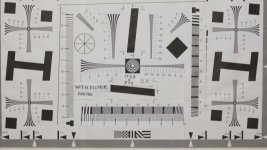
Moire and aliasing still bad even in Raw, the VAF is useful only in 1x normal mode.
In crop mode the VAF actually makes the image bad and softness comes in blotches especially with horizontal patterns. With no vaf,
the image is sharp and minimal moire and color aliasing is still there but only in the finest lines.
If you have a controlled shoot where you must use crop mode, it is advisable to remove VAF.
Chart at 3x (5x magnify) crop mode NO VAF.
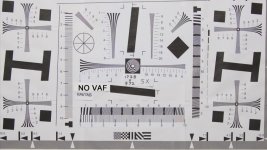
Chart at 3x (5x magnify) crop mode WITH VAF.
Last edited:
Ted Ramasola
Veteran
Is it possible to play back clips in the camera?
yes. But its in black and white.
I am having a hard time getting the raw2dmg to work with the latest build, get this message when I drop the files on -
raw2dng converter GUI for OsX
Beta ver.0.11
M13-1753 File Supported
/Applications/raw2dng.app/Contents/Resources/script: line 31: 7057 Segmentation fault: 11 "$RAW2DNG" "$FLDR$FILE_NAME".RAW >> "$LOG"
Generating jpg preview
dyld: Library not loaded: /usr/local/lib/libexiv2.10.dylib
Referenced from: /Applications/raw2dng.app/Contents/Resources/ufraw-batch
Reason: image not found
/Applications/raw2dng.app/Contents/Resources/script: line 31: 7062 Trace/BPT trap: 5 "$UFRAW" --out-type=jpg --out-path=../"$FILE_NAME"_jpg *.dng >> "$LOG"
Generating avi preview
dyld: Library not loaded: /usr/local/Cellar/ffmpeg/1.1.3/lib/libavdevice.54.dylib
Referenced from: /Applications/raw2dng.app/Contents/Resources/ffmpeg
Reason: image not found
/Applications/raw2dng.app/Contents/Resources/script: line 31: 7063 Trace/BPT trap: 5 "$FFMPEG" -i ../"$FILE_NAME"_jpg/%6d.jpg -vcodec mjpeg -qscale 1 ../"$FILE_NAME".avi >> "$LOG"
Anyone have any idea what is causing this?
Also is there a way to save the ML setup or do I have to dial in all the settings every time I turn off the camera?
It is giving me 24.01 frames in the settings is that supposed to be like that?
Thanks
raw2dng converter GUI for OsX
Beta ver.0.11
M13-1753 File Supported
/Applications/raw2dng.app/Contents/Resources/script: line 31: 7057 Segmentation fault: 11 "$RAW2DNG" "$FLDR$FILE_NAME".RAW >> "$LOG"
Generating jpg preview
dyld: Library not loaded: /usr/local/lib/libexiv2.10.dylib
Referenced from: /Applications/raw2dng.app/Contents/Resources/ufraw-batch
Reason: image not found
/Applications/raw2dng.app/Contents/Resources/script: line 31: 7062 Trace/BPT trap: 5 "$UFRAW" --out-type=jpg --out-path=../"$FILE_NAME"_jpg *.dng >> "$LOG"
Generating avi preview
dyld: Library not loaded: /usr/local/Cellar/ffmpeg/1.1.3/lib/libavdevice.54.dylib
Referenced from: /Applications/raw2dng.app/Contents/Resources/ffmpeg
Reason: image not found
/Applications/raw2dng.app/Contents/Resources/script: line 31: 7063 Trace/BPT trap: 5 "$FFMPEG" -i ../"$FILE_NAME"_jpg/%6d.jpg -vcodec mjpeg -qscale 1 ../"$FILE_NAME".avi >> "$LOG"
Anyone have any idea what is causing this?
Also is there a way to save the ML setup or do I have to dial in all the settings every time I turn off the camera?
It is giving me 24.01 frames in the settings is that supposed to be like that?
Thanks
Ted Ramasola
Veteran
Also is there a way to save the ML setup or do I have to dial in all the settings every time I turn off the camera?
Thanks
The ability to save settings is implemented for the jun 13 build. You can use that to update the alpha 1 or earlier versions.
Also the camera always default to SD card every time I restart it. Any way to change that?
What camera do you have? The mkIII? I have the mkII. Maybe a mkIII user can chime in.

Thanks... don't know what I am doing wrong, but just about to throw in the towel... usually pretty tec savy... but this thing is not working for me.
 Is anyone managing to have build 12 or 13 working on their mac?
Ted Ramasola
Veteran
Thanks... don't know what I am doing wrong, but just about to throw in the towel... usually pretty tec savy... but this thing is not working for me.
vpfilms,
here is the thread for raw postprocessing for the mac using raw2dng.
http://www.magiclantern.fm/forum/index.php?topic=5508.0
I read there at the end they also have problems with this to work with the jun 13 build.
The poster mentioned Rawmagic works for mac.
http://www.magiclantern.fm/forum/index.php?topic=6218.0
Try that, I suggest to stick with the newer builds for the camera and try to find the extractor that works.
The raw2dng and conversion developers usually are the ones to catch up with the camera ML development, not the other way around.
Also answered your post at ML forum.
Last edited:
Ted Ramasola
Veteran
Thank you Ted, Squig
Appreciate the help!!!
Let me give this a last shotrogar-KnockedOut(D
I suggest to stick with the newer builds for the camera and try to find the extractor that works.
The raw2dng and other conversion developers usually are the ones to catch up with the camera ML development, not the other way around.