F35: Magenta and Blue Artifacts in the Image

joeywu

New member
Hey everyone, I finally got myself a F35 and did some tests. I noticed that in some higher contrast areas there's flickering magenta and blue artifacts happening. I'm worried that the sensor may be bad, but at the same time, the blue reminds me of how the A7s responds to blue light, so it's possible that it's a lens issue like chromatic aberration causing the crazy magenta and blue effect.
The lens I'm using it with is the Tokina ATX 11-16mm
I'm using an AJA LUT-box and PIX-E5 to record 12 bit.

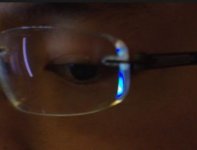
Here's a zoomed in view of what it looks like on my glasses:

I also have a Helios 44-2 in PL but it doesn't flicker. It does have the unnatural blue peaking going on though.
Helios.jpg

If anyone has encountered this issue, any help would be appreciated. Thanks!
 
This is something in the signal processing. Switch the camera to 422 and run single cable straight into recorder and go from there. Biggest thing you need to do with F35 is learn to trouble shoot. First don't jump to my sensor is damaged, usually inside the F35 is stable. Read back through the archives and you will find other with similar problems usually from wrong signal processing. I would go as far to say everyone's first problem or issue arose from external recorder. F35 is unique, how you have to record image is unique, you have to adapt yourself to it.

It's always the external recorder and mixed up settings that cause image artifacts, these almost never come from inside the camera.

I would suggest learning your setup on 422 10-bit via a single cable and learning everything you can about the F35 by testing a lot.

It could be a strange frame rate or shutter speed, learn all of those menu options.

I can tell you it's the LUT box without looking at your setup. Remove the LUT box and I bet your image is purdy.

I have no issue with the LUT box, it serves a clever purpose. But there is absolutely no reason you should be starting off thinking it's the camera head when you have 2 cables going into LUT Box and single cable then going into Sound Devices and a whole lot of signal processing going on there.

Start out as simple as possible. Read the entire F35 manual, it's fun, power up the camera and go through every single menu, just for kicks.

Does the issue exist over 422 10-bit? I bet it doesn't. If it does, try a monitor live, do you see the artifacts then?

If you still want help with issue post your sony F35 format select page in the menu, the current configuration of the LUT Box (I think you get this via usb to a computer), and the settings of the Sound Devices.

This is why the F35 costs 3.5k instead of 5k like the Alexa, it's a signal path system you have to design yourself.

The more you know the more advanced things you will be able to do with this camera. There is also a very small advantage of 12-bit vs 10-bit out of the F35. The LUT box is a novel idea but also complicated because it's another device to power. And did Sound Devices ever solve the highlight issue? That's what the LUT Box was for? I can't remember and there are so few using that setup if any. If 12-bit is must for you, get a used 7Q, they pop up well under $800 on eBay. At least there is a support group for the 7QF35.

I know your camera, I know the setup, I'm pretty sure I know the scientist who build it and he was trying to solve an issue before Convergent Design stepped into the game and did it via software. It was very clever but also not necessary and one of the more complicated routes to take for recording F35 signal.
 
Last edited:
I think Yachacha just gave you a good insight... I agree. Simplify and test. I understand concern about damaged sensor, but that doesn't look like that kind of issue.

I have used the Pix E5 with a Multiplexer (Like a LUT box, but simpler and lighter) succesfully for 444. No issues on my end.

BUT, I did start simple... 422HD 10 bit.

Enjoy! There is nothing like this camera out there. Nothing.
 
Thank you everyone for the responses! Good news! I recorded straight from the monitor out in 422 and the crazy jagged magenta and blue artifacts went away. There's still clipping with the blue in my glasses, but the edges of my glasses tends to do weird things to light because it's polished. The response to blue light seems to be similar on the Sony A7s. There's a lot of examples in Google images under "A7s blue clipping".

The Odyssey 7Q is definitely the way I want to go in the future so I'll keep my eyes open on ebay.
 
Also a new F35 owner here. @ rbirnbaum Which multiplexer are you using ? Picked up a PIX E5 on the cheap and I’ve got an Aja LUT box on the way. Wasn’t aware there where some issues with the LUT box. Probably end up going Odyssey in the future too. Seems the way to go.
 
There isn’t an issue per say, but it’s less plug and play than the 7Q.

Issue 1 with F35 12-bit is that it’s spread over 2 cables. The LUT box serves the purpose of combining into single 3g 12-bit that lots of recorders recognize.

Issue 2 with F35 12-bit is the highlights. 10-bit handles the 107% white just fine. early on 12-bit files were all showing clipping off at 100%. Convergent Design set it’s engineers to solve issue and this is why you need to make sure you have specific 7Q firmware. I don’t remember how Sound Devices users corrected this issue, I know someone had it working, I thought it had to do with 3g signal being read correctly. In any case, it’s easy to be clipping at 100 and not really notice. Even in the post path it is easy to accidentally clip the 12-bit footage.
 
The coatings on your glasses can affect this too. Also check the vectorscope in your NLE to see if there is chroma clipping. Your colors look very saturated.
 
Back
Top