"macroblocking" in display.....looks like crap....what's up?

In CS4, the card has nothing to do with rendering exports; is only used for display purposes ?

Right. But that's why I mentioned watching output files that don't exhibit the same problems. Like we're both saying at this point, it's just when going through premiere. Even huge output files at the native res are fine on playback......just as long as it's not premiere doing the playback. Am I incorrect in this thinking?

Card is definitely not overheating. I was checking it yesterday and it never got above 47deg.

When you check your footage on a friend or work PC, it looks normal, correct?

Let me get one on my network at home and I'll check. I suspect it will be fine but at least it's one more avenue to cross out.

I've been checking the adobe forums since I discovered this wonderful little quirk. Finding the nuggets there is a pain but I'm working on it.

Thanks again!
 
Right. But that's why I mentioned watching output files that don't exhibit the same problems. Like we're both saying at this point, it's just when going through premiere. Even huge output files at the native res are fine on playback......just as long as it's not premiere doing the playback. Am I incorrect in this thinking?


Yes we're on the same page. It's likely a display issue for Premiere, and my best guess is that it's tied to your graphics card / settings

But when you export output files, were they 1280x720 (ie. resized)? So there wouldn't be any farther scaling for playback like there would be if you were viewing an anmorphic file, or your native footage. Premiere isn't using the GPU scaler for encoding, that's only for display. So when it resizes for encoding/exporting, it shouldn't be affected and this is consistent with your observations.

Note with media playback software you can often select the scaling algorithm in the options (e.g. bilinear vs. bicubic etc...), so even if you were viewing the native footage, upon playback you could choose different scaling.
 
Yes we're on the same page. It's likely a display issue for Premiere, and my best guess is that it's tied to your graphics card / settings

But when you export output files, were they 1280x720 (ie. resized)? So there wouldn't be any farther scaling for playback like there would be if you were viewing an anmorphic file, or your native footage. Premiere isn't using the GPU scaler for encoding, that's only for display. So when it resizes for encoding/exporting, it shouldn't be affected and this is consistent with your observations.

Ah, I see what you're saying. Yes I output 1280x720 so you're right.

I'm still not sure how to address the GPU settings.....
 
Not sure, I would just fiddle with them.

eg. In your forceware settings , display tab, is the slider on "quality" or "performance"? Change it to "quality"

Also make sure you're using WHQL certified drivers, not some beta or test drivers
 
I've tried to figure out what you're referring to with forceware settings. There's no way to access that with the default card accessibility. Is this a third party app I have to get?

I'm about ready to just try a reinstall of premiere.
 
Last edited:
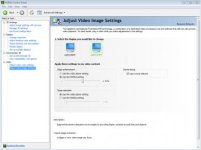
Heh. My 'version' of the nvidia control panel is missing a lot of the options noted in that article. Some good stuff to know in there though.

Check out the menu panel on the left of my version. Not much there.

I did watch a small clip on another computer. It looked fine (really good actually, as it did on mine), but I had to compress it to get windows media player or vlc to read it. Any ideas on how to get the closest to uncompressed/encoded file? Neither will read the native p2 files/format.

I've got a copy of after effects that should be here in a few days. If that does the same thing, I'm going to lose it.

I've still got my CS3 versions of both programs......I may install them and see if it's this system I just built (IE: the card). I know on my old 32 bit machine, the 720 footage definitely did not do this.

Thanks again for all the help. If you have any late night revelations, let me know. :D
 

Attachments

  • Nvidia CP.jpg
    Nvidia CP.jpg
    14.4 KB · Views: 0
I did watch a small clip on another computer. It looked fine (really good actually, as it did on mine), but I had to compress it to get windows media player or vlc to read it. Any ideas on how to get the closest to uncompressed/encoded file? Neither will read the native p2 files/format.

You could use a lossless encode eg. lagarith, huffyuv, UT etc.. or even uncompressed. However this is problematic - the DAR signalling flag for the AR won't be present (i.e. there is nothing that tells the media player to stretch the image). Also the media player often uses it's own scaling. e.g. you can specify in many media players to use different algorithms, so this complicates things.

So really testing on another computer with PP CS4 will reveal the most info. Maybe check with some friends / coworkers, just to see quickly how PP CS4 handles it (and note their graphics card configuration). Even if you upload a small test clip that is large enough to demonstrate your issues at a free hosting site (e.g. mediafire.com), I could test it out for you

I've still got my CS3 versions of both programs......I may install them and see if it's this system I just built (IE: the card). I know on my old 32 bit machine, the 720 footage definitely did not do this.

Yes it's weird, but tough to narrow down this issue because it still could be a CS4 update that screwed things up, for example.
 
The other computers in the house belong to my graphic designing girlfriend. She said she's not rising putting another adobe program on her machines because of PS conflicts in the past........ I can fire up my old machine and try it there.

I can easily host a file for you on my server. I'll do that later today. I think it's just going to show us what we already suspect though. Just to be clear, what are you looking for? Something compressed or a raw P2 file?

I think I'm going to reinstall the program tonight, not run any updates and see how that looks. If it's okay, then I'll just go update by update and see where the issue comes in. I do kind of need the avchd update they did though.
 
The smallest native sample that replicates your issue. A raw p2 file

So when somebody opens it up in PP CS4 with the same updates, using the same sequence settings, do they see the same thing as your very 1st screenshot in the program monitor at full quality/full screen?
 
This is nuts.

I looked at some old dvx footage and it does the same thing.

I just deactivated and reinstalled PP and no change. I also can't find anything on the adobe forums or anywhere else.
 
I'm going to bump this again because I want it both resolved and to serve as a tip in the future for anyone else searching on the topic if they experience the same thing. I just installed AE CS4, and the same clips look gorgeous. Zero of that blocky crap.

So at this point, I know it's not something inherent in my computer that's screwing with clips.

It's definitely unique to Premiere.


So how's this for an avenue: AE is displaying the true 960x720 whereas premiere displays the interpreted full 16:9 ratio. As PDR kept hinting........maybe that's the problem. How would one find settings in PP for this?

edit: HA! When using the "toggle pixel aspect ratio correction" feature in AE, the 16:9 gets all blocky again. So at the true 960 x 720 frame, everything's peachy. Now in BOTH programs, things get weird when it comes time to interpolate. Now what.........
 
Last edited:
This doesn't change anything;

Your observations are still consistent with a low quality resize algorithm (i.e. point resize). When you exported the 1:1 .bmp image from PP it looked fine, it's only when you resize or do the PAR correction with the point resize algorithm that it becomes blocky - I replicated this in the mediafire link a few posts back.

The native sample you uploaded looked fine to me in both AE / PP when viewed at 100% with or without PAR correction, and at full screen

So I still suspect some issues with graphics card /driver /settings
 
It's a little frustrating having just spent money on a new camera, a new computer, and new software.........and then having problems that none of the old trio had.

Know what I mean?
 
Hmm, i see what you mean.

What display driver version are you using? The latest? Have you tried an older driver?
 
I haven't tried an older driver other than what was on the card when I got it. Neither that nor the newest gave a proper display.
 
Back
Top