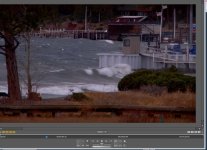
"macroblocking" in display.....looks like crap....what's up?

kidwoo

Well-known member
I just got PPCS4, did all the updates, AND just built a new computer. When looking at P2 720 footage, I'm getting some horrible pixelation/blocking in the display. It's horrendous when viewing at 100%. All footage looks like this shot in all light conditions. My display setting is at 'highest quality'.

What's going on?
 
Look at this at full size. Check out the white water, the trees on the left...... It's fairly bad in a still, but it's ridiculous when playing.


EDIT: Attaching this shrank it a bit but you can still kind of see it.


Here's the full size

http://kidwoo.com/images/Capture.PNG
 

Attachments

  • Capture.jpg
    Capture.jpg
    118.9 KB · Views: 0
Last edited:
It doesn't look like this when you render out?


Nope. Actually looks better in a compressed output file.


Timeline rendering doesn't do anything, and like I said, I've got the display setting at 'highest quality'. This is weird. At first I thought there might be a 'draft quality' setting I was on by default as in AE..........
 
What kind of P2 footage?

This looks like a low quality resize; maybe you mixed up your proxy footage or your graphics card drivers/settings need updating

Export a single frame .png from the sequence to narrow down the problem ie. if it's a display issue (either graphics card or premiere) vs. an issue with the actual footage

EDIT: I didn't see your last post. If exported a compressed output looks better, then it's more likely a display issue. Try updating your graphics card drivers , and play with the settings
 
Last edited:
What kind of P2 footage?

This looks like a low quality resize; maybe you mixed up your proxy footage or your graphics card drivers/settings need updating

Export a single frame .png from the sequence to narrow down the problem ie. if it's a display issue (either graphics card or premiere) vs. an issue with the actual footage

Yeah it definitely looks like a resize. I'm in a P2, 720/24p preset so it shouldn't be a resolution mismatch right? And yes, it's 720/24p footage.

I just tried to do a single frame export. The frame export option isn't there as it was in CS3......need to figure that out.

EDIT: yeah I'm convinced it's a display problem. Let me do a driver update. Everything in my system is about 5 days old. A GTX 260 shouldn't be having problems with this should it?
 
So if its jsut in the Monitor that you see it, look right below the monitor to all the controls/playback/safe zone on/off buttons, and you'll see a RGB circles button, click that and it will open up a file, and you can see Draft Quality, Automatic Quality, and i think Full Quality... just click on what ever it's not, and that should clear up any microblocking
 
A GTX 260 shouldn't be having problems with this should it?

No it should not.

So if its jsut in the Monitor that you see it, look right below the monitor to all the controls/playback/safe zone on/off buttons, and you'll see a RGB circles button, click that and it will open up a file, and you can see Draft Quality, Automatic Quality, and i think Full Quality... just click on what
ever it's not, and that should clear up any microblocking

He said he was using highest quality in the 1st post
 
Yup. Display already set to highest quality.

I suck at exporting one frame in CS4. I just created about 1,000 bmp files. :D

The good thing is that I can page through them. Zero artifacting. The stills are fine. I really don't think it's anything weird with the footage. I was just looking at some of these exact same clips in CS3 on a different machine last week. It's definitely something in the display.

Thanks for the input guys. This is frustrating though. Still fishing for ideas...........

EDIT: I just pulled in some avchd footage from another camera and it's doing the same thing. I HIGHLY doubt it's the footage. WTF is up with premiere?
 
Last edited:
Okay, seriously........

None of you guys using PPCS4 have this problem when viewing clips at 100% in your editing windows?
 
Nope, have only seen this when the window wasn't set to Highest Quality. And you say yours is so don't know what's going on there.

As far as exporting a still - use File > Export > Media and then choose TIFF for best results. The preset should be "Full HD 720p".
 
Seriously, are those picts from the same timeline? I've never had a TIFF that was exported as a still that didn't look exactly like the images in the timeline.
 
Your source footage is P2 960x720, and uses an anamorphic resize. Earlier, I said it looked like a low quality resize, I'm almost certain that is the case, at least for your display.

So I took your native , non PAR corrected 960x720 .bmp and resized using 2 different algorithms to 1280x720:

a) lanczos resize, b) point resize (nearest neighbor) and they can be downloaded in this zip file:

http://www.mediafire.com/?zj2eqhyitem

It certainly looks to me like your scaler in PP is using the lower quality point resize algorithm for some reason.

I still think this is an issue with your graphics card settings. I would play with the forceware driver settings.
 
It certainly looks to me like your scaler in PP is using the lower quality point resize algorithm for some reason.

I agree. I've pretty much exhausted any sort of setting in PP as being the culprit. Even resizing the display to 75% and %50 still shows the artifacts though. Less obvious, but still there.

I updated the drivers on my GPU yesterday with no change. And exporting small clips at native resolution doesn't carryover the problem so it shouldn't be the universal settings on the card right? If so, I'd think the 720 output files would have the same problem. I can't even really think of what to change.....

There seems to be something wrong with the way in which the GPU is playing with Premiere specifically.

Quick question: I built my system based largely on the recommendations of a friend. Looking back, I think he might have under specced the power supply. It's only a 500w. Now.....he does build systems quite regularly with his job so he's got some experience and he specifically told me that this would be fine. Is there anyway an underpowered card would manifest itself in this way, playing with the orginal P2 files? I've seen overworked cards do strange things, but it's usually in the playback speed or playback smoothness. Playback is fine, and the pixelation shows up even when paused and looking at a single frame. That's the weirdest part.

Thanks for looking into this. I really do appreciate it.
 
500w should be okay....

In my last post, i forgot to mention to set in in/out points otherwise you will get each frame, my bad :)

now there is visibly less pixelation on the exported still then the screenshot, so here comes the question, when you export the movie in a distributable format, such as MPEG2, is the pixelation still visible
 
I agree. I've pretty much exhausted any sort of setting in PP as being the culprit.

I had a quick look and couldn't find any hidden display settings either. Maybe contact Adobe or look at their support forums?

I updated the drivers on my GPU yesterday with no change. And exporting small clips at native resolution doesn't carryover the problem so it shouldn't be the universal settings on the card right? If so, I'd think the 720 output files would have the same problem. I can't even really think of what to change.....

In CS4, the card has nothing to do with rendering exports; is only used for display purposes (unless you are using a quadro with the special plugin, then it functions to encode as well). The fact that you can render out stuff and it looks fine strongly suggests it's a display issue. Of course this will change in CS5, as GPU accerleration for decoding is supposed to be added.

Quick question: I built my system based largely on the recommendations of a friend. Looking back, I think he might have under specced the power supply. It's only a 500w. Now.....he does build systems quite regularly with his job so he's got some experience and he specifically told me that this would be fine. Is there anyway an underpowered card would manifest itself in this way, playing with the orginal P2 files? I've seen overworked cards do strange things, but it's usually in the playback speed or playback smoothness. Playback is fine, and the pixelation shows up even when paused and looking at a single frame. That's the weirdest part.

Unlikely. The usual symptoms for bad or underpowered PSU would be BSOD, crashes, or inability to power up. Overheating cards do produce artifacts, but the artifacts wouldn't be consistently the same , they would be different types of artifacts and all over the place - I suspect this isn't the case here. To me, it seems you have consistent issue with point resizing (nearest neighbor)

When you check your footage on a friend or work PC, it looks normal, correct?
 
Back
Top