
Navigation
Install the app
How to install the app on iOS
Follow along with the video below to see how to install our site as a web app on your home screen.
Note: This feature may not be available in some browsers.
More options
You are using an out of date browser. It may not display this or other websites correctly.
You should upgrade or use an alternative browser.
You should upgrade or use an alternative browser.
mac for rendering prores in davinci
- Thread starter Publimix
- Start date
Imamacuser
Veteran
Maybe a Mac Mini, but it would probably need to be souped-up, and wouldn't run the latest version of Resolve.
Hackintosh can do it on your current computer.
Buy a small/cheap second SSD along with a shuttle bay to easily swap it with your current boot drive, and it's easy to set up, too - the hardest part of setting up a Hackintosh is dealing with/saving an existing Windows installation, and if you take such out of the computer altogether temporarily when you run macOS then the whole thing becomes easy.
FFmpeg might be even easier, however.
Buy a small/cheap second SSD along with a shuttle bay to easily swap it with your current boot drive, and it's easy to set up, too - the hardest part of setting up a Hackintosh is dealing with/saving an existing Windows installation, and if you take such out of the computer altogether temporarily when you run macOS then the whole thing becomes easy.
FFmpeg might be even easier, however.

cyvideo
Veteran
My workflow is mainly in Windows, I want to render 4K files to prores, which (older or cheap) mac can do the job?
thanks.
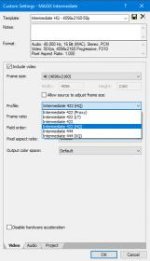
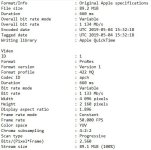
On Windoz if I have a request for ProRes files I just use Magix Vegas Pro. Worth buying if you have a reasonable amount of requests for good old ProRes. You will hear howls of indignation from Mac users who say it is not 'real' ProRes. I ignore those howls because any post outfit or network I have supplied Magix ProRes files to encoded on the Windows platform has never been knocked back. Two images below. The first shows you the ProRes 'Intermediate' render options and the second image shows you the typical analysis of the files produced using Magix Vegas Pro. On a fast PC the Magix Vegas render engine will also use hardware acceleration and push out the files pretty quickly. If required you can also do batch renders if you have a number of files to deliver.
Chris Young
Try the free Shutter Encoder. I think it uses ffmpg, but in a nice user friendly GUI
http://www.shutterencoder.com/en/
http://www.shutterencoder.com/en/