F5: LUT's in POST?

Lenilenapi

Carbonite Member
This is an issue that I am ignorant about, but in the age of Log and RAW is becoming very important , so I'm hoping maybe one of you kind people can just provide a brief little primer on the subject of how and if LUT's and Metadata are used in post, both for this camera and others.

Actually its maybe more relevant for RED and Alexa since those cameras do provide LUT's that have more detailed color info than the F5/55/FS7. But of course with Sony's on a sophisticated set a colorist might be creating 3rd party LUT's to go with every scene or shot.

How does this metadata (original camera and/or 3rd party) travel along with the camera files and at what stage is it used by a colorist?

How often is it ignored because its a pain in the butt? I can certainly imagine it being used if the original footage is colored before being edited, but then what happens to it when the footage is cut up and edited? Also what happens to that initial colorist metadata when the footage is edited ?

How does it differ on quick and dirty shoots (my specialty sadly) vs full bore commercials and features ?

Is the footage being edited have color already burned in or is it still Log for Raw just with metadata? Do you cut with Proxies and if so how are they linked back up?

I can imagine once the footage is being cut that the the editor or colorist won't want to go back and access metadata for each shot.

I realize this is probably POST 101, and there must be lots of workflows out there for different kinds of jobs , but if anyone has the energy to tackle these questions I'll buy you a drink at NAB!

I'd be thrilled if someone would just point me to a good explanation somewhere else on the web.

Lenny Levy
 
I am a colourist who mainly works on Indie features, MoW's and national TVC's… most of the shows i work on are shot on Red, Alexa, F5, or film no matter what i ask for camera original files ( aside from film, there i get 2K log film scans normally)

In all cases I use RAW settings for my first pass, no matter what the software is that i am using to grade and finish

i use Nucoda FilmMaster in ACES as my go-to choice, so i have no need for LUTs there if the camera has a input transform ( and most do)

If i am working in Nucoda and RGB then i use base layer with input adjustments, layers as needed for grading, and then a Log-Lin LUT on my master layer, Nucoda's tools work well in with LOG footage

If i am working in Resolve then i use a node to adjust input values, a node for a Log-Lin LUT of my choice, and then nodes beyond that to work in gamma corrected LIN as Resolve's LOG grading tools are a bit limited, and it's implementation of ACES seems unworkable at this point.

I usualy de-bayer with on set metadata entirely bypassed other than colour temp and ISO if they are options, and then go through the show and see what i can adjust in the RAW to make a scene work better

Hope this helps, on-set metadata is more useful for dailies and editorial than it is for grading - When finishing/ grading the shots in the timeline are now seen in context, and in a very controlled environment and monitoring. When the on-set metadata was generated it was in an uncontrolled environment, and with no solid way of knowing how the shots string together in context, even if the monitor was calibrated accurately, that's only a part of the puzzle
 
Last edited:
Ok you are on set and your director is viewing a monitor with a lut. You are getting close to
the look he wants.

Now the footy goes of to post and that look is basically lost.

That is a problem in this 'new' workflow.

how to communicate with post?

well you could write it on the clap board - you could provide notes via e-mail or rtf in the folder with the card.

Does that all feel a bit 1930? Yes because it is.

Simply this meta data pass is lacking.

If you expose using lut and EI - then there is more confusion steps!

Resolve basically takes no data from Sony cameras - Cat browse takes EI and can tell when you shot EI mode and your EI selection but not the lut you used.

So it's the Wild West - develop your own communicatin standards with your clients and also join people like me in communicating with software developers to bring this process into the 21st century!
 
From where i sit, the looks developed earlier in the post chain, and shown on the off0line chase Qt provided are too rough to be used for real… smashing a tiny finishing nail with a sledgehammer.

really the rubber hits the road when i sit down with the director and DoP and screen the show top to tail.. the DiT and editors attempts at art are interesting and sometimes of value, but usually when you can screen the show cleanly and without excess baggage attached the final look starts to emerge from the footage, and at times it is close to what the on-set data was, at times it's quite the opposite, you really need to open the doors to the opportunities, and that can only happen with a clean slate, and work with the Director and DoP to make their vision reality

And almost always there's a cleaner and more flexible way to get to a "look" than the one provided from on-set.
 
Ok you are on set and your director is viewing a monitor with a lut. You are getting close to
the look he wants.

Now the footy goes of to post and that look is basically lost.

That is a problem in this 'new' workflow.

how to communicate with post?

well you could write it on the clap board - you could provide notes via e-mail or rtf in the folder with the card.

Does that all feel a bit 1930? Yes because it is.

Simply this meta data pass is lacking.

If you expose using lut and EI - then there is more confusion steps!

Resolve basically takes no data from Sony cameras - Cat browse takes EI and can tell when you shot EI mode and your EI selection but not the lut you used.

So it's the Wild West - develop your own communicatin standards with your clients and also join people like me in communicating with software developers to bring this process into the 21st century!

I find it humorous that you entertain the option of including an RTF with notes/instructions but not the option of just including a LUT file along with the footage. That's my plan. Have my LUTs accessible from Dropbox or something. When you prep a drive for the editor, throw the LUT alongside the footage folder.
 
I WAS wondering why if you went to the trouble of preparing a LUT why nobody would save it/them and stick /it/them on a drive in the same folder as the relevant clips.

On a busy low to mid-low budget shoot I've no idea who would have the time or capability to fill out clip-based metadata logs on set.
 
I find it humorous that you entertain the option of including an RTF with notes/instructions but not the option of just including a LUT file along with the footage. That's my plan. Have my LUTs accessible from Dropbox or something. When you prep a drive for the editor, throw the LUT alongside the footage folder.

I was not advocating that - just pointing out how the whole situation is currently farcical - clearly the meta should stay intact with no workarounds
 
I would prefer CDL to a LUT, and that does travel through the system already...

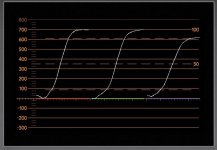
LUTs can be quite destructive.. see this one that a client supplied me, they loved it in their off-line process, they actually paid for this "film emulation" LUT… i always drop any LUT onto a linear gradient to see what the LUT is doing on my scopes… this is a screen grab;
3510%u00252Bclient%2Bsupplied%2Balone.jpg

As you can see it's a pile of problems. but they loved it when screening on their iMac.. sigh...
 
LUTs are being completely misused from their original intent. When say misused, I mean that actual application is not working the way it was envisioned. Originally, LUTS were meant ONLY for viewing an Slog image in cam during capture, so the director could get some sense of how the footage would look. Well, that's not the way it's working out. Directors are now trying to get the final look in-cam. No! With Sony, at least, I can shoot with a number of predefined LUTs, then get almost precisely the same look in post with Resolve or Media Composer. This first node grade was/is never intended to be the final grade. It's only a starting point. The fallacy is in trying to make the acquired footage match the pre-production grade. LUTs were never intended to be finishing grades, only a preliminary "look".

Having said this, I think the way things are actually working out, and it's a development process, recording the LUT in metadata is coming. Things are too crazy right now. And it's incumbent on the DOP to make a note of EVERY clip and how it was configured during the shoot, to be able to get back to a similar look in post. But, even if it's not, it's still up to the colorist to get the look the director / producer want. And with 10/12 bit Slog, its' infinitely easier.
 
Dermot - i think that looks quite a cool end lut?

Cuevo
You are right - kind of - a lut should just give a 'hint' of where the final colour will go. But it would be great to simply get Back to the vision seen on set.. One can then take the colour forward from there. That is particularly relevant to EI shooting which can simply look "over" when coming in to a suite even with a lut applied.
 
Interesting conversation but i was hoping that rather than talk about the pros and cons of using LUT's someone could just help understand the basic principles of how these files are used in the workflows of the 3 main cameras RED , Alex, Sony F5/F55/FS7 and with on set DIT created user LUT's.
Maybe I'm asking for too much of a basic primer here so alternatively perhaps a list of Web resources could be attached.

The main questions at first relate to how LUT's are used prior to final grading before and during the initial assemblies and editing. I'm wondering how tight the link is between a camera LUT and Post or is it usually ignored right away.

Questions:

1- How does a LUT travel along with the shot it was used with? Is it part of the metadata? Is there a second file alongside the actual shot that is somehow linked? Does this differ with different camera systems and with ON set DIT created LIUT's?

2. How is the linkage between LUT and the shot file accomplished ? Is there something like an EDL?

3. At what point in the process is an initial LUT applied? ( This must be different on varying projects)
- Does someone typically go through all the camera original files and add LUT's to them making quick grades even before editing?
- Or might they typically be pulled apart into first assemblies and the LUT's only added at that point?

4. Once the footage has been broken up , do the original LUT's still attach to the shots ?
- If not is it possible for the editor/colorist to go back to them later in the process.

5, Once a LUT has been applied and the footage is being edited - is that LUT still metadata or has it typically been turned into a baked in 709 file until final grading?

6. I've wondered, in CINE EI , if you could at the head of each scene show a correctly white balanced and exposed version in hypergamma as a general reference , then switch to SLOG3 for the actual shot. -Would anyone look at this or would it immediately get separated from the shot anyway.


I've got some more but its tool late to think straight now. Sorry if this is pedantic, but I don't get it yet.
 
1 it doesn't. No.
2 it can't. No.
3 hopefully before anyone has to watch the rushes.
either the nle can apply a lut or proxies are made with a lut appied.
either action should be 'one click' the latter is one click plus transcode
4 no no - unless noted on clap board or some other archane method
5 it should be a non destructive transform In the nle - the transcode method would bake it into the proxies and require a round trip to the original material to re colour.
6 no idea
 
Last edited:
I think you don't "get it" because you assume the answer to 1 and 2 is not no ! It is entirely nuts - but it is no :)

btw my answers are for Sony cams - alexa red may differ
updates to cat browse may change those answers - cat browse seems to update weekly. Cat browse has the best idea on how the camera was set.
Few dits or editors use cat browse.

Now reread my first answer.
 
Last edited:
You guys are partially wrong regarding #1. If you have a LUT applied in the FS7 during your shoot, this information is stored in the metadata. If you open the shot in Catalyst Browse and you were using a Sony-provided Look or LUT, it will be applied to the preview in Catalyst Browse.

I don't think it's unreasonable or unrealistic to have the DIT install a free program like Catalyst Browse. Isn't this basically what everyone does with RED Cine X when they have a a RED shoot? 1. It's *free*. 2. It's the right tool for the DIT (or your) job. When a DP rents a certain camera, he's expected to have or rent the right gear to work with that camera system (cards, lenses, batteries, support, etc). Heaven forbid a DIT or editor has to install a free program.

Best scenario for gigs that are this big... FS7 + XDCA + 7Q. Camera in RAW + XAVC mode. Record RAW out w/ Slog3 to RAW or ProRes on the 7Q while simultaneously recording 1080p XAVC w/ burnt-in LUT to the XQD cards.

Then you'll have contrasty/saturated XQD files for rushes and for the editor. Reconnect to the RAW or ProRes from the 7Q for color and final.
 
BTW, I realize this is going to make for some eye-rolling, but Arri and the Amira almost have this scenario wrapped up. I only mention it because I assume it will be the next step for Sony.

On the Amira, a Look file is used as a LUT for live shooting. It can be a Rec709 + CDL, or a 3D LUT turned into an Amira Look File.

When recording, the Look File gets embedded in the metadata of every Quicktime.

Select post tools can read the meta and apply the embedded look file. I've tested this with FCPX, but apparently it works for Premiere CC and Avid MC8 too.

The upshot of all this is the files work a lot like Red, except without the raw debayering overhead.
 
It's a good point Nate.

I myself haven't looked at the sidecar files with Sony footage to see if the LUT I used for monitoring, or one I used to burn in is included anywhere in the metadata. This would be very nice, and bring it close to how RED currently works by allowing the person in post to select color science default, camera operator "looks" tweaked in-camera, or custom "look" used.

Sony will hopefully get there.
 
Josh you are not wrong.

cat browse is a big step not only applying the lut but also sustaining ones EI choice.

this opens various options for workflows mainly involving a transcode and or a round trip.

Liam made a point recently that he considered proxies having no place in a modern workflow. Certainly a multi hour transcode is not ideal.

Afaik only Cb sustains EI choice.

The situation is far from perfect but will improve quickly - I'm chatting offline to Mr Resolve to see where they can go.

im also pushing to keep CB fully specced and free as I see it critical that any client can use it on "their" footage.

with the right planning the situation is tenable but not ideal

if premier and resolve sustained EI choice I think we would step forward fast.
 
Once Red finally released the redcode sdk to Adobe it was relatively quick for them to start implementing a lot of Red metadata controls straight into the NLE. Hopefully that will be the same for Sony.
 
I'll confirm nate's observation that MC8 applies a default LUT when a file is opened in Media Composer. The LUT reads metadata because it always matches the format, Slog2 or 3. It's fairly simple to change the default value to any number of LUTS included with the installation or user defined.
 
Back
Top