Low Light Streaks - Is my camera faulty?

It has nothing to do with low light. It has to do with underexposure.

If the surface you're shooting is about 3 stops under proper exposure, regardless of the light level, you'll see banding. There is no magical way around it, there's nothing you can do, it just happens. It's going to happen, it'll always happen, it happens on many different brands of cameras (all with CMOS sensors) and it happens on the GH1 and that's the way it is.

It'll happen indoors, it'll happen outdoors, it'll happen in daylight or in shadow.

The only things you can do are to minimize the areas in the frame that are 3 stops underexposed. If you need exaggerated contrast, shoot it flatter and stretch it in post maybe. But if you shoot segments of your frame 3 stops underexposed, you'll see banding in those segments. Especially the flatter the area; if it's a highly detailed area you may not notice the banding, but if it's a flat wall or a sheet of paper or something like that, you'll see the banding.

It doesn't matter what ISO you're at.

It doesn't matter whether any other element in the frame is properly exposed, or overexposed.

All that matters is that if you have anything in your frame that is 3 stops under, it will have banding.
 
Maybe part of the reason I haven't really been having much of a problem with this is that I am shooting with contrast reduced by 2, etc, and am tweaking in post? Could that be part of why? Because it flattens everything out?

Also I just want to point out that 3 stops is A LOT.

Barry I don't seem to notice banding in areas that are near totally black...shooting at night where things are either exposed or they're not (as in, black or close to it), with less middle ground, I haven't seen banding.
 
Maybe part of the reason I haven't really been having much of a problem with this is that I am shooting with contrast reduced by 2, etc, and am tweaking in post? Could that be part of why? Because it flattens everything out?

Also I just want to point out that 3 stops is A LOT.

Barry I don't seem to notice banding in areas that are near totally black...shooting at night where things are either exposed or they're not (as in, black or close to it), with less middle ground, I haven't seen banding.

Exactly, I do not see any banding in the areas that are near totally black.

As I've said previously, shoot a subject in completely dark room with just a flashlight lighting the subjects face at ISO 100 and there will be no banding at all in the areas around the face which is totally black. Just as you will start to up the ISO, the banding will start to become visible...
 
In my experience adding dramatic contrast to a scene either means adding contrast that is less than 3 stops difference (3 stops is HUGE people. Seriously) or where you're dealing with positive and very dark negative space.

Getting banding in your contrasty moody shot? Put some more light on the subject and stop down. It will make things more moody and dark, sure, but will get rid of some banding. Or, alternatively, add light to the background and crunch on it a bit in post.

Again...3 stops is pretty darn huge.

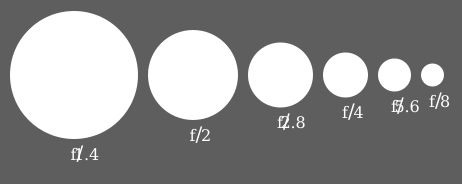
http://upload.wikimedia.org/wikipedia/commons/8/87/Aperture_diagram.svg
Aperture_diagram.svg
 
Small test, that everobody can make with your GH1 and slow 14-140mm kit lens in low light:

A
Set 720p, 14mm, f/4.0, ISO 800 or 1600, creative mode 'Aperture' and record short movie.

B
Set 720p, 14mm, f/4.0, ISO 800 or 1600, creative mode 'Manual' AND set SHUTTER - depending on your conditions (observe histogram) - eg. 1/2 sec or 1/6 sec. (remember to set manual focus first).


Ad. A - I can see banding
Ad. B - no banding, even on high ISOs

That would prove, that banding is related to underexposing. But for me - it is still open topic - why it occurs, if it doesn't on other hardware (in such conditions) or at least not so strongly...
It is probably related to quality of software, firmware I think.


PS: I assume you have firmware 1.1 of course (in order to be able to use slow shutter speeds).
 
Why would we set ISO to 800 or 1600 when there is no possible way that, at least me personally, would ever even consider shooting at such sensitivities? I get if you're trying to break it...but wtf? Same with slow shutters? Also same with a non-manual movie mode. Seriously.

I think what we're saying is that the banding happens when an element in the frame is 3 stops darker than the element that is properly exposed (which just means the element you're exposing for, regardless of how much light is on it.) So this test probably wouldn't show anything other than that shooting in a dark room at a high ISO and a faster shutter has banding because you're not actually exposing for anything.
 
Ben,
and this is exactly what I wanted to say. Some people do believe there are better and worse GH1 bodies.

I am saying - do this test on so called worse ones - and you will see that proper exposure (which I was able to get only with long shutter speed in my conditions using kit lens and existing light) doesn't show banding.
I described it for test only.

I really encourage to make such test people, who stilll believe they have worse bodies.
 
I hear ya. See if there actually are faulty sensors out there. Hmmmm. I don't know that any of them will get banding doing the second step though...more faulty or not.
 
I'll try the test when I get a chance. I think I may have one of the worse bodies. Yes 3 (2.75) stops is a lot, but I'm getting banding when underexposing by just 1 stop at 100 ISO... So, that limits a lot visually.
 
Last edited:
Just to confirm no banding on ultimate-contrast shots I took some photos of the moon with an old borrowed vivitar 300mm f/5.6 lens. Exposed for features on the moon, no banding in the sky. I'd post pics but I'm embarassed of how soft the photos are...will try again tonight with a shorter but better lens (borrowed Nikon 135mm f/2.8) see if I can get sharper, maybe not. In any case it shouldn't surprise anyone there's no banding here, just saying that it's nice to know that we at least don't get it in blacks in extremely high contrast situations :)
 
Hey Ben, still photos not video right? I don't get banding on my photos either. In still mode, I can see banding in the LCD/EVF but after the picture is taken and the preview shows up on screen, the banding is gone. They must be doing some DSP to correct certain levels of banding and noise in still mode that they don't have the power or speed to do with video.

Anyway, I'll shut up on this issue.
 
Video looked fine. I got get the thing properly exposed at a number of different aperture and shutter combinations...all at 100 ISO.

At 1/60 shutter and a more open aperture it looked the same on video, no banding.

Seems to confirm what we suspected: there is no banding in super high contrast footage where the under exposed stuff is near true black. It'd be nice to see where the cutoff is...like if banding happened between say, 3-(arbitrary number) 6 stops under exposed, but after 6 it was fine, etc.
 
Best GH1 setting for low light

Best GH1 setting for low light

Hi Ben,

What is your setting (contrast, NR, sharpness, etc..)?

I would like to know what is the best setting to use in low light situations and the best setting to use in normal light situations.

Thank you in advance.
 
I am using NR -2, Contrast -2, Sharpness +1, Saturation -1, all with the goal of getting a better image with more detail in highlights and shadows, so I can then do a bit more color work and increase saturation in post with more control and without breaking the codec.

I have these stored on My Film 1 using the Standard option.

I use these settings in just about all situations.

Keep in mind though that taking a picture of the moon is actually a high-light situation, you need to be doing fast exposures or stopping down. I actually kind of meant this example as a joke, given that we were all pretty sure that it wouldn't band on the night skiy...still...exposed for the brightest object in the night sky there was no banding on the darkest one...I guess that tells something...maybe.
 
Am trying to learn as much as I can about this camera. So I take a lot of notes while reading these forums. Here are some other views about settings. I apologize for not knowing where they came from.

"I think there is a very good argument for trying to achieve as much in camera as possible - using the camera settings and filters."

"I agree completely. Whenever I shoot with Sat and contrast down, I seem to want more color in post, and pushing it up just exacerbates the banding artifacts like crazy, so I've started shooting with sat +2 and contrast at 0- +2 depending on the scene. If you look at the footage on the rgb parade scope as you push up the mids and highs, you can see holes and banding develop quickly."

"When exposing, I try to stay on the high side, because having to push anything up in CC'ing is pretty disastrous, but pulling it down works great.

My plan is only to leave coloring for post, because that works fine. I try to get contrast and saturation as close to a 'final' image as I can in-camera, which has seemed to produce the best results."

Ben, maybe you would be kind enough to give us your thoughts on this with respect to how much you can really push things in post and what variables might be involved -- like kicking it up to 4:2:2, etc.

Thanks.
 
I convert it to ProRes which is 4:2:2 and 10-bit.

If you lower the contrast in camera you're getting a more even image, with more detail in highlights and shadows, basically a higher dynamic range. The difference between the image on the same image with the different settings is sometimes subtle and sometimes staggering.

This allows you to increase contrast in post to the point you want. Also in post you can be somewhat more selective with whether you're just generally increasing contrast, or clipping shadows while leaving highlights, etc, which the camera does not do.

I decided to shoot like this after getting really sick of watching lots of 5D Mk II videos that had really aggressive shadows that clipped lots of detail even at the very edge of the shadow. Sometimes this is an advantage. If I was shooting a film noir I probably wouldn't shoot with contrast -2, and there is something to be said for trying to get the right image in the camera, but my view on contrast is this: if you up contrast in camera you're clipping out details that you can never get back. In post you have a lot more flexibility and control, and can even, as I mentioned above, do tricks like increasing the contrast on the blacks relative to the mids, but leaving the highlights untouched, etc

...whereas if you shoot with higher contrast on the camera in say, a daylight wide shot with lots of shadows, your shadows will have no detail, and your sky will be white and blooming into other parts of the frame. Bring the contrast down, stop down slightly, get the sky looking nice, maybe not blue, but at least not crazy, don't lose more detail in the shadows despite stopping down. And then if you want things to look different in post you can increase the contrast on say, the ground, with out going nuts again and blowing out the sky.

As for Saturation, I shoot -1 because I find you can push them back up pretty easily if you need them, but again with more control. Now this is probably a weak argument for shooting on this setting, but I like it, and it works for me, so go figure. Here is the reason I figure I will sell some of you on it for certain things: any kind of framewide color shift with the GH1, like an ultra cool scene or a warm scene, etc (like Matrix style color shifts, blue and green for real and fake worlds in that film) it is easier to do if the . If the saturation is already slightly lowered on the footage. Have you ever tried slapping a blue color filter/shift on over-saturated footage in post? Does it look menacing and edgy like that cool look usually does? NO. It looks ridiculous and is hard on the codec!

Anyway, having saturation turned down slightly is good if you know you'll be doing a lot of color work in post that doesn't involve actually dealing with the colors that are on the scene in terms of saturation, but rather involves shifting the whole scene one way or another.

Noise reduction is turned to -2 because you can always do that in post, that to me screams "SOFTENING!" and a little bit of noise never hurt anyone...people have complained the GH1's footage is already too soft and too noise free in certain situations, and I've found that a little noise can help hide some of the weaknesses of the codec in out of focus areas. Also it may aggravate banding, that's just a guess...no proof <---

Sharpness +1 is from some recommendations I heard on the forum and I'm glad I went with it. The idea here is that the camera does these effects as the image is being recorded and before the codec gets it's hands on it. As the codec operates by sensing changes in a frame and only recording things that change (at a pretty fine level so yes a lot of it is changing per second) there is a problem with, as you all know, mud, wherein a rapid change to many areas of the frame results in what is known as macro-blocking, as the areas of the frame, called macroblocks (subdivided areas in which the camera scans for changes and then records them) are seen as it cannot keep up with all the rapid changes being made.

Similar to mud is the fact that the camera doesn't seem to detect changes in area of fine detail. For example, a sea-gull cleaning it's wing, or a white dry-wall wall that you're panning past. In these situations these areas of high detail appear to be come muddled, because the codec does not see substantial change, or the change is perceivable by us on the macoscopic level, but not at the level the camera is scanning for change, and therefore doesn't really make any. (some of the technical details here might be incorrect but I was trying to explain it in terms people would understand, in the terms I understood it.)

We can combat this by increasing sharpness by 1 or by 2, or even leaving it at 0, but never turning it down. This is because it increases the sharpness of these little detailed areas, and allows the camera to register all the little changes being made, and record it, so it doesn't be come overly muddied. I prefer +1 because I want it to work, but I don't want everything over-sharpened.

So, do I believe we should do as much in-camera as possible before going to post? Yes. Do I believe that means getting as close to the final image as possible as many people (very justifiably do, as it is very comforting to know what you've got is what you've got) at least on this camera? No not really.

I believe that we should strive to get as much detail as possible in our footage. In shadows, in highlights, and in high detail areas, because otherwise what is the point of shooting on a camera with a 4k sensor if you're just going to let the codec, or increased contrast in-camera, take it all a way. You don't have to do it! You can have it all!
 
Nice post, Ben, if I might say so. Lots to consider here, whether people in the end go with your suggestions or not.
 
That clarifies a lot! Thanks for taking the time to detail everything.

Do you think you would be comfortable doing all of this without first converting to 4:2:2 10 bit?

I'm working in Premiere (and sometimes After Effects) and find I sometimes don't have a lot of leeway in terms of color correction when just dropping AVCHD into a 24p timeline. For example, I had an available light clip that I had to shoot at 1600 while trying to keep 1/60 with the kit lens. The resulting saturation was very low and the 3 point corrector in Premiere barely boosted it enough to look decent. Would this be a situation where 4:2:2 10 bit might help?

Do you use any of the Red Giant plug-ins?
 
I use Magic Bullet Looks.

I wouldn't know as I don't use Premiere or ever shoot @ ISO 1600 as I have access to some fast glass.
 
Back
Top