Hawk Teflon
Veteran
I have a pretty basic timeline in premiere of videos I've built in AE. However, once I add a simple cross fade transition and render it, it starts getting glitchy and pulling frames from all over the timeline during the transition. It even adds nice useful frames like this:
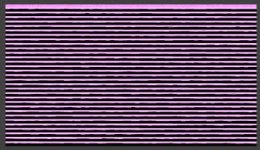
Believe it or not, I don't want that in there. It doesn't matter what transition I use, either. Cross fade, fade to black, whatever. So I thought, "I'll just keyframe opacity. A pain in the butt, but whatever." Same outcome. "Maybe it's because there's no file underneath and it's having trouble fading to anything, so I exported a 1080p solid black video.
Same. Results.
WHY IS THIS HAPPENING?! I just want to add a simple fade and render it.
I'm going insane.
For the record, I have tried multiple codecs from AE (Animation, ProRes, HQ, h.264) and it's all the same outcome. The issue arises only when I click 'render.'
And yes, it does export this way.
Believe it or not, I don't want that in there. It doesn't matter what transition I use, either. Cross fade, fade to black, whatever. So I thought, "I'll just keyframe opacity. A pain in the butt, but whatever." Same outcome. "Maybe it's because there's no file underneath and it's having trouble fading to anything, so I exported a 1080p solid black video.
Same. Results.
WHY IS THIS HAPPENING?! I just want to add a simple fade and render it.
I'm going insane.
For the record, I have tried multiple codecs from AE (Animation, ProRes, HQ, h.264) and it's all the same outcome. The issue arises only when I click 'render.'
And yes, it does export this way.