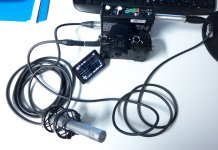
looking for high quality but small audio recorder

Hi and thanks again for all the invaluable info I have learnt from this and many other audio threads

regarding the Rode Lav mic, I have been doing my own little tests the last few days and I think I was probably being a little unfair on the lav. Bearing in mind I have no ther lavs to compare it with I think it is just their nature as has been mentioned that they will have more self noise than my ntg3 for example
I had been using the lav - zoom h1 combo as back up whilst also using ntg3 - mix pre - panasonic gh3. It was when comparing that the lav sounded so much noisier with less clarity - yet I had been happy enough on other occasions using the lav directly into the gh3.
Having tested side by side the zoom was giving me a slightly better recording than the gh3 (that agc still kicks in even with gh3 set at level 1)
I think it was only because I had the ntg3 recording to compare that made me frustrated with the zoom - lav combo

Another reason for wanting to incorporate a better audio recorder into my set up has been the frustration of trying to record room tone with a mic going into the mix pre-d and then gh3. The agc on the gh3 kicks in and makes this a waste of time. I am wondering how The Dingo gets around this issue?

John thanks for the link to the Blue Cow fella - he has quoted me £56 to make up the lead to connect mix pre-d to the Tascam - does that sound about right? Has given me more food for thought......
 
Throwback - I am intrigued in hearing the Sony m10 - Rode lav combo just to see if it would improve on my zoom h1 - have not been able to find any examples anywhere. I realise its not a true comparison but if you have a little sample you could send my way I promise not to bug you with any more questions again - no worries if thats a lot of ball ache for yourself I realse I am being quite demanding now....

I presume I need to get an xlr - 3.5mm stereo cable?
 
Last edited:
the frustration of trying to record room tone with a mic going into the mix pre-d and then gh3. The agc on the gh3 kicks in and makes this a waste of time. I am wondering how The Dingo gets around this issue?

The audio control built into the the GH3 camera is really an AGC limiter. With the camera audio set to level 1 the AGC circuit can only add 3 dB of gain to the signal, which will raise the noise-floor from -66 dB RMS to -63 dB RMS when the AGC kicks in. ( as you raise the camera's audio level the amount of AGC gain rises until you get to level 19 where the AGC is adding more than 20+ dB of gain )

So by keeping the camera audio permanently set to level 1 you effectively remove the AGC problem, but this means you have to feed your camera a strong audio signal, ideally in the range of -20 to -10 dB, which means using an external mic pre-amp or a wireless system ( like the Sennheiser G3 UHF system ) that can output a strong signal. ( for quick'n'dirty audio the Rode Video Mic Pro has a +20 dB output setting that works very well with the GH3 camera audio level set to 1 )
 
Thanks for the response - I am keeping the gh3 at level 1 throughout but can hear the room tone increase as sooon as there is no talking - but it definitely feels like more than 3db. For the recordI am using SD supplied unbalanced mic out lead into the gh3 - I was told that gives a fairly strong signal but have no idea how strong - I realise it isnt as strong as the tape out which I use to connect the Zoom H1. Tape out to gh3 seems too strong unless the mix pre-d levels are almost at nothing
Am I doing something wrong, also is there an easy way I can upload some audio samples?
 
For the record I am using SD supplied unbalanced mic out lead into the GH3

The SD mic out is -50 dB which is way too low for the GH3. If you want to use a direct cable from your SD mixer to your GH3, you need to use LINE out from the SD mixer and add a 20 dB in-line XLR PAD like this one...

Pro Co Sound MAX20 In-Line 20 dB Pad : $25 at B&H Photo

I use an old BeachTek DXA-2S unit ( the DXA-2T has replaced it ) to connect XLR inputs to my DSLR cameras because they are passive ( no signal amplification, so the quality of the signal remains intact ) and have LINE/MIC switches as well as signal pots that allow me to tweak the input levels. They also remove the cable strain from the camera's fragile 3.5mm mic input. ( if somebody trips on a mic cable they will yank on the BeachTek and not the camera mic input )
 
ade4all, I've pmd you regarding M10 etc. samples with Rode lav: my problem is getting the audio file to you (I tried to attach it to a response in the forum, but couldn't - obviously I'm not with it!), Cheers, Roland
 
John thanks for the link to the Blue Cow fella - he has quoted me £56 to make up the lead to connect mix pre-d to the Tascam - does that sound about right? Has given me more food for thought......

i have had several cables made by Blue Cow - he is very good and I first went to him on recommendation from several top UK freelance sound recordists who use him.
 
sorry to re open this thread but having found a 20db attenuator lying around at work -it doesnt seem to reduce the level at all and I am still getting distortion using line out from mix pre-d to gh3 - wondering if its because it says 600 ohm rather than 150 ohm that The Dingo linked to? Sorry for my ignorance
 
sorry to re open this thread but having found a 20db attenuator lying around at work -it doesn't seem to reduce the level at all

Can you list your audio chain ( all the connections from A---> B---> C ) and how things are set.

To test your set-up, turn on the 1 kHz tone generator on the MixPre, and have your gear set-up something like this...

MixPre LINE OUT ---> 20 dB PAD ---> GH3 MIC IN

GH3 camera audio level should be set to 1

Set up like this your GH3 should not be distorting, provided you are actually using a 20 dB PAD and not some other type of inline XLR adapter.

I'm not in the office today, but tomorrow I can test this exact set-up and confirm my results. ( I have all of these components )
 
You really should not be going into the gh3 "stereo" because what you are actually doing is recording 1/2 of the balanced signal on each track.

What this means down the road is that instead of what you are recording sounding center it will have no center image, and if you ever pan the two tracks center your sound will cancel out and you will hear nothing, or close to nothing. It's kind of a disaster waiting to happen.

The MixPre-D has an output designed for connecting to DSLR's so I'm not sure why you are trying to adapt the XLR out?
 
hmm..... I was using the dslr output on the mix pre-d but The Dingo said it would be better to use the xlr line in on the gh3 (see posts 44 & 45).....am getting confused now...

regarding not going stereo into the gh3, are you saying I would be better off using a mono xlr to 3.5mm lead, obviously my rode ntg3 is mono anyway
 
I was using the dslr output on the mix pre-d but The Dingo said it would be better to use the xlr line in on the gh3

MIC OUT ( -50 dB ) on the MixPre-D is too low for the GH3, as the GH3 audio pre-amps are noisy and have a horrible AGC problem that effectively kills the camera's low noise-floor, so you want to feed the GH3 a strong -20 dB signal and set the camera audio level as low as possible, which is level 1.

TAPE OUT on the MixPre-D is too strong for the GH3, so you need to pad this by 10 dB to get it down to a level that the GH3 thrives on.

LINE OUT on the MixPre-D is also too strong for the GH3, so you need to pad this by 20 dB to get the signal down to an optimal range for the GH3.

I normally use a BeachTek DXA-2s set to MIC level ( so it doesn't pad the signal ) and then use the built-in POT to bring the signal down to the -20 dB range. ( the BeachTek only has a 50 dB MIC pad, so using the POT controls are the only way to get -20 dB out of it )

...I also own a direct XLR to 3.5mm cable ( that I rarely use ) that I will use tomorrow to test the same set-up that you are trying to use. ( MixPre-D ---> 20 dB pad ---> GH3 )
 
thanks again dingo for your patience - I do understand why the pad is needed to get the line level right for the gh3 to handle - am just not sure if the 600 ohm 20db pad I tried is the same as what you recommended....
 
"The MixPre-D has an output designed for connecting to DSLR's so I'm not sure why you are trying to adapt the XLR out?"
-- I concur with Scot.. if the GH3 has an unbalanced mic level input like most DSLRs, why go to all the trouble, additional cables, pads, risk, ect to get a line level signal back down to mic level the MixPre-D already outputs??
 
if the GH3 has an unbalanced mic level input like most DSLRs, why go to all the trouble, additional cables, pads, risk, ect to get a line level signal back down to mic level the MixPre-D already outputs?

Because you end up with 20+ dB of automatic gain that kicks in when ever things get quiet, which pushes your noise-floor from an acceptable -66 dB RMS to a very unacceptable -46 dB RMS or louder.

Even if you could disable the AGC ( currently you can't, but we can always hope ) I doubt that the camera pre-amps would sound very good at anything past the mid-level setting.

This camera can sound great, but only with a strong ( -20 dB ) signal, otherwise everything gets lost to the vile AGC circuitry. ( the GH2 has exactly the same problem, topped up by AC-3 compression )
 
I also own a direct XLR to 3.5mm cable ( that I rarely use ) that I will use tomorrow to test the same set-up that you are trying to use. ( MixPre-D ---> 20 dB pad ---> GH3 )

I couldn't find the XLR to 3.5mm cable ( I've used this thing maybe 2 times since I bought it 5 years ago ), but I rigged up a XLR to 1/4 inch cable with a 1/4 inch to 3.5mm mono adapter. ( see the picture below )

So here we have an Audio-Technica 3031 cardioid pencil mic going into my MixPre-D, with the LINE out from the MixPre-D being padded with a XLR inline 20 dB WhirlWind pad and then this goes directly into my GH3 with the audio recording level set to 1 on the camera. I would never shoot with this sort of setup as I don't like having audio connections sticking out like this. Somebody trips on a cable and your camera audio input is destroyed completely.

MixPreD_LINE_Test-1.jpg

...And here is the audio recording from my GH3 which was recorded a little hot ( the GH3 recorded the 1 kHz test-tone at -7 dB, but if I reduced the signal from the MixPre the automatic gain circuit in the GH3 would still try and boost it back to -7 dB, so you just have to live with a slightly hot recording ), so I brought everything down by 5 dB before I exported this MP3 file. As you can hear, there is no distortion from my voice or the 1 kHz test-tone being recorded. ( FYI, most of the room noise is from a vertical fan about 5 feet behind me along with about 5 PC towers humming away )
 
There's two channels there, 'out of polarity' so it sounds a little odd on PB. Summing them to mono cancels out. The signal was likely balanced, and inputting + and - to L-R does this.
Playing just one of the channels sounds pretty good.
 
There's two channels there, 'out of polarity' so it sounds a little odd on PB. Summing them to mono cancels out. The signal was likely balanced, and inputting + and - to L-R does this. Playing just one of the channels sounds pretty good.

Yes, I noticed this too, but figured I would leave it as the camera recorded it. Normally I wouldn't connect things up like this, but I couldn't find the proper XLR to 3.5mm cable, so I improvised with what I had.
 
Back
Top