Limiting bitrate adjustment

aidan_x

Member
I'm a newbie to the Ptool hack. I'm trying my best to get through this.

On the settings:
-Video bitrate adjustment - c)xxxxxxxx
-Overall bitrate adjustment - c)xxxxxxxx
-Limiting bitrate adjustment - c)xxxxxxxx

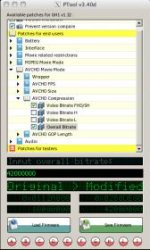
I can't find the "Limiting bitrate adjustment".
There are only four choices under "AVCHD Compression".

Once I get past this, I'm lost on the "A, B, C" settings. Where to set and where to find. I've assumed it's the multiple letters at the bottom, but not sure how to use. if there is a post on this, please direct me to it.

I'm on a Mac using "WineBottler".

Thanks
 

Attachments

  • ptool.jpg
    ptool.jpg
    12.8 KB · Views: 0
You don´t need to use "Limiting bit-rate adjustment" now .. ;-)

.. to use the memory function (or save settings) .. first you need to save some settings .. So select everything you need and then Shift+click on any letter (for example "A") to save your selection .. You can save settings from "A" to "J" and you can easily load all your saved multiple selections.. To load settings just click on the green letter (in this example "A") and its done ..
By alt+click you can load settings only for unchecked patches ..
 
Hi aidan_x

Long time lurker here...first post...Thanks Tester13 for your brilliant work ;-)

I finally decided to try the hack yesterday and was having the same issues with the settings buttons as it isnt really clear how to use the set*.ini files to load in presets from other users.

Basically you need to put these *.ini files into the same folder you are running PTool from and then the red buttons at the bottom of PTool associated with each .ini file then activate (turn green) so seta.ini activates the "A" button setb.ini activates the "B" button etc etc. Then just click on one of the activated green buttons to load the settings into PTool.

Tested out Rambooc1 settings (as he is a fellow Aussie/PAL user) yesterday and havent had any issues so far (Thanks Rambooc1) see here...

http://www.dvxuser.com/V6/showpost.php?p=2045075&postcount=24

One thing I did notice was that the "time remaining" indicator is now unreliable but the footage itself was stunning...I used the Nikkor 28mm f2.8 AIS MF lens and the pictures were very sharp with great detail.
 
Last edited:
Back
Top