Nice film.. Ive shot there in the winter.. snow over everything.. funny to see it in the summer.. that interview didn't bother me too much.. I think its fine to be slightly looking up in interviews ..(anyway alot better than looking down)..just would have helped if you could get the back ground more out of focus I think personally.. same with all the interviews .. I know its a very used look.. but it does usually look better I think.. unless a very stylized wide angle look .. maybe its a limitation of that lens.. stop wise ..?

Navigation
Install the app
How to install the app on iOS
Follow along with the video below to see how to install our site as a web app on your home screen.
Note: This feature may not be available in some browsers.
More options
You are using an out of date browser. It may not display this or other websites correctly.
You should upgrade or use an alternative browser.
You should upgrade or use an alternative browser.
FS7: Latest Arctic doc - shot on FS7 and 18-110
- Thread starter bengiles
- Start date
Nice film.. Ive shot there in the winter.. snow over everything.. funny to see it in the summer.. that interview didn't bother me too much.. I think its fine to be slightly looking up in interviews ..(anyway alot better than looking down)..just would have helped if you could get the back ground more out of focus I think personally.. same with all the interviews .. I know its a very used look.. but it does usually look better I think.. unless a very stylized wide angle look .. maybe its a limitation of that lens.. stop wise ..?
Thanks Donny. Yes, this was a follow up film to the one I shot a couple of years ago in the snow - and it's much more photogenic at this time of year: https://vimeo.com/169846070
I shot this master interview on a G Master 24-70/2.8, so it's limited more by my nervousness to shoot wider than f8, for fear of someone's nose falling off focus!
Maybe a return to the Victorian head clamps, when long exposures were the order?

Thanks Donny. Yes, this was a follow up film to the one I shot a couple of years ago in the snow - and it's much more photogenic at this time of year: https://vimeo.com/169846070
I shot this master interview on a G Master 24-70/2.8, so it's limited more by my nervousness to shoot wider than f8, for fear of someone's nose falling off focus!
Maybe a return to the Victorian head clamps, when long exposures were the order?
2.8 isn't that scary.. its 1.4 that the nose tip to eyes can go on a longish lens.. even T4 that back ground would have gone quite a bit.. 8 is a bit on the safe side
.. but its up to you of course.. but give 2.8 /3.5 a try .. unless they are really moving around back and forward and your on 150mm its pretty safe.. esp as wide as you are there.. it is the easy path I admit.. but when I have any background thats not great.. but at least I have depth.. I,ll just try my hardest to get it out of focus.. doesn't have to be a total mush.. can be equally off putting..but then the viewer is just drawn to the subject.. and even crappy backgrounds can sometimes look pretty good.. esp if there are some windows not too blown out.. just an idea..Im not saying it has to be like that for every interview.. but at least now with our S35mm sensors its alot easier to achieve.. when the background is just really not interesting at all.. you can really go wider than T8 and not have to worry about noses going out of focus .. I think there is a reason feature films usually go this road for close ups.. it just looks good.. and not like news ..
Liam Hall
Veteran
The newer Air will have a higher bit rate in 4K I believe .. on paper sound s a better deal that the pro really.. unless I have read it all wrong..
Forget the Air, if rumours are to be believed the Mavic Pro II will be released next month with a significantly better camera and enhanced sensors.
Forget the Air, if rumours are to be believed the Mavic Pro II will be released next month with a significantly better camera and enhanced sensors.
No your right.. I didn't even know there was a new mavic on the way.. I had only heard of the Air .. still haven't got one myself yet.. but looks like it will soon become something we are expected to have.. and I can see the advantages..

Clermond
Veteran
Forget the Air, if rumours are to be believed the Mavic Pro II will be released next month with a significantly better camera and enhanced sensors.
hopefully they will keep the 28mm lens. The Phantom 4 Pro with the 1" sensor is far superior image wise but the 24mm lens is too short if you have people or vehicles as a subject.
hopefully they will keep the 28mm lens. The Phantom 4 Pro with the 1" sensor is far superior image wise but the 24mm lens is too short if you have people or vehicles as a subject.
Agree. Its more of a landscape b-roll tool.
Clermond
Veteran
Agree. Its more of a landscape b-roll tool.
In fact I use it mostly for location scouting. Whats behind that trees, where is an access to the field. I am ready to fly in 5 minutes and the mavic starts and lands on a 40x60cm plastic box. It's great as it fits in every small baggage.
For commercial work I used it exactly three times: when I was in a not restricted area but so close to an airfield that I did not dare to fly my Inspire and literally preferred to stay under the radar.
Also for a shoot in Spain where limitations are strict and the fines are high . Third was a shoot in strong wind when I was scared for the Inspire. It's okay for YT and social media but not for Large Screen display. I hope for the 28mm 1" sensor Mavic II
Beautifully shot, Ben. Loved it. But...
Interesting. I felt the disconnect with the interview, too. My theory? The skin tones and color palette were all over the place. I think that's why Andy's interview felt so jarring from the field stuff. Outside, bright strong colors, skin looking pink/ruddy, but with a little magenta. Inside, a complete absence of red in his shot and the skin tones looked rather thin, maybe even a hint of yellow? What was your key light? Perhaps if you would have hung Andy's bright red field jacket on the wall behind him, it might have helped made the visual transition a little better. Easy to come up with after the fact.
I don't know. Not to sound too harsh. I'm not Roger Deakins. As a Sony F5 owner, I'm sadly used to seeing slightly off skin tones from time to time. In fact, I did one slog3 interview not long ago that completely defied all my (not a pro) grading efforts make the skin look right. On a good Sony day, I sometimes look at my stuff and say that looks almost Canon.
Interesting. I felt the disconnect with the interview, too. My theory? The skin tones and color palette were all over the place. I think that's why Andy's interview felt so jarring from the field stuff. Outside, bright strong colors, skin looking pink/ruddy, but with a little magenta. Inside, a complete absence of red in his shot and the skin tones looked rather thin, maybe even a hint of yellow? What was your key light? Perhaps if you would have hung Andy's bright red field jacket on the wall behind him, it might have helped made the visual transition a little better. Easy to come up with after the fact.
I don't know. Not to sound too harsh. I'm not Roger Deakins. As a Sony F5 owner, I'm sadly used to seeing slightly off skin tones from time to time. In fact, I did one slog3 interview not long ago that completely defied all my (not a pro) grading efforts make the skin look right. On a good Sony day, I sometimes look at my stuff and say that looks almost Canon.
Liam Hall
Veteran
I wasn't going to comment, but will just say Ben's done a great job with B roll, lots of well executed story elements, though like others, I don't feel the interviews are the strongest they could be. For me, the centred compositions feel unbalanced, and distant, but more importantly, there's no clear eye-line, one moment it's at camera the next it's off, and this adds to the disconnection that others have noted.

jasonbrooks
Well-known member
Actually, no I didn't use any sharpening this time - although I feel some of the landscape shots might have resolved slightly better if I had. At the end of the day, it's a small sensor, with a low bitrate codec, so results can be hit and miss. I avoid NR and use a set of Polar Pro ND filters to get the exposure in the ballpark, while keeping ISO down to 100 and a 180 degree shutter. Everything is standard, except for D-Log curve.
Ben.
Ah, righton. Just to be clear, I've been following the "MavicPilots" forum quite a while, and pretty much consensus over there also lines up with my own findings. DJI have made a stupid FW choice by AUTOMATICALLY implementing NR in-camera when the PP profile settings are left at default (i.e. "0" or neutral sharpness). This may work OK for shot without fine detail, but throw anything with grass or leaves visible in large portions of the frame, and it quite literally turns to mush. Of course it's a question of personal choice (or choose your own poison), but I find that for 99% of landscape shooting, the result look much nicer with PP sharpness set to +1. This does give a slightly 'over-sharpened' look to the footage, but I usually then decrease the sharpness slighting in post to give a nice balance. Shooting at ISO 100 is of course a good remedy for the internal-NR "watercolour effect", but I really recommend comparing the same shot with 0 vs. +1 sharpness just FYI.
Also, out of interest re: 4K DCI footage playing nice in PP. What's your edit machine, and most specifically, what GPU does it have, and does PP use OpenCL, CUDA, Metal, or software-only?
Cheers,
jason
Ah, righton. Just to be clear, I've been following the "MavicPilots" forum quite a while, and pretty much consensus over there also lines up with my own findings. DJI have made a stupid FW choice by AUTOMATICALLY implementing NR in-camera when the PP profile settings are left at default (i.e. "0" or neutral sharpness). This may work OK for shot without fine detail, but throw anything with grass or leaves visible in large portions of the frame, and it quite literally turns to mush. Of course it's a question of personal choice (or choose your own poison), but I find that for 99% of landscape shooting, the result look much nicer with PP sharpness set to +1. This does give a slightly 'over-sharpened' look to the footage, but I usually then decrease the sharpness slighting in post to give a nice balance. Shooting at ISO 100 is of course a good remedy for the internal-NR "watercolour effect", but I really recommend comparing the same shot with 0 vs. +1 sharpness just FYI.
Thanks - I wasn't aware of this. Perhaps it was auto NR that was giving me more mush than I cared for on certain shots.
Also, out of interest re: 4K DCI footage playing nice in PP. What's your edit machine, and most specifically, what GPU does it have, and does PP use OpenCL, CUDA, Metal, or software-only?
Screenshots of settings below:
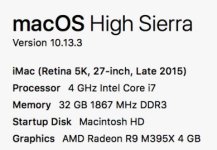
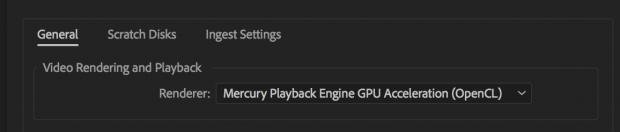
I have the option of accelerating with Metal - might give that try. By far, the biggest performance improvement I've experienced recently is the move to a 24TB Thunderbolt 2 G Speed Shuttle.
Ben.
Liam Hall
Veteran
It depends what FW you were shooting with and if you've been lucky or not! The codec was always poor with detail, but after a FW update last Autumn they introduced this ridiculous noise reduction. Footage is unusable on many peoples drones, mine included, unless you go +1 sharpness.Thanks - I wasn't aware of this. Perhaps it was auto NR that was giving me more mush than I cared for on certain shots.
jasonbrooks
Well-known member
Thanks for the details Ben - I reckon that's confirmed that my rMBP and/or it's GPU is the culprit - GODDAMMIT!!! I knew that I'd end up having to cave in a buy a shiny new iMac before too long..!
Cheers,
jason
Cheers,
jason

Joshua Milligan
Well-known member
Thanks - I wasn't aware of this. Perhaps it was auto NR that was giving me more mush than I cared for on certain shots.
Screenshots of settings below:
View attachment 129392
View attachment 129393
I have the option of accelerating with Metal - might give that try. By far, the biggest performance improvement I've experienced recently is the move to a 24TB Thunderbolt 2 G Speed Shuttle.
Ben.
I have this exact same computer to the specs and year. I absolutely love it. In the 2.5 years I've had it, I've never once encountered an edit in couldn't handle. I also work off of an 8TB RAID by Pegasus. I love it.
The only thing that's ever gave my computer any trouble is h.265 footage off of my Phantom 4 Pro+. To combat that, I covert those files to ProRes HQ. Other than that, this machine is phenomenal and plays very nicely with native 4K footage from my FS7 and my A7SII and A7RIII. Never have to render or anything.