Lacie Drive wont appear in events browser

crot0019

Well-known member
I am trying to do my first project in FCP X and I understand (i think) the process that for an event on an external device to show up in the events browser there has to be a folder called "Final Cut Events" on that drive and for it to be connected. But I haven't been able to manange to get my Lacie drive to show up as an option at all within FCP X. Is there a step I'm missing at all? I'm sure it's me missing something I just don't know what!

Any help would be appreciated :)

Cheers
 
Is the Lacie visible on the desktop?

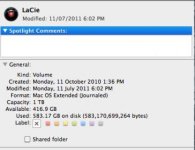
If it is do a get info on it and make sure it is a HFS+ volume.

Format.png

If it is not, erase/reformat it as HFS+ format. But only if you backed up everything on it first. Reformatting will erase everything on the drive.
 
Is it a USB drive? I may be wrong but I seem to remember that only FireWire was supported. And no, a special folder does not need to be on the drive before use.
 
The drive is firewire 800. I've used it for a bunch of things including my capture scratch for FCP 7 and has never been an issue.
 
Use a utility like DiscWarrior to make sure the drive is OK.

I have used about 10 different drives with FCPX internals RAIDS and FW, without any problems including LaCies.

How old is the drive. Make sure it is HFS+, not an older Mac format.
 
Okay guys it's definitely visible on the desktop and here's the get info screen I have attached. Let me know your thoughts!Screen shot 2011-07-14 at 6.36.39 PM.jpg
 
First try to fix it with disk utility.. if that doesnt work... Disk Warrior is your friend... Good Luck!

-G
 
would it have anything to do with the fact that i use time machine with the drive? The checks are fine in disk utility and disk warrior :(
 
would it have anything to do with the fact that i use time machine with the drive? The checks are fine in disk utility and disk warrior :(

Do you backup this drive with TimeMachine? Would be a nightmare. FCPX creates all the time temporary render files and many of these files would end up being versioned in TimeMachine (means backup explosion).
 
Yeah i back-up with Time Machine to this drive. So if I erased the drive then partitioned it would that work?
 
Back
Top