
Navigation
Install the app
How to install the app on iOS
Follow along with the video below to see how to install our site as a web app on your home screen.
Note: This feature may not be available in some browsers.
More options
You are using an out of date browser. It may not display this or other websites correctly.
You should upgrade or use an alternative browser.
You should upgrade or use an alternative browser.
GH4 L:ink to V-Log L 8bit footage?
- Thread starter swaneon
- Start date

swaneon
Well-known member
in an hour or so you will have 10,000 videos to choose from!
thank you guysI'll post some shaky cam of a sunset I took in about ten minutes, and I'll post a link here.
Shot internally :
https://vimeo.com/138207167
https://vimeo.com/138207167
Obviously edited, what's needed are links to downloadable original footage, straight from the SD card.Shot internally :
https://vimeo.com/138207167
RedChalice
Active member
Came across this:
https://vimeo.com/139454369
a lot of guys saying theyre underwhelmed by internal recording, but all I see are examples where I like what I see.
https://vimeo.com/139454369
a lot of guys saying theyre underwhelmed by internal recording, but all I see are examples where I like what I see.
Obviously edited, what's needed are links to downloadable original footage, straight from the SD card.
Here is something. I have no idea if this exposure was right or not. Please forgive the late reply, but it took forever to upload this to Google Drive!
https://drive.google.com/file/d/0BzXpNy2MdkE6N19Ld0h6c2Qyems/view?usp=sharing
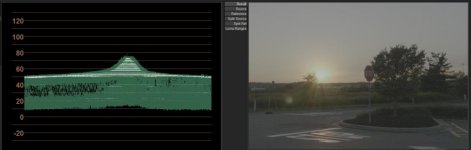
Thanks for the upload, the video file looks like original GH4 V-Log-L footage, shot in 4K at 24p. Here is a screenshot of a sample frame, along with its waveform. Notice the black pedestal at 10 IRE and the highlight peak at close to 79 IRE, both consistent with V-Log-L proper exposure guidelines:Here is something. I have no idea if this exposure was right or not.
https://drive.google.com/file/d/0BzXpNy2MdkE6N19Ld0h6c2Qyems/view?usp=sharing

LochnessDigital
Active member
Here's my take on it. The skies band like all hell, that's for sure.

2K res: https://i.imgur.com/sOW0aLu.jpg
2K res: https://i.imgur.com/sOW0aLu.jpg
Last edited:
LochnessDigital
Active member
Here's a new one. I was able to alleviate a ton of the banding by isolating the sky and blurring the color channel separate from the luma, adding grain overall, and pushing even more orange into the highlights to make it a bit more monochromatic and blend all those blotchy magentas and greens:

Hi Res: http://i.imgur.com/F7Kyvzj.jpg
Even though it can be fixed, I'm sure we'd all rather not have to deal with it in the first place! I'm sure recording 10 bit out will alleviate a lot of this.
Hi Res: http://i.imgur.com/F7Kyvzj.jpg
Even though it can be fixed, I'm sure we'd all rather not have to deal with it in the first place! I'm sure recording 10 bit out will alleviate a lot of this.

LochnessDigital
Active member
Whatever I do, I can't seem to lose that milky 'film' that seems to coat my graded footage. Must be an issue with the LUT I'm using.
If you're using the Panasonic supplied V-Log to Rec709 LUT, avoid it. My first grade was with it, my second grade was without. The banding is nowhere near as severe.
"Milky" to me sounds like an elevated black level.
Edit: After revisiting this thread I hate my original two grades. I tend to grade a little too aggressively after just waking up. Here's a new one:

Full res: http://i.imgur.com/iIuNOWJ.jpg
Banding is present in the file itself, but the Panasonic LUT definitely makes it more apparent. In this one, the only LUT I've used was Juan Melara's Kodak 2393 print LUT at the very end of the grade. I didn't blur the color channel in this one either. There still is some film grain added to dither the banding.
Last edited: