

Navigation
Install the app
How to install the app on iOS
Follow along with the video below to see how to install our site as a web app on your home screen.
Note: This feature may not be available in some browsers.
More options
You are using an out of date browser. It may not display this or other websites correctly.
You should upgrade or use an alternative browser.
You should upgrade or use an alternative browser.
Ki Pro Mini upgrade 3.0 is ready for download
- Thread starter scocklin
- Start date

Douglas Villalba
Well-known member
Thanks for the notice Stephen. I already download it and checked if it started recording with SDI TC.
By the way what is "super out"?
By the way what is "super out"?

Jason Davenport
Well-known member
This is the super out. (superimposed over video-Doug)
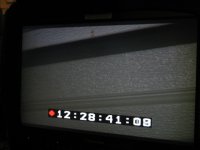 It's a bit large.....But hey, you know your rolling.
It's a bit large.....But hey, you know your rolling.
Douglas Villalba
Well-known member
Awesome. Thanks
Jason Davenport
Well-known member
You don't do it on the CF card, needs to be done in Mini control panel.
Download the firmware update (in a Zip folder,unzip and put in a folder on desktop or where ever.
http://www.aja.com/support/ki-pro/ki-pro-mini.php
You plug in the eithernet cable to mini. Open firefox, type the IP address of your mini in the address bar. Now you have a onscreen control panel for your mini. Go to firmware upgrade and select your unzipped folder of 3.0 firmware and update...say yes to add to flash drive of mini, restart. Done.
If you call support they will be happy to talk you through it. Takes 5 minutes.
Download the firmware update (in a Zip folder,unzip and put in a folder on desktop or where ever.
http://www.aja.com/support/ki-pro/ki-pro-mini.php
You plug in the eithernet cable to mini. Open firefox, type the IP address of your mini in the address bar. Now you have a onscreen control panel for your mini. Go to firmware upgrade and select your unzipped folder of 3.0 firmware and update...say yes to add to flash drive of mini, restart. Done.
If you call support they will be happy to talk you through it. Takes 5 minutes.
scocklin
Well-known member
Thanks for the notice Stephen. I already download it and checked if it started recording with SDI TC.
By the way what is "super out"?
Yes Super out was suppose to be the in viewfinder confirmation that your Ki Pro Mini was actually rolling but seeing as right now most of the viewfinders are HDMI in and Super Out is SDI out only, hopefully we will have HDMI out in a future upgrade. This was a big disappointment for me. I've been doing test all day on the various settings I do like the presets, you may now label each preset to match your settings and recall those settings, I currently have two settings one is labeled 422 29.97 and the other is 422HQ 29.97. Now when you hit the recall all the settings you have set for that particular setting are made and the take number goes back to 1. I think the rental houses will like this because they can have a setup for all of their cameras, thus hopefully eliminating frantic phone calls asking for help on a setting for a particular camera to work with the Mini. I've been test the LAN transfer mode where you can transfer your media from the card through the LAN cable to a hard drive via your computer but I can't get any speed out of it yet. I have a gigabit adapter and have been transferring to USB 3.0 drives but not much luck as of yet. As we all know no DNx yet but maybe by NAB. There are more settings on the 3.0 upgrade that I will be testing shortly. All in all this is a good upgrade by Jon and his crew you have to appreciate a company that even after they have your money they still try to please.
scocklin
Well-known member
Just discovered something new, in the config menu I set the TC in to TC value and not SDI RP 188, Armed Recording to Record Key not TC/Rec Key Camera Data to C300, I have an F3, just to make sure I put my TC on the F3 to free run the Mini starts and stops now with what I assume the SDI data from the F3. I don't want to use this in the field just yet so I have a call into AJA tech support to see if the SDI data coming from the C300 is the same as that coming out of the F3.