Just got a new camera - Sony F35

so the light illusion gamma curves - how much of a difference do you think you would see vs the standard s log curve?

Stuff looks great Mac
 
Last edited:
Ed I haven't tested the light illusion gammas, but there are interesting options there, one even goes to 1000% dynamic range called "cineon gamma", but I will have to test.
I have loaded them to the camera, but work always seems to take all my time.
I'll make a concerted effort to test them out asap.
 
Thanks for the LUT, Mac. I had a chance last night to mess around with the work flow in Resolve 9. I rather liked the results, but its WIP status does show in spots. One thing I found was that applying the Slog->cineon LUT directly to a clip via the clip properties tended to push the exposure higher. I solved that by having no LUTs on clips directly via the clip properties and just applied the LUTs to nodes instead. Seemed more controllable. One thing that came up for me was that the combo of the slog-> cineon on one node and the Kodak LUT on a serial node after it also tended to overexposed the footage (but not as bad as putting the cineon LUT onto the clip props). So I ended up throwing a correction node in the chain before the Kodak LUT node to bring the exposure more in line with what I originally shot via the Middle wheel. Easy to solve, looks good. Last bit of wonkiness for me is that the noise feels somewhat elevated as well, but it's not so bad that I can't work around it. I'm still relatively new to Resolve, so I may be doing everything wrong, which is certainly very likely.
 
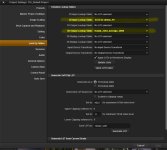
Thanks, although I think I may have solved it. When I put the LUTs into the project settings like this....

solved.jpg

... then I get some nice results. Exposure, noise levels, and highlights all feel proper.
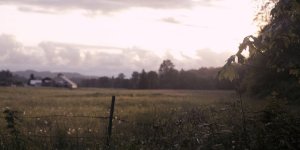
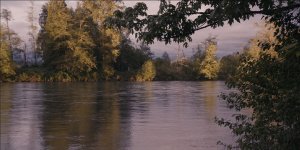
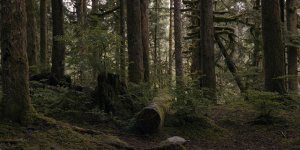
For example, here are some quick results. This is just the sLog footage and the input/output LUTs, no CC nodes. Exposure is kinda hit and miss, but that was my shooting, not the LUTs.

snap_01.JPG

snap_02.JPG

snap_03.JPG

snap_04.JPG

Like I mentioned, I'm still new to Resolve and it seems there are about 4 or 5 different places a person can apply a LUT, and when you mix and match different methods you end up with wildly different results.

When I get some time later I might make a longer post showing all the different odd combinations I ran through to find my way. Perhaps it may prove helpful to other Resolve n00bs like myself.
 
just a bit out of topic. I tested the Miguel's LUTs with my F3 in DaVinci and they works fine. For those interested, remember to follow the advice from Keithlango, thus putting LUTs in the project setting instead of applying them to 2 serial nodes.
Best,
Diego
 
Thanks, although I think I may have solved it. When I put the LUTs into the project settings like this....

View attachment 74740

... then I get some nice results. Exposure, noise levels, and highlights all feel proper.
For example, here are some quick results. This is just the sLog footage and the input/output LUTs, no CC nodes. Exposure is kinda hit and miss, but that was my shooting, not the LUTs.

View attachment 74736

View attachment 74737

View attachment 74738

View attachment 74739

Like I mentioned, I'm still new to Resolve and it seems there are about 4 or 5 different places a person can apply a LUT, and when you mix and match different methods you end up with wildly different results.

When I get some time later I might make a longer post showing all the different odd combinations I ran through to find my way. Perhaps it may prove helpful to other Resolve n00bs like myself.

From my experience, this is exactly how it should be used. The 3D IN is non-destructive, as long as the Cineon LUT's efficient, you shouldn't begin with anything clamped.

The 3D OUT's basically just applying the simulation before hand, to everything along with the 3D IN. You can remove it later on if you want.

Experimenting with the Cineon and Kodak combo Mac posted, I'm thinking you guys should have a solid base, but the Kodak LUT is slightly aggressive in regards to shadows and highlights. HIghlights especially, to me anyway.

Stills look good.
 
Been getting nice results playing around with the other LUTs that I downloaded from Juan Melara's site. (http://juanmelara.com.au/print-film-...-for-download/). His Fuji stocks seem to lean a bit green on the cineon treated sLog from my F35. At least to my eye they do. I've not shot any film so I can't say if that's intentional or not (Yeah, I know. Unwashed Philistine and all...). Even so, it's easy enough to pull it back with a midtone adjustment if you don't want the green-ishness.

It's certainly nice to have a few different stocks to play with. It adds to the pleasure of shooting with this cam, which already grabs such nice organic images off that CCD sensor. The ISO 450 is a bit slow by today's standards, but I like that it forces me to think & light like I'm shooting with film. I started my career as an animator on the computer, but I never really felt like I took off as a pro and understood what I was doing until I learned how to animate the old fashioned way with a pencil and paper. The discipline that comes with working with older limitations pays off in spades down the road.
 
The green's intentional. Part of that look.

Cool thing about a lot of LUT's that they're universal. I've been using Mac's LUT in conjunction with one I'm building on my Blackmagic footage, and testing Juan's along with a fistful of others.

Would be interesting to see how the reverse works.
 
Ed I haven't tested the light illusion gammas, but there are interesting options there, one even goes to 1000% dynamic range called "cineon gamma", but I will have to test.
I have loaded them to the camera, but work always seems to take all my time.
I'll make a concerted effort to test them out asap.

Test them, test them, test them!!! :laugh:
And also the 50p thing!
 
I got a LUT for Davinci Resolve that goes from Slog to film stock emulation in 1 step. Testing the results. So far it looks fine and makes grading much easier.

Mac,

The LUT you got from light illusion, which LUT is it? I'm willing to split costs!

I spoke to Steve at light Illusion, asked about a slog->cineon LUT, he said he can make one to do that. Then I asked: if I use his "cineon gamma", do I still need the slog->cineon LUT? what about DR compared to Slog? he replied:
"The Cineon curve does indeed map the camera output into Cineon space ;o) They should indeed do as you are trying to manage.
With the Cineon Curve you will not need the LUT.
It has more latitude than Slog."

This is interesting, so I will indeed try the gammas out in the next day or 2, and the 50P thing too.
 
Mac,

The LUT you got from light illusion, which LUT is it? I'm willing to split costs!

I spoke to Steve at light Illusion, asked about a slog->cineon LUT, he said he can make one to do that. Then I asked: if I use his "cineon gamma", do I still need the slog->cineon LUT? what about DR compared to Slog? he replied:
"The Cineon curve does indeed map the camera output into Cineon space ;o) They should indeed do as you are trying to manage.
With the Cineon Curve you will not need the LUT.
It has more latitude than Slog."

This is interesting, so I will indeed try the gammas out in the next day or 2, and the 50P thing too.

Exactly!
That's why I wanted you to test them asap. If the cineon curve is properly mapped, there would be no need to convert Slog to cineon. However, there is a reason why Sony and Panavision developed the Slog/Panalog. It should distribute values better than a cineon log curve. So while in theory, the cineon might be easier for post, it could look worse. And since the Slog-cineon is just as simple as setting up davinci resolve nodes/lut settings, I don't see it as a great disadvantage.
Also the EVF does a good conversion from Slog to 709, imagine having to work and frame with a cineon log image, too flat. Sure you can start boosting contrast in the evf, but not a great way of working.

I don't have my F35 with me at the moment, that's why I didn't ask you to send me those camera curves to test. Otherwise I'd do it.
Send me an email so I can send you the lightilusion davinci resolve LUT from these guys.
 
PMed you mac.


its true, I didn't consider the monitoring of cineon. But lets see what transpires.

im definitely in! Can u do Paypal?
 
Back
Top