Just got a new camera - Sony F35

To be honest I can't recall all the prices/options, but it's all covered in this thread.

It is a commitment, and you have to be prepared and fully aware of what you need to get to a full working package. But after everything, it's been worth it for me.
Some have gone bare bones, others fully kitted.
Its not more than a C300 package, but much more image value.
If something goes bang, depending on the part, its potentially an expensive affair, and if you have a wife, she might leave you, but buying another body for spare parts is not a bad idea (and you can do a 2 cam shoot while they both still alive! ;) and I have it insured, so another body would be an easy replacement (dunno how your country insurance works, but mine will cover anything that goes wrong, up to the value I paid for the body)

Off the top of my head:

F35 (with HDVF viewfinder)
4x Swit Vlock 190w/h Batteries, Vlock chargers
CineDeck (used, incl ssd drives, but you could use a BM Hyperdeck or similar)
Tilta handles, lanparte shoulder pad
PL to Nikon conversion

+- £ 11 200

But I had nikon lenses, if you have PL then no conversion.

Hope this helps.

i think a cinedeck and a bm hyperdeck are two very, very different beasties
 
View attachment 71336
Had a bit of an aha moment today when I was organizing my microforce. I have one microforce cable which has the same layout at the 12v out of the F35, it also came with a splitter box for that connection which I never knew what it was for. Problem is, it does not work, at least with the micro force. My suspicion is that this port does not work unless you are using the actual power input on the camera. No way to test this yet unless I purchase the gold plate for the f35. Good news is that you might be able to order one of these connectors from Preston Cinema in Santa Monica.

You are correct, the 12v and 24v output of the camera will only work when the camera is receiving power from the main connector by the on/off switch. V-Lock/AB power via the If box will only power the camera head. I think this is a measure to stop people trying to draw 150w from a battery which can only handle half of that.
 
Macgregor,
I am working on obtaining a Sony F35 with Interface box as a rental from one of the rental facilities in Los Angeles.

Thanks,
Jon Thorn
Senior Product Manager
AJA Video Systems, Inc.

Guys I'm not sure if it will help but I would think the Panavision Genesis is similar enough to an F35 to be helpful here, and Panavision UK certainly still carry both Genesis and F35s
 
Macgregor,
We have a Sony F35 rental lined up now, but it will need to be shipped to us at AJA headquarters. Because of this, I cannot say for certain whether we will be able to determine what the issue is by the time you leave for your trip. Just being honest. It may be something as simple as a setting in the camera menu parameters or it may be something more complex. Also, considering the Ki Pro Quad worked with other video sources - except the F35 Interface box - we cannot yet completely rule out a possible video timing fault, etc. that is specific to your specific hardware. Finally, if possible, it would be great if you could supply me with the firmware version your Sony F35 is currently using.

Thanks,
Jon Thorn
Senior Product Manager
AJA Video Systems, Inc.
 
[FONT=Tahoma, Calibri, Verdana, Geneva, sans-serif]Macgregor,
The Sony F35 rental unit we received today is working when connected to a Ki Pro Quad via the Interface box. I have the camera configured for 23.98 444 output and the Ki Pro Quad for SDI 1-2 RGB input; the two devices are connected via 2x 3G SDI rated cables. I am going to review all of the camera settings and share those with you, but your issue seems like it may be specific to your F35 Interface box, your cables or to a menu setting(s) on your camera based on this initial test.

More to follow,
Jon Thorn
Senior Product Manager
AJA Video Systems, Inc.[/FONT]
 
Macgregor,
What follows are the specific settings from our testing of the Sony F35 and the AJA Ki Pro Quad. Again, we are having success with the Ki Pro Quad when used with the Sony F35 when things are configured accordingly.


Sony F35 with Interface Box attached to the rear of the unit. 2x 3G SDI rated cables connected to the Interface Box SDI A and SDI B outputs. Proper power supplied independently to both the Sony F35 and the AJA Ki Pro Quad via unique power sources. AJA Ki Pro Quad connected via 2x 3G SDI rated cables to SDI 1 and SDI 2 inputs.


Settings on the Sony F35:
1 - Sony F35 set to and reporting: _23.98P 444
We also tested:
S29.97P 444
S59.94P 422
_23.98P 422
(All of the above worked as expected if the Ki Pro Quad 2.1 Video Input was correctly configured for the video signal used.)


2 - the RAMP function was disabled with the default selections set during all of our testing.


3 - in the MAINTENANCE menu, BASE SETTING
SHOOT MODE>Custom
D-RANGE>Extend
COLOR SPACE>S-Gamut


4 - in the MAINTENANCE menu, AUDIO
Camera Mic CH Select
IF BOX: CH1/2
Delay Comp:Off
Audio Delay: 0 Frame
Video Delay: 2 Frame


5 - in the MAINTENANCE menu, OUTPUT FORMAT
CURRENT>23.98PsF 4:4:4
SCAN>Progressive
FRAME>23.98
FIELD (Not applicable)
SIGNAL>4:4:4 RGB
SELECT FPS>Off
(Other frame rates were tested without issue.)
SET FORMAT


6 - in the MAINTENANCE menu, GENLOCK
REFERENCE>Internal
STATUS>No Signal
H PHASE>0


7 - in the MAINTENANCE menu, METADATA
EMBEDDED>Off
ANC LINE>(9)
TYPE>(User 1)
REC MS WRITE>Off
PLAY MS WRITE>Off
DISP ON REC


8 - in the DIAGNOSIS menu, PLD VERSION
TG: V1.10
AD: V1.10
PRE: V1.11
POST: V1.05
TX: V1.04
RX: V1.07
VDA: V1.04
AT: V1.06


9 - in the DIAGNOSIS menu, ROM VERSION
MAIN: V1.46 DEC/22/2009
NET: V1.42 JUN/09/2009
BOOT: V1.20 JUL/16/2008
F35


Settings on the AJA Ki Pro Quad (running release version firmware 5.0.0.143):
1 - in the CONFIG>1.1 Record Type
Normal


2 - in the CONFIG>1.4 In Convert
None


3 - in the CONFIG>1.5 Out Convert
None


4 - in the CONFIG>1.6 SDI Out
SDI 1-2 RGB (if the source is 444)
SDI 1-2 YCbCr (if the source is 59.94P)
SDI 1 (if the source is 422)


5 - in the CONFIG>2.1 Video Input
SDI 1-2 RGB (if the source is 444)
SDI 1-2 YCbCr (if the source is 59.94P)
SDI 1 (if the source is 422)


6 - in the CONFIG>2.2 Audio Input
SDI or XLR are both viable
(We connected a Sony kit microphone to the Interface Box XLR CH1 and CH2 inputs to test SDI embedded audio from the camera which worked as the SDI embedded audio source.)


7 - in the CONFIG>6.1 Genlock
Freerun


8 - in the CONFIG>8.0 TC In
All choices seem viable, but the SDI RP188 does not appear to receive a value from the Sony F35.


9 - in the CONFIG>8.3 Arm Recording
REC KEY


10 - in the CONFIG>13.1 Camera Data
None


11 - in the CONFIG>32.0 Loss of Video
STOP REC


12 - in the MEDIA>12.1 Media State
Record-Play


13 - in the MEDIA>12.2 Rollover
OFF


14 - in the MEDIA>14.1 Encode Type
ProRes 444 (if a 4:4:4 source is used)
ProRes 422HQ (if a 4:2:2 source is used)


Note that I could achieve a "No Input" and black display on the Ki Pro Quad if:
- an incorrect 2.1 Video Input selection was made
- a valid genlock source was applied to the Sony F35 Genlock input connector, but the Sony F35 was configured for Internal in the Genlock portion of the Sony F35 Maintenance menu.


Again, based on this testing, you may have an issue with your specific settings or your specific Interface Box or cables, etc.


I hope this is helpful,
Jon Thorn
Senior Product Manager
AJA Video Systems, Inc.
[FONT=.Helvetica NeueUI]
[/FONT]
 
Hi Jon,
thanks for the post. I´m away from my camera but I´ll be flying tomorrow back home and I´ll be able to check.
From your menu settings I notice you have an older firmware update on that camera. The ones we have are newer. I wonder if you still have the camera around today, if you could upgrade it to the last firmware update, (the one that includes 10/12bit output), and see if still you´re getting a valid video signal. Remember I was able to get a valid signal if passthrough other sdi decks, but not directly.

BTW, any news on the davinci resolve issue with the QT files recorded on the Quad?
Thanks!
 
Macgregor,
Since the camera is a rental, updating the firmware on it will really be up to the rental facility to decide if they are comfortable with us doing that. I can ask, but cannot promise that they will be comfortable with us performing the update. Can you please verify which versions of firmware you are using on your Sony F35? (I had asked for that information earlier in the thread). You might also consider reverting your Sony F35 firmware to the version we have had success with as a test.

I do not have any additional information regarding DaVinci Resolve. Again, as you have noted, the files work with all other applications so the issue is possibly with DaVinci Resolve's QuickTime importer.

Regards,
Jon Thorn
Senior Product Manager
AJA Video Systems, Inc.
 
Macgregor,
With permission from the rental facility, we updated the rental Sony F35 to V2.12. We tested under this firmware with both 10-bit and 12-bit for the 444 BIT DEPTH setting in the MAINTENANCE>OUTPUT FORMAT menu. We did not experience any problems with the Sony F35 Interface Box output with any frame rate (23.98, 24, 25, 29.97) of 4:4:4 set to either 12-bit or 10-bit when connected to the AJA Ki Pro Quad. All settings suggested appear to work.

At this point, based on our testing, it would seem that your experience is specific to your configuration: Sony F35 settings, Sony F35 Interface Box, SDI cables, AJA Ki Pro Quad settings or the AJA Ki Pro Quad itself. While it is unlikely that the AJA Ki Pro Quad is problematic (you yourself said it worked with your NLE output without issue and only the F35 was problematic), AJA Technical Support could still issue you a new unit under RMA. Before contacting them to doing that, please verify all settings offered and tested by us in this thread for both the Sony F35 and the AJA Ki Pro Quad. Again, the only way we can get the Ki Pro Quad to "go dark" is to incorrectly set the CONFIG 2.1 Video Input to an inappropriate setting or apply genlock to the camera while it is set for internal genlock.

Thanks,
Jon Thorn
Senior Product Manager
AJA Video Systems, Inc.
 
Thanks Justin,

Five hard weeks for the camera in all weathers and it behaved like a champ. I wish the cinedeck was as hardy, but that's why it's five grand not twenty-five I suppose. The quality of the footage is undisputable though.

All shot on CINE-EI 450. First two shots are lit, obviously, third is completely natural light.
 
Love the look.
ive just been shooting in Ghana Africa for 5 straight days in intense heat and humidity, and as expected, the champ kept on going flawlessly without complaint. Also wish the Cinedeck was as hardy. When I shoot 50P cineform, recording gets interrupted for some reason, but it seems only to happen when I'm moving a lot and could even be the cables causing that, so I have to keep an eye on the deck to see when it happens.

Btw, not a scientific test, but I think I've managed to reduce the power hungry Beast's draw by disabling the wifi, network, and sound card hardware in device manger, and it seems to draw about the same amount of power as the F35 now, as I run out of battery on both the F35 and the CineDeck at about the same time, whereas before that the deck ran out a lot sooner than the champ.

What codec are you recording to? I'm using prores 444 but there's that 95% highlight cutoff problem, that makes me just expose under it.
 
But I do think the lack of full range is a QuickTime decoder/mac thing, as if I playback clips directly on the cinedeck with waveform selected, the full range does seem to be there, so I'm a bit frustrated at the mo.
 
IMG_0144.jpgIMG_0145.jpgIMG_0146.jpgIMG_0141.jpg

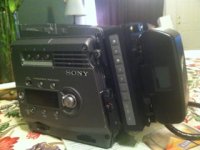
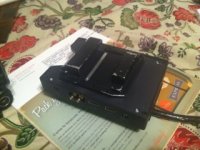
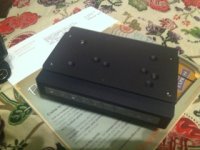
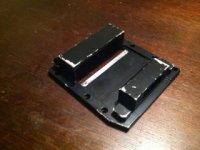
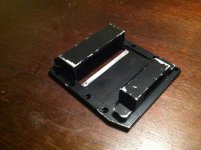
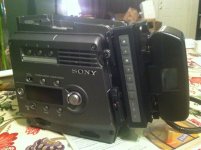
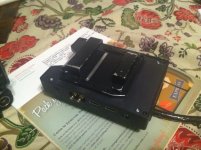
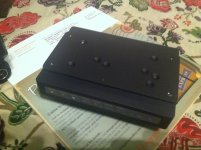
Please forgive the tablecloth and crappy iphone photos. I got a chance to test the f35 body and everything appears to be 100% functional. I am slowly waiting for the pieces to come in from ebayland. I am seriously considering the Abelcine HDx35 B4 to PL adapter, I tested a friend's adapter and lens yesterday and the range of an 20x ENG lens is really nice. The light loss is not as terrible as you might think. Also they have a few in overstock bringing the price down below 3000.

I know a few will think this is a bad solution, I would agree if this was still a rental unit, but now it is my personal camera. I removed the back mount from the interface box, I found some 2 ton metal epoxy which fused the mount to the hyperdeck and then on the other side I put the f35 gold mount plate which i picked up at Abelcine, on sale under 200 now also might want to check it out for anyone using anton bauers. When the 12-bit pipeline is worked out I'll go back to the interface box, I am sure I can remove it from the hyperdeck but I will probably destroy the hyperdeck plate as it is fairly flimsy metal. Also the gold mount plate came with a plate it screws into, when I am ready to upgrade, I think I can get another one of these plates to swap the gold mount. In terms of using glue to hold this together- I am very happy with how strong it is held together. I think the weak point is using the hyper deck as the metal case of the unit is not terribly thick, I feel like the hyperdeck would rip apart before the epoxy came off the unit. In any case, I am really happy with this setup as I am trying to get the smallest configuration possible for this cam.

The official f35/65 gold mount plate is really nice. The biggest drawback is the lack of d-taps. The nicest feature is the 12v accessory power now works on the camera. I am most likely going to order a battery with a d-tap built in. I would highly recommend this plate, especially now that it is on sale.

You might also notice I have removed the top mount off the camera, I am working on a custom plate to screw in on top with mounting holes for a wooden camera handle or similar. I wanted to test that the camera would function properly with these parts removed. The camera did not give any errors with the parts missing.
 

Attachments

  • IMG_0141.jpg
    IMG_0141.jpg
    105.4 KB · Views: 1
  • IMG_0143.jpg
    IMG_0143.jpg
    93.7 KB · Views: 1
  • IMG_0145.jpg
    IMG_0145.jpg
    103.1 KB · Views: 0
  • IMG_0146.jpg
    IMG_0146.jpg
    88.8 KB · Views: 1
Last edited:
Back
Top