
Navigation
Install the app
How to install the app on iOS
Follow along with the video below to see how to install our site as a web app on your home screen.
Note: This feature may not be available in some browsers.
More options
You are using an out of date browser. It may not display this or other websites correctly.
You should upgrade or use an alternative browser.
You should upgrade or use an alternative browser.
Just got a new camera - Sony F35
- Thread starter macgregor
- Start date

Jusgorilla
Well-known member
Hi Jon
Thats quite a gut wrenching experience! Glad the F35 survived like a champ. I had a not as severe crash with mine, I let the camera rest on the floor before a take, and walked off to adjust a light, but I forgot I was still tethered to it to my waist belt CineDeck! Bam! pulled it over onto its side. Everyone on set looked at me with horror/pity. But the champ was unscathed! It really is built like a tank.
What you recording to? Any clipping?
Thats quite a gut wrenching experience! Glad the F35 survived like a champ. I had a not as severe crash with mine, I let the camera rest on the floor before a take, and walked off to adjust a light, but I forgot I was still tethered to it to my waist belt CineDeck! Bam! pulled it over onto its side. Everyone on set looked at me with horror/pity. But the champ was unscathed! It really is built like a tank.
What you recording to? Any clipping?
Last edited:

keithlango
Well-known member
Keith Thanks, that's interesting but the Samurai doesn't do 1080 50P
Keith, it may seem that you figured out ACES in Resolve for the F35? Did you manage to get the F35 specific IDT to work? please do tell.

Yeah, it's a bummer that the Samurai doesn't do 50p, but I don't often need it. For those times I do I can borrow or call in a favor from a friend who has a Red.
As for figuring out ACES in Resolve, I'm not sure I'd go that far. But I will say that I'm getting stuff that I like, so I'm OK with things for now. I've only just recently started using Resolve (I've used probably a dozen other compositing apps in my career for comping CG onto live action footage, but Resolve is new to me.) I never did find an F35 IDT file anywhere on the net, so I can't help there. None of the other IDT options in Resolve looked good or behaved properly, so I leave the IDT for the project to none.
Right now in the Project Settings I have my color science set to ACES, I've set full data levels, I use Miguel's first sLog LUT as the 3d input LUT and no output LUT. In the Media Bin I am not applying any LUTs to the clips individually. The Arri Alexa C-log to Rec709 LUT is more contrasty and saturated as a starting point, but it's usable. I just like what Miguel has done with his LUTs, so I use those as a jumping off point for my grading. I set my output renders to be QT DNxHD 10-bit 220mbs. I'm able to edit that without trouble in Premiere Pro. When I switch between DaVinci YUV and Davinci ACES I do see a difference in the color rendition, as well as the distribution of shadows and highlights in the waveform. I personally like the ACES color look- it feels a smidge richer and it does a better job of making use of the highlight room in the footage. I'm sure that without an F35 specific IDT that I'm not getting the full benefit of ACES, but what bit I am getting out of it I like.
And that's about as much as I know right now. I wouldn't dare to pretend that I'm an expert at this, but I've at least found a path that works for me and gives me footage that I like to look at.
keithlango
Well-known member

The 2nd is this bottom plate that includes 15mm rods at the correct height, so that you can use standar 15mm accessories. If you attach any 15mm bottom plate (such as the tilta or lanparte, or even a standard arri 15mm plate) you'd probably noticed how the rods sit too far from the lens. This might be a problem with some matte boxes or follow focus units. But the reason why I got this is because is because this is the simplest and more compact way of having 15mm rods in this camera for tripod configuration. Now the kit is more compact and the center of gravity is also lower (I no longer need the Sony VCT-U14 Quick-Release Tripod Adapter which is quite heavy).
My camera came with a plate that looks a lot like that, but without the rails. I'm curious to know where you got it. The Lanparte shoulder pad thing works, and I like how quick it is with the VCT mount. But I don't like how high up the center of gravity is, though. The F35 is a tall camera as it is without adding another 2-3 inches to it. Put the EVF up high on the handle (my camera came with the handle mount for the EVF) and it gets top heavier still.
Jusgorilla
Well-known member
As for figuring out ACES in Resolve, I'm not sure I'd go that far. But I will say that I'm getting stuff that I like, so I'm OK with things for now. I've only just recently started using Resolve (I've used probably a dozen other compositing apps in my career for comping CG onto live action footage, but Resolve is new to me.) I never did find an F35 IDT file anywhere on the net, so I can't help there. None of the other IDT options in Resolve looked good or behaved properly, so I leave the IDT for the project to none.
Right now in the Project Settings I have my color science set to ACES, I've set full data levels, I use Miguel's first sLog LUT as the 3d input LUT and no output LUT. In the Media Bin I am not applying any LUTs to the clips individually. The Arri Alexa C-log to Rec709 LUT is more contrasty and saturated as a starting point, but it's usable. I just like what Miguel has done with his LUTs, so I use those as a jumping off point for my grading. I set my output renders to be QT DNxHD 10-bit 220mbs. I'm able to edit that without trouble in Premiere Pro. When I switch between DaVinci YUV and Davinci ACES I do see a difference in the color rendition, as well as the distribution of shadows and highlights in the waveform. I personally like the ACES color look- it feels a smidge richer and it does a better job of making use of the highlight room in the footage. I'm sure that without an F35 specific IDT that I'm not getting the full benefit of ACES, but what bit I am getting out of it I like.
And that's about as much as I know right now. I wouldn't dare to pretend that I'm an expert at this, but I've at least found a path that works for me and gives me footage that I like to look at.
Keith, I found the F35 IDT : https://github.com/ampas/aces-dev/tr...idt/sony/S-Log
But I have had no time to find a way to implement it into Resolve, and not sure where else it would apply. Maybe some one here knows more about ACES workflow and to implement the IDT for the F35?
keithlango
Well-known member
Thanks for sharing the link. I was surprised to see that the code in that IDT is fairly straightforward (well, as much as 3x3 matrices are straightforward..). However, the problem is that it does not appear that there is a way for a user to add a new IDT to DaVinci Resolve themselves. At least I haven't been able to find any documentation on that, and the user manual strongly implies that the supported IDTs are at BMD's discretion and not by user choice.
So we're out of luck. Maybe send a bunch of requests to BMD to add F35 IDT support to the next Resolve update? They recently added CinemaDNG IDTs to Resolve 9.1 (to support their own BMCC cams, natch). Not sure how keen they'd be to add a new IDT feature for a camera that is fading from the high end production landscape. An more intriguing feature request would be for BMD to add a 3x3 matrix input dialog for defining arbitrary IDTs. That way you could copy/paste the values in yourself. But that presumes that all IDTs apply the arbitrary matrix data the same way, which I have no clue whether they do or not.
So we're out of luck. Maybe send a bunch of requests to BMD to add F35 IDT support to the next Resolve update? They recently added CinemaDNG IDTs to Resolve 9.1 (to support their own BMCC cams, natch). Not sure how keen they'd be to add a new IDT feature for a camera that is fading from the high end production landscape. An more intriguing feature request would be for BMD to add a 3x3 matrix input dialog for defining arbitrary IDTs. That way you could copy/paste the values in yourself. But that presumes that all IDTs apply the arbitrary matrix data the same way, which I have no clue whether they do or not.

macgregor
Veteran
Unfortunately, a rental tripod crapped out on us while we were doing some tests in our hotel, sending the F35 toppling to the hard floor. I practically vomited my heart out of my body when it happened, but the camera behaved like a champ. Started right up, and had no internal issues at all. Two small metal pieces broke off of the rear accessory mount, however, though we think that we'll be able to simply epoxy them back on because they were clean snaps. Luckily, because that mount is so over-engineered, it still works fine without those small pieces.
Wow, how did the tripod collapse? The lens was ok?
Sorry to hear that.
Macgregor,
I'm doing my best to respond while traveling, but it is not easy to say the least I'm afraid. (Cel phone access only and then only intermittently working...)
Let's review the information we do know at this point about your Sony F35 and Ki Pro Quad configuration.
You stated: "I made sure the Quad works by testing it in the editing room and sending several video formats. It saw them all.
And again, interestingly, the Quad can also see all the video formats from the F35 if we passthru the signal through the blackmagic Hyperdeck (except for those that require dual link of course)."
- There are some clues here... First, it seems likely that the Ki Pro Quad is not defective in terms of it's SDI input connectors since it recognizes signals from a video source other than the Sony F35. Another clue is that when you connected the Sony F35 SDI A output to your Hyperdeck Shuttle, then the Hyperdeck Shuttle output to the Ki Pro Quad input via a signal loop through, that produced a signal that the Ki Pro Quad would accept; the Hyperdeck Shuttle may have stripped out offending ancillary data (such as improper VPID or metadata) from the F35 SDI signal or re-clocked the SDI signal if the F35 source had bad timing. The final additional clue is that the Sony F35 SDI monitor output (not the interface box SDI output) appears to work when connected to the Ki Pro Quad. All of these things would lead one to believe that the SDI outputs from the Sony F35 interface box, when connected directly to the Ki Pro Quad, are the root of your issue. Therefore, it might be good to review the Sony F35 settings.
I'm not asking the following questions to belabor this matter, but to get a more complete understanding of the settings being used on your Sony F35.
1 - You don't see (SET FORMAT) appearing in the Sony F35 user interface instead of CURRENT do you?
2 - does SELECT FPS display a value in parentheses, such as (23.98)?
3 - the RAMP function is not enabled is it?
4 - in the MAINTENANCE menu, BASE SETTING, what SHOOT MODE, D-RANGE and COLOR SPACE are selected?
5 - in the MAINTENANCE menu, OUTPUT FORMAT, what do CURRENT, SCAN, FRAME, FIELD,
SIGNAL and SELECT FPS indicate?
6 - in the MAINTENANCE menu, GENLOCK, what is selected for REFERENCE?
7 - in the MAINTENANCE menu, GENLOCK, what is selected for STATUS?
8 - in the MAINTENANCE menu, METADATA, what are EMBEDDED, ANC LINE, TYPE, REC MS WRITE, PLAY MS WRITE, and DISP ON REC set to?
9 - in the DIAGNOSIS menu, do all items appear to be operational and as expected?
If you can supply us with these specific Sony F35 menu parameter selections that would be valuable in our effort to determine what may be causing your issues.
On the Ki Pro Quad, it would be good to verify the settings as well:
10 - in the CONFIG>1.1 Record Type, what is the setting?
11 - in the CONFIG>1.4 In Convert, what is the setting?
12 - in the CONFIG>1.5 Out Convert, what is the setting?
13 - in the CONFIG>1.6 SDI Out, what is the setting?
14 - in the CONFIG>2.1 Video Input, what is the setting?
15 - in the CONFIG>2.2 Audio Input, what is the setting?
16 - in the CONFIG>6.1 Genlock, what is the setting?
17 - in the CONFIG>8.0 TC In, what is the setting?
18 - in the CONFIG>8.3 Arm Recording, what is the setting?
19 - in the CONFIG>13.1 Camera Data, what is the setting?
20 - in the CONFIG>32.0 Loss of Video, what is the setting?
21 - in the MEDIA>12.1 Media State, what is the setting?
22 - in the MEDIA>12.2 Rollover, what is the setting?
23 - in the MEDIA>14.1 Encode Type, what is the setting?
As much specific information about these settings as you can supply would be appreciated as we try to assist you.
Regarding the QuickTime files in Resolve, as you stated: "The files open fine in QTplayer and FCP. They just don't show up in Resolve. This happens in windows and macOS. And I've read other people comments having the same issue."
The fact that the files open without issue in a multitude of other applications may mean that there is an issue specific to DaVinci Resolve's QuickTime importer; this seems probable considering, as you note, that the files open without issue in your other applications.
Please let me know if you can provide the information for the numbered questions above. Again, just to be clear, AJA's QA department performed testing with a Sony PMW-F3 after you reported your experience (since we do not currently have a Sony F35 on hand for testing); the Sony PMW-F3 worked in all formats tested (which are comparable to the Sony F35 - single link, dual link and dual link high frame rate outputs.) Since video inputs to the Ki Pro Quad, other than your Sony F35 seem to interact as expected, something about the output of the Sony F35 would seem to be the issue. We would like to help determine what that issue is.
Also, my apologies to others on this forum for my interruption of your other discussions.
Sincerely,
Jon Thorn
Senior Product Manager
AJA Video Systems
I'm doing my best to respond while traveling, but it is not easy to say the least I'm afraid. (Cel phone access only and then only intermittently working...)
Let's review the information we do know at this point about your Sony F35 and Ki Pro Quad configuration.
You stated: "I made sure the Quad works by testing it in the editing room and sending several video formats. It saw them all.
And again, interestingly, the Quad can also see all the video formats from the F35 if we passthru the signal through the blackmagic Hyperdeck (except for those that require dual link of course)."
- There are some clues here... First, it seems likely that the Ki Pro Quad is not defective in terms of it's SDI input connectors since it recognizes signals from a video source other than the Sony F35. Another clue is that when you connected the Sony F35 SDI A output to your Hyperdeck Shuttle, then the Hyperdeck Shuttle output to the Ki Pro Quad input via a signal loop through, that produced a signal that the Ki Pro Quad would accept; the Hyperdeck Shuttle may have stripped out offending ancillary data (such as improper VPID or metadata) from the F35 SDI signal or re-clocked the SDI signal if the F35 source had bad timing. The final additional clue is that the Sony F35 SDI monitor output (not the interface box SDI output) appears to work when connected to the Ki Pro Quad. All of these things would lead one to believe that the SDI outputs from the Sony F35 interface box, when connected directly to the Ki Pro Quad, are the root of your issue. Therefore, it might be good to review the Sony F35 settings.
I'm not asking the following questions to belabor this matter, but to get a more complete understanding of the settings being used on your Sony F35.
1 - You don't see (SET FORMAT) appearing in the Sony F35 user interface instead of CURRENT do you?
2 - does SELECT FPS display a value in parentheses, such as (23.98)?
3 - the RAMP function is not enabled is it?
4 - in the MAINTENANCE menu, BASE SETTING, what SHOOT MODE, D-RANGE and COLOR SPACE are selected?
5 - in the MAINTENANCE menu, OUTPUT FORMAT, what do CURRENT, SCAN, FRAME, FIELD,
SIGNAL and SELECT FPS indicate?
6 - in the MAINTENANCE menu, GENLOCK, what is selected for REFERENCE?
7 - in the MAINTENANCE menu, GENLOCK, what is selected for STATUS?
8 - in the MAINTENANCE menu, METADATA, what are EMBEDDED, ANC LINE, TYPE, REC MS WRITE, PLAY MS WRITE, and DISP ON REC set to?
9 - in the DIAGNOSIS menu, do all items appear to be operational and as expected?
If you can supply us with these specific Sony F35 menu parameter selections that would be valuable in our effort to determine what may be causing your issues.
On the Ki Pro Quad, it would be good to verify the settings as well:
10 - in the CONFIG>1.1 Record Type, what is the setting?
11 - in the CONFIG>1.4 In Convert, what is the setting?
12 - in the CONFIG>1.5 Out Convert, what is the setting?
13 - in the CONFIG>1.6 SDI Out, what is the setting?
14 - in the CONFIG>2.1 Video Input, what is the setting?
15 - in the CONFIG>2.2 Audio Input, what is the setting?
16 - in the CONFIG>6.1 Genlock, what is the setting?
17 - in the CONFIG>8.0 TC In, what is the setting?
18 - in the CONFIG>8.3 Arm Recording, what is the setting?
19 - in the CONFIG>13.1 Camera Data, what is the setting?
20 - in the CONFIG>32.0 Loss of Video, what is the setting?
21 - in the MEDIA>12.1 Media State, what is the setting?
22 - in the MEDIA>12.2 Rollover, what is the setting?
23 - in the MEDIA>14.1 Encode Type, what is the setting?
As much specific information about these settings as you can supply would be appreciated as we try to assist you.
Regarding the QuickTime files in Resolve, as you stated: "The files open fine in QTplayer and FCP. They just don't show up in Resolve. This happens in windows and macOS. And I've read other people comments having the same issue."
The fact that the files open without issue in a multitude of other applications may mean that there is an issue specific to DaVinci Resolve's QuickTime importer; this seems probable considering, as you note, that the files open without issue in your other applications.
Please let me know if you can provide the information for the numbered questions above. Again, just to be clear, AJA's QA department performed testing with a Sony PMW-F3 after you reported your experience (since we do not currently have a Sony F35 on hand for testing); the Sony PMW-F3 worked in all formats tested (which are comparable to the Sony F35 - single link, dual link and dual link high frame rate outputs.) Since video inputs to the Ki Pro Quad, other than your Sony F35 seem to interact as expected, something about the output of the Sony F35 would seem to be the issue. We would like to help determine what that issue is.
Also, my apologies to others on this forum for my interruption of your other discussions.
Sincerely,
Jon Thorn
Senior Product Manager
AJA Video Systems
macgregor
Veteran
Hi Jon, please find my answers in yellow. Thanks for working on this. Hopefully there's a way of fixing this or a firmware update before I leave out for shooting in the Sahara by the end of the month:
1 - You don't see (SET FORMAT) appearing in the Sony F35 user interface instead of CURRENT do you? No.
2 - does SELECT FPS display a value in parentheses, such as (23.98)? In what menu are you refering to?
3 - the RAMP function is not enabled is it? No.
4 - in the MAINTENANCE menu, BASE SETTING, what SHOOT MODE, D-RANGE and COLOR SPACE are selected? It's in CINE EI mode right now, which automatically sets Drange extended and color space Sgamut. But I´ve also tried Custom, F900 color space and regular 709 gamma curve in case it made any difference.
5 - in the MAINTENANCE menu, OUTPUT FORMAT, what do CURRENT, SCAN, FRAME, FIELD,
SIGNAL and SELECT FPS indicate? Right now I have it on 23,98PsF 422 10, scan progressive, frame 23.98, signal 422 YCbCr, select fps off, 444 bit depth 10bit. But I've tried all combinations possible here. It made no difference. Sometimes when switching output formats, the AJA screen reacts like attempting to interpret the signal, but not a single frame appears on the screen.
6 - in the MAINTENANCE menu, GENLOCK, what is selected for REFERENCE? refernece internal, status no signal. H phase 0.
7 - in the MAINTENANCE menu, GENLOCK, what is selected for STATUS? No signal.
8 - in the MAINTENANCE menu, METADATA, what are EMBEDDED, ANC LINE, TYPE, REC MS WRITE, PLAY MS WRITE, and DISP ON REC set to? I have metadata switched OFF. But I did try switching it to on. Embedded OFF, anc line (9), type (user1), rec ms write ON, play ms write on, disp on red, on.
9 - in the DIAGNOSIS menu, do all items appear to be operational and as expected? All OK.
If you can supply us with these specific Sony F35 menu parameter selections that would be valuable in our effort to determine what may be causing your issues.
On the Ki Pro Quad, it would be good to verify the settings as well:
10 - in the CONFIG>1.1 Record Type, what is the setting? It´s on PSF right now, but I tried the 3 modes.
11 - in the CONFIG>1.4 In Convert, what is the setting? none. Tried them all as well.
12 - in the CONFIG>1.5 Out Convert, what is the setting? none. Tried them all as well.
13 - in the CONFIG>1.6 SDI Out, what is the setting? SDI 1 YCbCr. Tried them all as well.
14 - in the CONFIG>2.1 Video Input, what is the setting? SDI 1 YCbCr. Tried them all as well. (I also noticed that even if I have selected the wrong setting, ie: SDI 1-2 RGB, if I connect a single link YCbCr signal -such as the monitor out or from the editing room-, the AJA still sees the video feed)
15 - in the CONFIG>2.2 Audio Input, what is the setting? SDI. I also tried XLR.
16 - in the CONFIG>6.1 Genlock, what is the setting? Freerun. If I select Input or Ref In, I get the following onscreen error message: genlock missing.
17 - in the CONFIG>8.0 TC In, what is the setting? Time of day. I tried all other combinations too.
18 - in the CONFIG>8.3 Arm Recording, what is the setting? REC key.
19 - in the CONFIG>13.1 Camera Data, what is the setting? None. I tried all of them just in case.
20 - in the CONFIG>32.0 Loss of Video, what is the setting? CONT Rec.
21 - in the MEDIA>12.1 Media State, what is the setting? Record-play
22 - in the MEDIA>12.2 Rollover, what is the setting? OFF.
23 - in the MEDIA>14.1 Encode Type, what is the setting? Prores 422 HQ (I also tried all codecs)
Regarding the QuickTime files in Resolve, as you stated: "The files open fine in QTplayer and FCP. They just don't show up in Resolve. This happens in windows and macOS. And I've read other people comments having the same issue."
The fact that the files open without issue in a multitude of other applications may mean that there is an issue specific to DaVinci Resolve's QuickTime importer; this seems probable considering, as you note, that the files open without issue in your other applications. Right, why would this happen? Does Blackmagic know about this issue? It's a big workflow constrain as you can understand.
Please let me know if you can provide the information for the numbered questions above. Again, just to be clear, AJA's QA department performed testing with a Sony PMW-F3 after you reported your experience (since we do not currently have a Sony F35 on hand for testing); the Sony PMW-F3 worked in all formats tested (which are comparable to the Sony F35 - single link, dual link and dual link high frame rate outputs.) Since video inputs to the Ki Pro Quad, other than your Sony F35 seem to interact as expected, something about the output of the Sony F35 would seem to be the issue. We would like to help determine what that issue is.
First I thought the Quad might be broken, but as you read I tried it with a different source and it worked fine. Then for a second I thought the Interface box could be broken in my camera, but it does work fine with the hyperdeck. Could the issue be related to a lack of TC in the SDI signal? Why does the B output work? Why none of the other recorders seem to have a problem with the SDI signal from the F35 and the Quad does? What could be different?
I could email you this answers if needed.
1 - You don't see (SET FORMAT) appearing in the Sony F35 user interface instead of CURRENT do you? No.
2 - does SELECT FPS display a value in parentheses, such as (23.98)? In what menu are you refering to?
3 - the RAMP function is not enabled is it? No.
4 - in the MAINTENANCE menu, BASE SETTING, what SHOOT MODE, D-RANGE and COLOR SPACE are selected? It's in CINE EI mode right now, which automatically sets Drange extended and color space Sgamut. But I´ve also tried Custom, F900 color space and regular 709 gamma curve in case it made any difference.
5 - in the MAINTENANCE menu, OUTPUT FORMAT, what do CURRENT, SCAN, FRAME, FIELD,
SIGNAL and SELECT FPS indicate? Right now I have it on 23,98PsF 422 10, scan progressive, frame 23.98, signal 422 YCbCr, select fps off, 444 bit depth 10bit. But I've tried all combinations possible here. It made no difference. Sometimes when switching output formats, the AJA screen reacts like attempting to interpret the signal, but not a single frame appears on the screen.
6 - in the MAINTENANCE menu, GENLOCK, what is selected for REFERENCE? refernece internal, status no signal. H phase 0.
7 - in the MAINTENANCE menu, GENLOCK, what is selected for STATUS? No signal.
8 - in the MAINTENANCE menu, METADATA, what are EMBEDDED, ANC LINE, TYPE, REC MS WRITE, PLAY MS WRITE, and DISP ON REC set to? I have metadata switched OFF. But I did try switching it to on. Embedded OFF, anc line (9), type (user1), rec ms write ON, play ms write on, disp on red, on.
9 - in the DIAGNOSIS menu, do all items appear to be operational and as expected? All OK.
If you can supply us with these specific Sony F35 menu parameter selections that would be valuable in our effort to determine what may be causing your issues.
On the Ki Pro Quad, it would be good to verify the settings as well:
10 - in the CONFIG>1.1 Record Type, what is the setting? It´s on PSF right now, but I tried the 3 modes.
11 - in the CONFIG>1.4 In Convert, what is the setting? none. Tried them all as well.
12 - in the CONFIG>1.5 Out Convert, what is the setting? none. Tried them all as well.
13 - in the CONFIG>1.6 SDI Out, what is the setting? SDI 1 YCbCr. Tried them all as well.
14 - in the CONFIG>2.1 Video Input, what is the setting? SDI 1 YCbCr. Tried them all as well. (I also noticed that even if I have selected the wrong setting, ie: SDI 1-2 RGB, if I connect a single link YCbCr signal -such as the monitor out or from the editing room-, the AJA still sees the video feed)
15 - in the CONFIG>2.2 Audio Input, what is the setting? SDI. I also tried XLR.
16 - in the CONFIG>6.1 Genlock, what is the setting? Freerun. If I select Input or Ref In, I get the following onscreen error message: genlock missing.
17 - in the CONFIG>8.0 TC In, what is the setting? Time of day. I tried all other combinations too.
18 - in the CONFIG>8.3 Arm Recording, what is the setting? REC key.
19 - in the CONFIG>13.1 Camera Data, what is the setting? None. I tried all of them just in case.
20 - in the CONFIG>32.0 Loss of Video, what is the setting? CONT Rec.
21 - in the MEDIA>12.1 Media State, what is the setting? Record-play
22 - in the MEDIA>12.2 Rollover, what is the setting? OFF.
23 - in the MEDIA>14.1 Encode Type, what is the setting? Prores 422 HQ (I also tried all codecs)
Regarding the QuickTime files in Resolve, as you stated: "The files open fine in QTplayer and FCP. They just don't show up in Resolve. This happens in windows and macOS. And I've read other people comments having the same issue."
The fact that the files open without issue in a multitude of other applications may mean that there is an issue specific to DaVinci Resolve's QuickTime importer; this seems probable considering, as you note, that the files open without issue in your other applications. Right, why would this happen? Does Blackmagic know about this issue? It's a big workflow constrain as you can understand.
Please let me know if you can provide the information for the numbered questions above. Again, just to be clear, AJA's QA department performed testing with a Sony PMW-F3 after you reported your experience (since we do not currently have a Sony F35 on hand for testing); the Sony PMW-F3 worked in all formats tested (which are comparable to the Sony F35 - single link, dual link and dual link high frame rate outputs.) Since video inputs to the Ki Pro Quad, other than your Sony F35 seem to interact as expected, something about the output of the Sony F35 would seem to be the issue. We would like to help determine what that issue is.
First I thought the Quad might be broken, but as you read I tried it with a different source and it worked fine. Then for a second I thought the Interface box could be broken in my camera, but it does work fine with the hyperdeck. Could the issue be related to a lack of TC in the SDI signal? Why does the B output work? Why none of the other recorders seem to have a problem with the SDI signal from the F35 and the Quad does? What could be different?
I could email you this answers if needed.
Last edited:

Hunterqual
Active member
Wow, how did the tripod collapse? The lens was ok?
Sorry to hear that.
Yes, luckily there wasn't a lens attached at the moment of impact. I believe there must have been a stripped thread on the lock down knob underneath the bowl, because we had balanced, leveled, and locked everything off but the head still tilted in the bowl, throwing off the balance of the unit and sending everything toppling to the floor. Once I begin my epoxy surgery I'll post a few pictures of what broke off.
deinzimmer
New member
Hello everybody on this thread
I am new and I am considering getting an F35, I am preparing a documentary and I am looking for alternative cameras and looks opposed to the producers F3. But I am still concerned to get this system working with a reliable external filebased recorder. I have not worked all my way through the 100+ pages of this thread but found some nice informations about the BMD shuttle. Would you think that this solution is reliable enough for a doc shooting in all kind of situations? data loss? I have also tried to contact other manufacturers of filebased recorders (I was asking for a recorder capable of recording fullHD 444 12bit up to 50fps compressed codec and uncompressed) , but nobody could tell me if their product would work on the F35, except for Codex, which is from a price point of view no solution:
Onboard M
Sony F35 Active Mount
3x Data Pack 512GB
Transfer Station Complete (including VFS, Disk and Tape Offloader)
for 35000€
UFFFF!!
sound devices answer:
We haven't tested the F35 specifically with the PIX 240. From what I can see from the manual the F35 does not have 3G SDI output so you would need to take the dual link SDI into a converter to bring the 444 signal in over a 3G SDI connection. If recording in 1080P the highest frame rate the PIX will record is 30.
AJA (as I have read in this thread is no option):
At this time the most tested and verified camera interface for Ki Pro Quad is with the Canon C500 4K camera. We are continuing to test and verify operation of the Ki Pro Quad with other cameras, but as of this moment we do not have any test results for your workflow.
Following is information from product management concerning using the Ki Pro Quad with the Sony F35 camera:
Irrespective of camera brand or model, the Ki Pro Quad can receive a 12-bit input signal(s), but the encoding on the Ki Pro Quad is performed at 10-bit. (This information is provided in the manual on page 4 and page 89 of the Ki Pro Quad manual. The manual for the Ki Pro Quad can be downloaded from the AJA.com website.)
The camera may or may not come with the "Interface Box"; inexpensively purchased units sometimes come with only the on-board Monitor Out HD-SDI 1 and Monitor Out HD-SDI 2 connections which are built into the body. These two connectors, I believe if memory serves, are 10-bit capable. The Interface Box, which has HD-SDI A and HD-SDI B outputs, can output at 12-bit. (Note: this is only true if the firmware is updated on the F35 since earlier versions of the F35 firmware only supported 10-bit).
It is also useful to mention that the Sony start/stop command in SDI ancillary data for this camera does not seem to match the Sony PMW-F3 or the newest Sony PMW-F5 or Sony PMW-F55 models. Because of this, we do not believe that the AJA CONFIG>Camera Data menu parameter that supports start/stop for specified Sony camera models will be applicable to the Sony F35 model.
Most promising convergent design:
Our Gemini 4:4:4 can record RGB 4:4:4 12-Bit Full Uncompressed at 50 fps. But, we have not tested it with a Sony F35 as we do not have one in our lab. We have proven this to work with the Canon C500. The Gemini 4:4:4 is available now.
The Odyssey7Q is definitely capable of recording that, at any frame rate from the F35.
We have not completed testing on all cameras, but by working with other Sony cameras we do know this is compatible. An Odyssey7Q is $2295. This includes compressed recording of DNxHD and another popular compressed codec that has not yet been announced. SSD's will come in 240, 480, and 960GB. Pricing will be announced next week, but two 480GB cards will run you under $2500. Adding uncompressed (compressed 4444 included in that package at a future date) would add about another $1500. Odyssey7Q will begin shipping in July.
Prices have been announced now and shipping will start in august since I have had contact with convergent design. I have also tried to contact Sony but no one was able or willing to give me some support! So Sony is probably no opption either.. But out of interest what would I have to calculate for a working SRR1 solution?
Does anyone know how is the Service for F35 cameras? This is also a big concern for me if there is tec. support if I have problems with the cam on a shoot!
I figured out that the oddyssey (not yet out) and the BMD shuttle would be the most interessting options. Can you give me some more advice what parts would be necessary (IF Box,...) to get the F35 running.. what about the upgrades (12bit, Cine EI 1000) is it true that older serial numbers need a hardware upgrade too (some boards changed)?
Many questions... thanx for answers!
Luke
I am new and I am considering getting an F35, I am preparing a documentary and I am looking for alternative cameras and looks opposed to the producers F3. But I am still concerned to get this system working with a reliable external filebased recorder. I have not worked all my way through the 100+ pages of this thread but found some nice informations about the BMD shuttle. Would you think that this solution is reliable enough for a doc shooting in all kind of situations? data loss? I have also tried to contact other manufacturers of filebased recorders (I was asking for a recorder capable of recording fullHD 444 12bit up to 50fps compressed codec and uncompressed) , but nobody could tell me if their product would work on the F35, except for Codex, which is from a price point of view no solution:
Onboard M
Sony F35 Active Mount
3x Data Pack 512GB
Transfer Station Complete (including VFS, Disk and Tape Offloader)
for 35000€
UFFFF!!
sound devices answer:
We haven't tested the F35 specifically with the PIX 240. From what I can see from the manual the F35 does not have 3G SDI output so you would need to take the dual link SDI into a converter to bring the 444 signal in over a 3G SDI connection. If recording in 1080P the highest frame rate the PIX will record is 30.
AJA (as I have read in this thread is no option):
At this time the most tested and verified camera interface for Ki Pro Quad is with the Canon C500 4K camera. We are continuing to test and verify operation of the Ki Pro Quad with other cameras, but as of this moment we do not have any test results for your workflow.
Following is information from product management concerning using the Ki Pro Quad with the Sony F35 camera:
Irrespective of camera brand or model, the Ki Pro Quad can receive a 12-bit input signal(s), but the encoding on the Ki Pro Quad is performed at 10-bit. (This information is provided in the manual on page 4 and page 89 of the Ki Pro Quad manual. The manual for the Ki Pro Quad can be downloaded from the AJA.com website.)
The camera may or may not come with the "Interface Box"; inexpensively purchased units sometimes come with only the on-board Monitor Out HD-SDI 1 and Monitor Out HD-SDI 2 connections which are built into the body. These two connectors, I believe if memory serves, are 10-bit capable. The Interface Box, which has HD-SDI A and HD-SDI B outputs, can output at 12-bit. (Note: this is only true if the firmware is updated on the F35 since earlier versions of the F35 firmware only supported 10-bit).
It is also useful to mention that the Sony start/stop command in SDI ancillary data for this camera does not seem to match the Sony PMW-F3 or the newest Sony PMW-F5 or Sony PMW-F55 models. Because of this, we do not believe that the AJA CONFIG>Camera Data menu parameter that supports start/stop for specified Sony camera models will be applicable to the Sony F35 model.
Most promising convergent design:
Our Gemini 4:4:4 can record RGB 4:4:4 12-Bit Full Uncompressed at 50 fps. But, we have not tested it with a Sony F35 as we do not have one in our lab. We have proven this to work with the Canon C500. The Gemini 4:4:4 is available now.
The Odyssey7Q is definitely capable of recording that, at any frame rate from the F35.
We have not completed testing on all cameras, but by working with other Sony cameras we do know this is compatible. An Odyssey7Q is $2295. This includes compressed recording of DNxHD and another popular compressed codec that has not yet been announced. SSD's will come in 240, 480, and 960GB. Pricing will be announced next week, but two 480GB cards will run you under $2500. Adding uncompressed (compressed 4444 included in that package at a future date) would add about another $1500. Odyssey7Q will begin shipping in July.
Prices have been announced now and shipping will start in august since I have had contact with convergent design. I have also tried to contact Sony but no one was able or willing to give me some support! So Sony is probably no opption either.. But out of interest what would I have to calculate for a working SRR1 solution?
Does anyone know how is the Service for F35 cameras? This is also a big concern for me if there is tec. support if I have problems with the cam on a shoot!
I figured out that the oddyssey (not yet out) and the BMD shuttle would be the most interessting options. Can you give me some more advice what parts would be necessary (IF Box,...) to get the F35 running.. what about the upgrades (12bit, Cine EI 1000) is it true that older serial numbers need a hardware upgrade too (some boards changed)?
Many questions... thanx for answers!
Luke
keithlango
Well-known member
Hey Luke,
To save you some searching, I can speak to the Sony service since I needed to get my camera serviced. Labor cost at Sony's LA repair shop was $135 per hour and replacement parts were Sony original list price. A lot of the smaller internal electronics are in the $300-500 range. If you need to replace some of the larger internal processing boards those run in the $2000-3500 range. The optical block is a singular unit by Sony's reckoning, so if you break that or any part within it the replacement cost would be way more than you paid for the camera. Thankfully there are optical blocks available on eBay for $3k or so if that ever becomes a need. My repair came to $1600 or so (a bad C-board & other wear & tear), split roughly equally between labor, parts, shipping and insurance.
As for the recorder option: Hyperdeck does work fine up to 10-bit 422 1080p 30fps. Same with the Atomos Samurai. I've got both and they both did the job (well, the Shuttle did before it went south. It's since been replaced under warranty by BMD). I have recorded off both the A&B from the IF box as well as the monitor out #1 & #2 from the main body. I don't know that I'd say either unit is a terribly robust long term solution. A Pix240 inspires more confidence with it's build quality. But they'll service for a while. I'm waiting to see what shakes out in the recorder market before making a bigger commitment.
If you get an F35 then I say get one with an IF box if at all possible, mainly for affordable powering and for going single audio/video source (esp since you say you're looking to do a doc with the camera). You may be able to find an IF box all by itself on the used market, but I wouldn't count on it. And you won't want to buy a replacement one from Sony. According to their price sheets they charge over $12k for a complete IF box sub-assembly. (you can search for parts and pricing here. Just type in F35 for the model number, chose the camera from the given list and choose Exploded views after that. Gives you diagrams, parts numbers, price lists, etc. Check out the optical block price if you want a good laugh.) It would seem that the best path to go down for affordable, critical path access to parts is to buy another used F35 like Ed David just did.
To save you some searching, I can speak to the Sony service since I needed to get my camera serviced. Labor cost at Sony's LA repair shop was $135 per hour and replacement parts were Sony original list price. A lot of the smaller internal electronics are in the $300-500 range. If you need to replace some of the larger internal processing boards those run in the $2000-3500 range. The optical block is a singular unit by Sony's reckoning, so if you break that or any part within it the replacement cost would be way more than you paid for the camera. Thankfully there are optical blocks available on eBay for $3k or so if that ever becomes a need. My repair came to $1600 or so (a bad C-board & other wear & tear), split roughly equally between labor, parts, shipping and insurance.
As for the recorder option: Hyperdeck does work fine up to 10-bit 422 1080p 30fps. Same with the Atomos Samurai. I've got both and they both did the job (well, the Shuttle did before it went south. It's since been replaced under warranty by BMD). I have recorded off both the A&B from the IF box as well as the monitor out #1 & #2 from the main body. I don't know that I'd say either unit is a terribly robust long term solution. A Pix240 inspires more confidence with it's build quality. But they'll service for a while. I'm waiting to see what shakes out in the recorder market before making a bigger commitment.
If you get an F35 then I say get one with an IF box if at all possible, mainly for affordable powering and for going single audio/video source (esp since you say you're looking to do a doc with the camera). You may be able to find an IF box all by itself on the used market, but I wouldn't count on it. And you won't want to buy a replacement one from Sony. According to their price sheets they charge over $12k for a complete IF box sub-assembly. (you can search for parts and pricing here. Just type in F35 for the model number, chose the camera from the given list and choose Exploded views after that. Gives you diagrams, parts numbers, price lists, etc. Check out the optical block price if you want a good laugh.) It would seem that the best path to go down for affordable, critical path access to parts is to buy another used F35 like Ed David just did.
I told myself I wasn't going to post anything until I had some footage, I have read every page of this thread as it seems that just having the body isn't acceptance into the club. However I need some advice/tips. I had my f35 shipped from Washington to LA, today when I opened up the box and moved the f35 around, there is clearly a small piece of something loose on the inside. It is on the right side of the body.
The seller shipped it in a sony anvil case with the body wrapped in bubble wrap, it seemed very secure, but it was shipped through the US Post office.
I own/borrowing all the parts to test, 4 pin power supply, hyperdeck, sdi monitor, I have a PL lens lined up for a few weeks but not until tomorrow.
Can anyone advice me on the quickest way inside the camera? I'd love to track down the source of the loose part to diagnose the problem. Cam powers on but I haven't started testing the ports. I figured if I could find what was loose, it would go a long way in figuring out what is broken and I can proceed from there.
Obviously a little bummed out, but I am still hopeful I can get this baby up and running. It goes without saying I owe a big thanks to the pioneers in this thread for helping me to consider the f35 as an option.
The seller shipped it in a sony anvil case with the body wrapped in bubble wrap, it seemed very secure, but it was shipped through the US Post office.
I own/borrowing all the parts to test, 4 pin power supply, hyperdeck, sdi monitor, I have a PL lens lined up for a few weeks but not until tomorrow.
Can anyone advice me on the quickest way inside the camera? I'd love to track down the source of the loose part to diagnose the problem. Cam powers on but I haven't started testing the ports. I figured if I could find what was loose, it would go a long way in figuring out what is broken and I can proceed from there.
Obviously a little bummed out, but I am still hopeful I can get this baby up and running. It goes without saying I owe a big thanks to the pioneers in this thread for helping me to consider the f35 as an option.
Thanks Miguel, obviously I already owe you a big thanks!
answered my own question: take the screws out, the tricky part was the little black ring which screws over the power input. Hopefully it's my lucky day, just a loose screw as pictured. I could tell that someone else had been inside the camera though which is a little concerning.
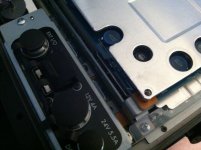
I will begin my own testing/configuring - hope to report back soon with footage. Now that my initial freak out is over, let me introduce myself:
My name is Evan Ferrario, I was very close to buying an Ikonoskop DII for many of the same reasons the f35 is so nice- global shutter, ccd, organic film look. I have been around the f35 before and loved the look but like most here, I had no idea it was a viable option for a person to own. I am really thankful for everyone's hard work and spent money in figuring out how to get this camera up and running. I hope I can contribute to the collection of knowledge soon. I am very aware of what I got myself into buying this camera.
First off: has anyone had experience with this plate http://www.innocinema.com/eu/power-...-f23-gold-mount-for-sony-f23-f35-cameras.html ? I own a collection of Anton Bauer's so I am looking for a gold mount option. Right now I just have a generic gold mount plate with a 4 pin, good for testing but not a permanent component. Am I correct in thinking I can eliminate the interface box if I get this plate because it will plug into the body and not the 4 pin?
I am going to borrow a B4 to PL adapter and ENG lens to test the camera out before I decide what to do about the mount. I do not have an extra mount and I am uneasy about potentially loosing the PL mount for a Nikon.
Anyways I know I need to put in some hours with this camera so hopefully I'll have some footage soon.
answered my own question: take the screws out, the tricky part was the little black ring which screws over the power input. Hopefully it's my lucky day, just a loose screw as pictured. I could tell that someone else had been inside the camera though which is a little concerning.
I will begin my own testing/configuring - hope to report back soon with footage. Now that my initial freak out is over, let me introduce myself:
My name is Evan Ferrario, I was very close to buying an Ikonoskop DII for many of the same reasons the f35 is so nice- global shutter, ccd, organic film look. I have been around the f35 before and loved the look but like most here, I had no idea it was a viable option for a person to own. I am really thankful for everyone's hard work and spent money in figuring out how to get this camera up and running. I hope I can contribute to the collection of knowledge soon. I am very aware of what I got myself into buying this camera.
First off: has anyone had experience with this plate http://www.innocinema.com/eu/power-...-f23-gold-mount-for-sony-f23-f35-cameras.html ? I own a collection of Anton Bauer's so I am looking for a gold mount option. Right now I just have a generic gold mount plate with a 4 pin, good for testing but not a permanent component. Am I correct in thinking I can eliminate the interface box if I get this plate because it will plug into the body and not the 4 pin?
I am going to borrow a B4 to PL adapter and ENG lens to test the camera out before I decide what to do about the mount. I do not have an extra mount and I am uneasy about potentially loosing the PL mount for a Nikon.
Anyways I know I need to put in some hours with this camera so hopefully I'll have some footage soon.
The anton bauer plate is nice and light, it has no D-Tap though. the power cable plugs in directly to the camera, but you still need an extra aluminum plate to mount onto the camera if you decide not to use the interface box.
the interface box provides clean SDI outputs without any monitor overlays, and the monitor outs from the camera only output 10bit.
so you would need to turn the peaking/monitor setting off if you intend to use those camera outputs to record.
One other thing to note, this camera is quite power hungry.
the interface box provides clean SDI outputs without any monitor overlays, and the monitor outs from the camera only output 10bit.
so you would need to turn the peaking/monitor setting off if you intend to use those camera outputs to record.
One other thing to note, this camera is quite power hungry.
keithlango
Well-known member
Welcome to the party, yachacha! I almost went for the d-II, as well. Looking forward to seeing your footage (which reminds me, I need to post up some proper stuff myself).
Sorry to hear about the loose bits, but it sounds like you've got a bead on the problem. That AB plate with the Lemo pin looks like a great solution. For D-tap just get batteries with built in D-tap ports. If you have the top handle you could take the handle off of the interface cover plate and probably mount the AB plate to the cover plate. Of course you'd lose the handle. I suppose if it's super important then you could order a new blank cover plate from Sony (price: $900. But it's in stock, at least.). That's a fairly extreme solution, though. It will be nice when the prices for parts come down for this camera, but I'm not holding my breath. :grin:
For day to day shooting I think the 10-bit out from the monitor feed to an affordable recorder is a solid option. The two monitor feeds certainly make it a workable plan (one clean for recording, one dirty for monitoring). But then that is leaving a lot of the camera's capability untapped.
Sorry to hear about the loose bits, but it sounds like you've got a bead on the problem. That AB plate with the Lemo pin looks like a great solution. For D-tap just get batteries with built in D-tap ports. If you have the top handle you could take the handle off of the interface cover plate and probably mount the AB plate to the cover plate. Of course you'd lose the handle. I suppose if it's super important then you could order a new blank cover plate from Sony (price: $900. But it's in stock, at least.). That's a fairly extreme solution, though. It will be nice when the prices for parts come down for this camera, but I'm not holding my breath. :grin:
For day to day shooting I think the 10-bit out from the monitor feed to an affordable recorder is a solid option. The two monitor feeds certainly make it a workable plan (one clean for recording, one dirty for monitoring). But then that is leaving a lot of the camera's capability untapped.

Hunter Hampton
Carbonite Member
Im in the middle of editing now and was being sidetracked by playing with all these new raw .dng's from the mark 3, trying to pull out nice colors and skin tones from them but its been kinda hard finding the sweet spot- then I come back from playing with the 5d files to editing f35 and just can't believe how much film the f35 looks out of the box and the kodak like skin color:

Why cant every camera look like this!?
Why cant every camera look like this!?