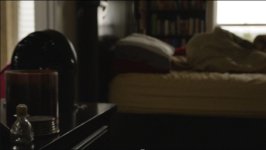
Just got a new camera - Sony F35

No problem! Aside from looking a bit silly (from many angles the lenses are so small that it doesn't even look like one is attached) it works just fine for me, no more difficult to use on the F35 than any other camera. But for me the conversion is just out of necessity; I plan to shoot a lot with this camera for personal unpaid work and I just wouldn't be able to afford PL glass for those projects.
 
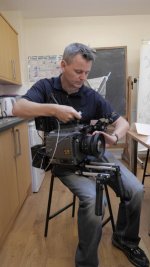
Hello all. Had my first proper shoot with the F35 this afternoon and I really enjoyed using it. It is very heavy though - but delighted with results! Recorded to a ATOMOS Samurai and used a TVLOGIC screen as a monitor - using the waveform monitor at all times to judge exposure. Will upload a clip shortly. Back out with it tomorrow as well! Sparky.
Sparky on F35.jpg
 
I just got the AJA Quad delivered today.

aja.jpg


Quick review: it does not work.

I'm not sure what's wrong with this but I cannot make it to work with the F35. So I'm not really happy. It doesn't seem to be recognizing the HDSDI signal out of the camera. I've tried switching to all video formats available in the F35 and nothing. 422 and RGB. Nothing. I have been able however to get a connection via the monitor out from the camera, but that was it. And it only worked at some video formats, not all.
So I thought, uhmm maybe it's the cables? Nop, they work fine.
Maybe it's the breakout box in the F35? Nop, it works perfectly with the blackmagic recorder.

I have no idea what's wrong with this thing but I plan on calling AJA as soon as they open today.

More let downs:
- the aja dock requires power!!! What? Why cannot be powered with the thunderbolt? A $400 card reader that requires power in 2013? Also it was missing a screw, yep, very nice.
- the screen in the aja quad is as bad as a 2003 cell phone screen. Really? Why such a low quality screen? Cell phones and DSLR have nice screens these days. I'm fine with being low res, but the contrast, colors and angle of view are terrible for a $4K product.
 
Man, that sucks. I hope you find a solution to the problems. It's a rotten feeling to go from so excited to so disappointed within a few minutes of time. And then to spend hours trying to see what the problem is or how to work around it. Not fun.
 
Well, it has to be something with the camera, because the kipro Quad seems to be recognizing HDsdi signals from the sdi out of the editing PC here... :furious3:
 
Thats very disappointing. What a let down for you Mac. I was also really looking forward to your positive reports. Maybe a defective unit? but it sounds like Aja weren't quite ready to send it out.

On another kwarm, I'm no closer to finding out how to stop the clipping on proRes codec on the CineDeck, Its clipping my highlights at 95%!!! hell clipping at 100% would bother me tremendously, but 95%!?!
I've also tried Cineform, and unfortunelty there's no dnxHD 444, only 422 (so not bothered to try avid) and none retain full range. Ive checked in FCP with "super whites" enabled, Premiere, even Resolve with "Data levels", and everywhere I try its clipped at 95%.
Only thing left that just might retain full range is uncompressed, and thats nutsville file sizes.

This is getting quite ridiculous that we don't have a solid recorder solution without many drawbacks. Now I've set my hopes on the CD Odyssey 7Q :(

Anybody else suffering clipped highlights? Ed David with the Pix? Viddovation with the SR-R1? Mac with the BM? anyone? Ive resorted to exposing at 95% limit to aviod the problem! This is nuts.
 
This is getting quite ridiculous that we don't have a solid recorder solution without many drawbacks. Now I've set my hopes on the CD Odyssey 7Q :(

Anybody else suffering clipped highlights? Ed David with the Pix? Viddovation with the SR-R1? Mac with the BM? anyone? Ive resorted to exposing at 95% limit to aviod the problem! This is nuts.

I don't think I'm seeing clipped highlights at 95 or 100 in Resolve with the Samurai on ProRes HQ, but to be honest I haven't been on the lookout for it. My footage til now seems to be behaving as expected with regard to highlight handling. After work I'll test some stuff with a seriously critical eye to see what I find. But yeah, the recorder issue is by far the biggest weak link in this beautiful image production chain.
 
Thats very disappointing. What a let down for you Mac. I was also really looking forward to your positive reports. Maybe a defective unit? but it sounds like Aja weren't quite ready to send it out.

On another kwarm, I'm no closer to finding out how to stop the clipping on proRes codec on the CineDeck, Its clipping my highlights at 95%!!! hell clipping at 100% would bother me tremendously, but 95%!?!
I've also tried Cineform, and unfortunelty there's no dnxHD 444, only 422 (so not bothered to try avid) and none retain full range. Ive checked in FCP with "super whites" enabled, Premiere, even Resolve with "Data levels", and everywhere I try its clipped at 95%.
Only thing left that just might retain full range is uncompressed, and thats nutsville file sizes.

This is getting quite ridiculous that we don't have a solid recorder solution without many drawbacks. Now I've set my hopes on the CD Odyssey 7Q :(

Anybody else suffering clipped highlights? Ed David with the Pix? Viddovation with the SR-R1? Mac with the BM? anyone? Ive resorted to exposing at 95% limit to aviod the problem! This is nuts.

Hyperdeck works really well. Small. Cheap and the internal battery is handy. No highlights clipped. Downside: connectors bend sometimes.
SR-R1 does everything and highlights don't clip. Nice codec. 444. 12bit. 50p. Downside: expensive and bulky.
 
More Kipro Quad updates:
This is getting crazy. I've been able to get a signal into the aja quad if I feed it via monitor out (but we don't want this), or the B HDSDI output (yep, only B is recognized!!!). I made sure the A output also works as well as the cables by connecting the hyperdeck to those ports. Yep, it all works.

Then I tried connecting the A sdi output to the hyperdeck, and then the hyperdeck to the aja quad, so that there is a loop. And yep, it works!!! So the problems seems to be with the HDSDI signal the camera outputs and the Aja Quad not liking it for some reason.

So with the B output in the camera working at least I get something working, but of course, no chance of 444 or 50p, which is the only reason why I want to use this recorder.

30 minutes on the phone with the AJA tech support, very nice people. They just don't know why this is not working.
 
Alright, and to make things even nicer, the quicktime files recorded with the Aja kiproquad don't appear in davinci resolve. ?????
 
Sorry to hear about all the hassle that has caused you mac. Sound like a nightmare. Speaking of which I had one today. I am using an ATOMOS Samurai for recording my F35 footage, and for the first time in three years using the system, after two short shoots yesterday morning, the WD drive just died on me (first time this has ever happened on me and I have gone through about 5 of the 750 gb drives) and now I can't get access to any of the footage. The drive has been left with a friend of mine who runs an IT company and they are going to try to recover something but it is not looking good. This is the gamble in a way with the F35. At least on the F3, if the drive in the Samurai packs in, you always have the internal footage on the cards as a backup. I have everything crossed the guys can recover some footage but I am not very hopeful.

Here are a few frame grabs from something else I shot yesterday that I could get access to! I am happy with them:
Josie 1.jpgJosie 2.jpgJosie 3.jpgJosie 4.jpg
 
Macgregor,
First, let me say that I am sorry for the frustration you have experienced. I only became aware of this today while traveling and I have not had reliable internet access for the duration of the day so I could not post until now. I have been in contact with AJA technical support and QA about this matter and I have asked them to look into this further. I'm sorry if technical support did not dedicate enough time initially when you first reported an issue. While I appreciate that they are following up with you now, there are some things to consider about this configuration. 1) The Ki Pro Quad can be configured to receive a wide variety of input signals: single link 1.485Gbps SDI, dual link 1.485Gbps SDI, single link 3G SDI, dual link 3G SDI, quad link 1.485Gbps SDI, quad link 3G SDI and RAW Canon SDI as produced by the Canon C500. The Ki Pro Quad was tested with a wide variety of cameras from Canon, Sony, Panasonic, ARRI, etc. The QA department re-tested formats and frame rates output by the Sony PMW-F3 today and verified them as operational; the Sony F35 is not a camera that AJA has on hand, but if necessary, one could be rented for testing (the Sony PMW-F3 offers many of the same formats and frame rates by comparison.) When connecting to any of these cameras the SDI output configuration for the camera and the Ki Pro Quad must "match" and signal which meets the SMPTE standards of the aforementioned 1.45Gbps and 3G single or multi-link signals must be met (such as VPID). Having said this, there may be a setting that is not configured as expected on the Sony F35, there may be a setting that is not configured as expected on the Ki Pro Quad, the signal output from the Sony F35 may be out of spec (bad connector, cable, VPID, etc.), there may be a bad input connector on the Ki Pro Quad, etc. If the Sony F35 is configured for single link SDI output, then the Ki Pro Quad CONFIG>2.1 Video Input would need to be set for SDI 1 YCbCr. If the output of the Sony F35 is configured for dual link output of 4:4:4, then the Ki Pro Quad CONFIG>2.1 Video Input would be set to SDI 1-2 RGB. If the Sony F35 is configured for dual link high frame rate 4:2:2 (such as 1080p 59.94), then the Ki Pro Quad CONFIG>2.1 Video Input would be set to SDI 1-2 YCbCr. If these steps are followed, and issues persist, then the video source (connector, cable, VPID, etc.) as well as the input connection may be at fault.
2) Regarding the comment about using Thunderbolt to power the Pak Dock media reader: while that was certainly considered, the power use scenarios with Thunderbolt and some SSDs make bus power a less than ideal solution. Having a powered media reader assures that the media obtains sufficient power.
3) The screen selected for the Ki Pro Quad had to meet a multitude of criteria and fit into a very compact form factor; it had to have no appreciable lag when viewing, support a scaled version of all formats and frame rates that could be input to the device, meet certification criteria for longevity, emissions, etc. Yes, cel phone screens may offer more clarity, picture quality, etc. by comparison, but they would not meet all of the criteria outlined. The monitor is meant to be used as a reference and for the user interface; AJA does not insinuate that it is a replacement for a dedicated on-board video monitor.
4) Regarding the use of the QuickTime files produced by the Ki Pro Quad in DaVinci Resolve: please be aware that AJA's Apple ProRes encoding and QuickTimes were certified by Apple. Additionally, the QuickTime files work in various NLEs without issue. This will require further investigation and QA at AJA is looking into the matter.

Again, I'm sorry for the frustrations you have faced thus far. I have asked support and QA to focus on providing you support. Should there be any issue with the Ki Pro Quad (or even a suspected issue) in terms of the connectors, etc. AJA will be happy to supply another unit, RMA, etc. I am also sorry that I was not available earlier today to investigate this matter alongside AJA technical support and QA, but my travel today made that impossible. I am typing this from an iPhone so please excuse any typos or grammatical errors that may have resulted. Look for more follow up from AJA with regards to your experience.

Sincerely,
Jon Thorn
Senior Product Manager
AJA Video Systems, Inc.
 
As promised, I looked at some of my test footage. It does not appear that the Samurai recording ProRes HQ is clipping below the expected full range. Excuse the crappy quality, JPEG compressed screen grabs....
Capture.JPGCapture2.JPG


ACES color space, full data, sing Mac's non-daylight balanced sLog LUT. No denoiser applied yet (using the free version of Resolve).
 
Keith Thanks, that's interesting but the Samurai doesn't do 1080 50P :(

Keith, it may seem that you figured out ACES in Resolve for the F35? Did you manage to get the F35 specific IDT to work? please do tell.
 
Macgregor,
First, let me say that I am sorry for the frustration you have experienced. I only became aware of this today while traveling and I have not had reliable internet access for the duration of the day so I could not post until now. I have been in contact with AJA technical support and QA about this matter and I have asked them to look into this further. I'm sorry if technical support did not dedicate enough time initially when you first reported an issue. While I appreciate that they are following up with you now, there are some things to consider about this configuration. 1) The Ki Pro Quad can be configured to receive a wide variety of input signals: single link 1.485Gbps SDI, dual link 1.485Gbps SDI, single link 3G SDI, dual link 3G SDI, quad link 1.485Gbps SDI, quad link 3G SDI and RAW Canon SDI as produced by the Canon C500. The Ki Pro Quad was tested with a wide variety of cameras from Canon, Sony, Panasonic, ARRI, etc. The QA department re-tested formats and frame rates output by the Sony PMW-F3 today and verified them as operational; the Sony F35 is not a camera that AJA has on hand, but if necessary, one could be rented for testing (the Sony PMW-F3 offers many of the same formats and frame rates by comparison.) When connecting to any of these cameras the SDI output configuration for the camera and the Ki Pro Quad must "match" and signal which meets the SMPTE standards of the aforementioned 1.45Gbps and 3G single or multi-link signals must be met (such as VPID). Having said this, there may be a setting that is not configured as expected on the Sony F35, there may be a setting that is not configured as expected on the Ki Pro Quad, the signal output from the Sony F35 may be out of spec (bad connector, cable, VPID, etc.), there may be a bad input connector on the Ki Pro Quad, etc. If the Sony F35 is configured for single link SDI output, then the Ki Pro Quad CONFIG>2.1 Video Input would need to be set for SDI 1 YCbCr. If the output of the Sony F35 is configured for dual link output of 4:4:4, then the Ki Pro Quad CONFIG>2.1 Video Input would be set to SDI 1-2 RGB. If the Sony F35 is configured for dual link high frame rate 4:2:2 (such as 1080p 59.94), then the Ki Pro Quad CONFIG>2.1 Video Input would be set to SDI 1-2 YCbCr. If these steps are followed, and issues persist, then the video source (connector, cable, VPID, etc.) as well as the input connection may be at fault.
2) Regarding the comment about using Thunderbolt to power the Pak Dock media reader: while that was certainly considered, the power use scenarios with Thunderbolt and some SSDs make bus power a less than ideal solution. Having a powered media reader assures that the media obtains sufficient power.
3) The screen selected for the Ki Pro Quad had to meet a multitude of criteria and fit into a very compact form factor; it had to have no appreciable lag when viewing, support a scaled version of all formats and frame rates that could be input to the device, meet certification criteria for longevity, emissions, etc. Yes, cel phone screens may offer more clarity, picture quality, etc. by comparison, but they would not meet all of the criteria outlined. The monitor is meant to be used as a reference and for the user interface; AJA does not insinuate that it is a replacement for a dedicated on-board video monitor.
4) Regarding the use of the QuickTime files produced by the Ki Pro Quad in DaVinci Resolve: please be aware that AJA's Apple ProRes encoding and QuickTimes were certified by Apple. Additionally, the QuickTime files work in various NLEs without issue. This will require further investigation and QA at AJA is looking into the matter.

Again, I'm sorry for the frustrations you have faced thus far. I have asked support and QA to focus on providing you support. Should there be any issue with the Ki Pro Quad (or even a suspected issue) in terms of the connectors, etc. AJA will be happy to supply another unit, RMA, etc. I am also sorry that I was not available earlier today to investigate this matter alongside AJA technical support and QA, but my travel today made that impossible. I am typing this from an iPhone so please excuse any typos or grammatical errors that may have resulted. Look for more follow up from AJA with regards to your experience.

Sincerely,
Jon Thorn
Senior Product Manager
AJA Video Systems, Inc.

Hi Jon!
Thank you so much for your interest following this issue.
As I wrote earlier, the AJA technician on the phone was really nice and he did dedicate as much time as he could on the phone. It's only that it's just difficult to try solving these problems without having the gear in front of you.

What drives me nuts is also what you're mentioning here. Why wouldn't a standard 1.5G signal be seen by the Quad? It makes no sense and that's why it's so frustrating.
We've gone through all possible combinations of framerate, subsampling and settings in both the camera and the recorder. What's more strange is that the Quad can see the video from the monitor out of the F35, but not from the clean SDI ports (except for that trick with port B that I mentioned earlier). There must be a hint there. Could it be the lack of TC embedded in the sdi signal what's stopping the Quad to interpret the sdi signal?

I made sure the Quad works by testing it in the editing room and sending several video formats. It saw them all.
And again, interestingly, the Quad can also see all the video formats from the F35 if we passthru the signal through the blackmagic Hyperdeck (except for those that require dual link of course).


Regarding 3: DSLRs cameras have screens the same size of the one used in the Quad, weren't you able to get a similar one?
Regarding 4: This is also something that makes 0 sense. The files open fine in QTplayer and FCP. They just don't show up in Resolve. This happens in windows and macOS. And I've read other people comments having the same issue. :undecided
 
Happy to report that we used the F35 for the first time out in the field -- this time to do some interviews with corporate clients at their offices. We're also traveling with a set of Dedolights, and I'm now a big fan of them as well for how quickly they set up and how transportable they are.

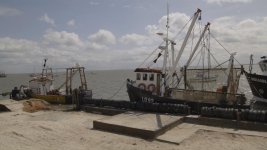
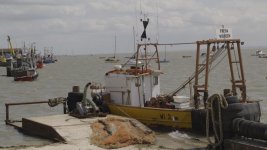
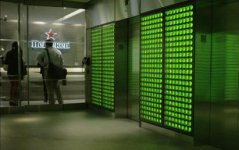
Not the most exciting looking footage, but the camera delivers such great color and crisp footage that it makes everything look like it has a higher production value. Can't really show the shots of the interviews, but here's something from one of the elevator banks:
Screen Shot 2013-05-11 at 9.24.04 AM.jpg

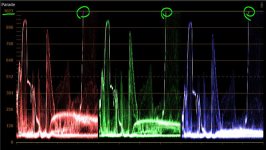
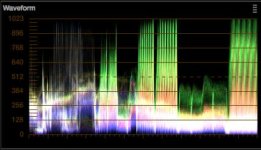
And the waveform, since we've been talking about that:
Screen Shot 2013-05-11 at 9.27.49 AM.jpg

Unfortunately, a rental tripod crapped out on us while we were doing some tests in our hotel, sending the F35 toppling to the hard floor. I practically vomited my heart out of my body when it happened, but the camera behaved like a champ. Started right up, and had no internal issues at all. Two small metal pieces broke off of the rear accessory mount, however, though we think that we'll be able to simply epoxy them back on because they were clean snaps. Luckily, because that mount is so over-engineered, it still works fine without those small pieces.

More to come as we travel to LA, Orlando, Chicago, and San Francisco in the next few weeks.
 
Back
Top