Navigation
Install the app
How to install the app on iOS
Follow along with the video below to see how to install our site as a web app on your home screen.
Note: This feature may not be available in some browsers.
More options
You are using an out of date browser. It may not display this or other websites correctly.
You should upgrade or use an alternative browser.
You should upgrade or use an alternative browser.
Just bought videomic pro... How do I monitor audio?
- Thread starter jrm27
- Start date

The mic is not going to be able to drive headphones. The mic has to go through a mixer or similar device, and be sent to a proper output for monitoring.
The down side is, with DSLR shooting, this cannot be done straight from the camera. Your best bet is to send the mic through a third-party device that allows for monitoring (JuicedLink or the like), but that still has major drawbacks and the monitoring is not from the camera (meaning you cannot listen to what the camera is "hearing").
The down side is, with DSLR shooting, this cannot be done straight from the camera. Your best bet is to send the mic through a third-party device that allows for monitoring (JuicedLink or the like), but that still has major drawbacks and the monitoring is not from the camera (meaning you cannot listen to what the camera is "hearing").

Doc Bernard
Indie Arms Member
jrm27, even it you could just put a "y" cable on it......your levels would be so low, they would be unusable.
Splitters for mics need active circuitry, which means a box. Your best bet is what Alex suggested. Yes, more money, but audio is one of those things that you have to have all the components in place to achieve a usable result.
Splitters for mics need active circuitry, which means a box. Your best bet is what Alex suggested. Yes, more money, but audio is one of those things that you have to have all the components in place to achieve a usable result.
Tanks for the info. I thought perhaps there was a Sescom out there efor this implementation. This is good to know! I spent pretty much all y budget on the mic, so I might end up trying the Fiio workaround that I've seen a few places as I already have one of those (while I save up for a juicedlink of course). Thanks all!
-jon
-jon

refocusedmedia
Veteran
Mic into Zoom H4N, splitter out to headphones and mic input on camera. That way you not only get a second recording, but you can monitor as well.
Steve House
Veteran
What do you mean by "the Fiio workaround?" One of those little amps can raise the level sufficient to drive your headphones but it doesn't resolve the major issue of the fact that a simple "Y" cable splitter is not the proper way to send a mic signal to two inputs. A "Y" will connect the input of the headphone amp directly in parallel with the input of the camera. Lord only knows how they might interact. When you send a signal to two inputs like that they need to be electrically isolated from each other and a simple "Y" won't cut it.Tanks for the info. I thought perhaps there was a Sescom out there efor this implementation. This is good to know! I spent pretty much all y budget on the mic, so I might end up trying the Fiio workaround that I've seen a few places as I already have one of those (while I save up for a juicedlink of course). Thanks all!
-jon
Steve House
Veteran
Yes, but adjusting the headphone volume on the H4n to a comfortable level screws up the recording levels in the camera.Mic into Zoom H4N, splitter out to headphones and mic input on camera. That way you not only get a second recording, but you can monitor as well.
Last edited:
What do you mean by "the Fiio workaround?" One of those little amps can raise the level sufficient to drive your headphones but it doesn't resolve the major issue of the fact that a simple "Y" cable splitter is not the proper way to send a mic signal to two inputs. A "Y" will connect the input of the headphone amp directly in parallel with the input of the camera. Lord only knows how they might interact. When you send a signal to two inputs like that they need to be electrically isolated from each other and a simple "Y" won't cut it.
The Fiio workaround I've seen takes the AV out (USB to RCA cables), and feeds it to a small headphone amp. Then I can monitor out of the headphone amp. This should allow me to hear what audio the camera is recieving. There is no split between the mic and the camera...

Chadfish
Veteran
This cable plugged into your T2I is the solution for monitoring your T2i:
http://www.markertek.com/Cables/Audio-Cables/DSLR-Audio-Cables/Sescom/DSLR-550D-HOCF.xhtml
http://www.markertek.com/Cables/Audio-Cables/DSLR-Audio-Cables/Sescom/DSLR-550D-HOCF.xhtml

drapeama
Well-known member
Better buying it, don't try to DIY a cable, because Canon use a proprietary pinout for their USB cable, as they output both data and A/V:This cable plugged into your T2I is the solution for monitoring your T2i:
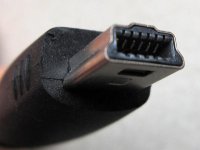
The standard USB cable has 5 connector on the upper and Canon use another 6 connector on the bottom of the connector.
Here's a standard USB cable: