juddering

MiniMe

Member
I'm having problems with juddering on my FS100. Whenever I pan, my eyes hurt when watching it on computer. I know that panning has to be done in a certain way - either very slow or very quick or with following to a subject. But I still think I have too much juddering and something either is wrong with me or camera. I just did a test with a glidecam and was hoping for a smooth picture but unfortunately I still have this damn juddering. I put the sample here - https://vimeo.com/66631025 It was shot 1080 50p but the same problem is also with 25p.

Anyone please with ideas what could be wrong?
 
The only thing I see which looks juddery feels like a buffering issue to my eyes. Nice that you caught some lightning. Would be curious to know what stabilizing rig you were using and how you find it, but I don't want to get off-topic.
 
The only thing I see which looks juddery feels like a buffering issue to my eyes. Nice that you caught some lightning. Would be curious to know what stabilizing rig you were using and how you find it, but I don't want to get off-topic.

I used Glidecam HD4000. Can't say much about it yet, since I've tested it just couple of times. It is clear, though - one has to learn the glidecaming skills and practice in order to get nice flying.

Shutter speed for 25p and 50p?

Shutter used for 25p - 50. And for 50p was 50 as well. I didn't try 100 speed for 50p, though.
 
It is called motion rendering. Apparently, it is an issue with the FS100. I do not know if it is an issue with PAL frame rates only though. I know there are a few key people (Big names) that did own FS100's that are no longer using them because of the motion rendering issue. Go here to learn more about it...

http://www.dvxuser.com/V6/archive/index.php/t-252559.html

Thanks for the link. I did some more search on what experts say about this problem and it comes to manipulating the DETAIL settings in camera - reducing the detail apparently helps. Only I could not find exact steps to be made for a proper adjustment. There are several options under DETAIL setting - V/H ballance, B/W balance, Limit, Crispening and Hi-Light detail - which I have no idea how to adjust. May be anyone has an experience or advise?
 
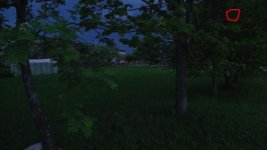
looks no worse than the usual motion judder to me, wonder if it could be your monitor's sharpness, contrast and brightness are making the juddering more obvious. Hate to be the bringer of bad news but you have a dead pixel in the top right of your footage, you may want to black balance and check that.
 
looks no worse than the usual motion judder to me, wonder if it could be your monitor's sharpness, contrast and brightness are making the juddering more obvious. Hate to be the bringer of bad news but you have a dead pixel in the top right of your footage, you may want to black balance and check that.

How do you spot the dead pixel? I can't find it.
 
Thanks for the link. I did some more search on what experts say about this problem and it comes to manipulating the DETAIL settings in camera - reducing the detail apparently helps. Only I could not find exact steps to be made for a proper adjustment. There are several options under DETAIL setting - V/H ballance, B/W balance, Limit, Crispening and Hi-Light detail - which I have no idea how to adjust. May be anyone has an experience or advise?

Ah, this old chestnut again. I think the conclusion was that everyone sees this differently. Sharpness and also compression artefacts can make it worse assuming there is nothing wrong with the viewer environment.

Funnily enough for all those at the time talking about how wonderful the BMCC was at motion i see a nice thread on that forum about motion and juddering. And the cycle continues :)

cheers
Paul
 
Looks great (on my iPhone that is).

I would say play with those detail settings to taste, but I have no insight.
 
I suppose different people react in different ways.

I found the video "dizzying".

I wonder how many hours with a new glidecam it takes to master flying.

It will be interesting to see what the learning curve is for the Movi stabilizer. I have not seen any footage - this apparatus probably is not yet on the market.

It seemed to me the panning was too fast for your recording. I have a table for zoom settings/24p/30p speed for AG-AC160 that I find useful. But the timings probably are different for each camera according to the focal length of the lens (i.e. on a 3.9 mm to 86 mm at 1/2 zoom, it says 32 seconds for 24p and 26 seconds for 30p). At 60p you may be able to go as fast as you like.

Does anyone have the Am Cinematorgapher's Manual (apparent source of these timing recommendations). Worth buying?
 
Last edited:
it's a small white dot that's towards the top righthand corner, if you do a black balance it will hopefully go away.

Could not find the pixel anyway but did the black balance as you suggested and studied the issue and will be doing that balance more often.

I suppose different people react in different ways.

I found the video "dizzying".

I wonder how many hours with a new glidecam it takes to master flying.

"Dizzying" is the right word. Thanks!

I wonder too about the glidecam. I'm not yet satisfied with my results at all...
 
Back
Top