Judder comparison between editing programs

Cavemandude

Well-known member
So I did a comparison between Edius Neo 2.5 Booster and Sony Vegas 9.0 using a 720 60p video clip and exporting it to 24p to get rid of that "live" video look with 60p. I exported this clip from each program from a 24p timeline. What I noticed is a big difference in the motion blur between Edius and Vegas.

Edius produces a very juddery image with very little motion blur on playback whereas the Vegas clips is very smooth with no judder but it may have too much motion blur. Now my question, is this adjustable in either program? Switching to "Frame Blending" didn't seem to make the image any less juddery in Edius.

Here is a split screen comparison of the same clip where I was panning the GH1 from right to left:
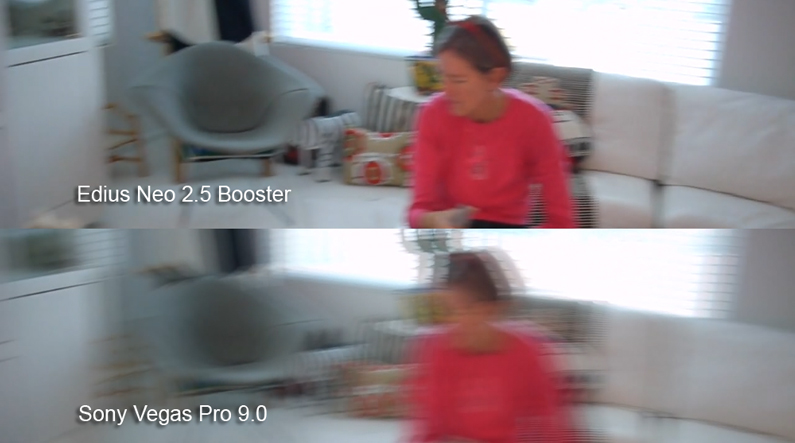
EdiusVegasComparison.jpg


Randy
 
The vegas pro 9 image looks wrong to me... looks more like double image frame blending than true motion blur.. I have yet to find the msot satisfactory way of getting 60p footage conformed to 24p that looks at least SOMEWHAT near as good in shooting in actual 24p

There is a great workflow up for the mac, but none for PC that i can find.

PS: so far... just having neoscene turn 60p to 24p and editing that file looks better then what vegas 9 outputs by just droping 60p in a 24p timeline...

BUT neoscene degrades the image quality to my eyes even at high quality setting.
 
There is actually 3 images but that's how it works and when it is played back it looks smooth with no judder but it also 24p so it doesn't have that 60p look anymore. Freeze a frame from a TV show that is 24p and doesn't have noticeable judder (some TV shows have judder and some don't that use 24p) and you'll see the same effect on the frame. Vegas is doing it correctly.

Randy
 
Can you put these actual motion clips up on vimeo? I'd like to see what the motion actually looks like. Also what are your vegas settings? Are you leaving smart resample on or turning it off on individual clips?
 
It would be easier for you to just test it out yourself since you have all the tools, just don't turn off resample since that is what you tried already.

Randy
 
Yeah I am sitting here toying with it but I honestly don't like either. I can see what you are saying... leaving resample on does a weird 3 flame sort of blend - but even though it is slightly 'smoother' it looks weird to me and does not look like the same scene filmed in actual 24p.

Neither does turning resample off... that gives a 24p image that is too stroby / choppy like your shutter was set way too high.

There has to be some middle ground here that I am missing.
 
Have you changed the type of Motion Blur in the Project Properties yet. There are 6 different settings to choose from.

Randy

MotionBlurType.png
 
Well, of course you would need to test "your" videos with "his" methods to see it meets your expectations. It may end up no better than what you are already using once you do your own testing which is often the case.

Randy
 
Can't test his methods. It's a mac workflow with tools not available on PC.

I have been doing some tests and just did about 5 outs of the same clip. When I get some time I will post them. So far... I like either no resamapling even though it's a bit choppy, or BOX filtering. There is something funky looking about the default gaussian. But again.. non of them look like 1080 24p with pulldown removed and resized to 1280 x720p intercut with the footage shot in 60p converted to 24p.

I am thinking always shoot 1080 24p and then plan any shots you want slomo for and upres.
 
Back
Top