
Navigation
Install the app
How to install the app on iOS
Follow along with the video below to see how to install our site as a web app on your home screen.
Note: This feature may not be available in some browsers.
More options
You are using an out of date browser. It may not display this or other websites correctly.
You should upgrade or use an alternative browser.
You should upgrade or use an alternative browser.
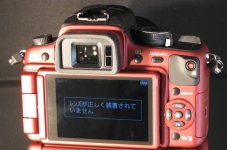
Japanese menu translation - low battery?
- Thread starter clickaustin
- Start date

SonicStates
Well-known member
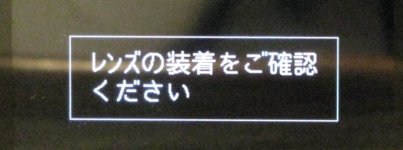
That's right...I have found that with my model this has come up relatively frequently as there is a little play in the lens on its mount. I have just updated the firmware so we'll see how we go. Remember: レンズ= rens (lens) Time to break out that Hiragana and Katakana chart 
All the best.
Sam.
EDIT: Where are you at in Japan catdude?
All the best.
Sam.
EDIT: Where are you at in Japan catdude?
Last edited:
SonicStates
Well-known member
Hamamatsu, not far from you. I love going to the Nagoya Immigration Office. Ha ha... not.
Send me a pm sometime..
Tell me about it.
As for the PM, you got it...collaboration, perhaps??

commanderspike
Carbonite Member
I am pretty sure this message says my battery is low but can someone verify?
I have lost my battery charger so I can't do the obvious thing - recharge my battery.
TIA
When the battery is low the battery indicator flashes red and is empty. Yours is full!!
It's not a Japanese translation you need... but a GH1 manual (in English of course)

Kevin I
Active member
My camera did that once, too. Wiggling the kit 14-140 lens solved the problem, but if it continues I'd contact Panasonic for a fix or replacement.
By the way, here's a link to download the English manual from dvinfo.net
http://media.dvinfo.net/media/panasonic/lumixgh1english.pdf
By the way, here's a link to download the English manual from dvinfo.net
http://media.dvinfo.net/media/panasonic/lumixgh1english.pdf
clickaustin
New member

J Davis
Veteran
I might be doing a shoot with a GH1 that has all japanese menu's and at the moment I do not have an english GH1 or manual for reference. If someone has a little spare time would you post a few pics of the LCD showing the kanji for FHD 1080p mode, Film mode for smooth and the place in the menu where you set 'shoot without lens' ???
Would really help me out, thanks in advance.
Would really help me out, thanks in advance.
Roberto Hapsad
Active member
My Japanese-speaking friend says that my own error (see below) means,It says the lens is not on properly. Try putting the lens on again
Hope that helps
"Cannot check lens. Or the C(spanner icon) Without-Lens (or No-Lens option?)release is in the Off position".
Now, I took delivery of my GH2 with only my older, c-mount lenses to try the camera out with.
Does this message imply that there is a menu setting somewhere to tell the camera that there is no auto-focus or auto-iris-type lens fitted?
(45 minutes later: yes, I switched the C (Spanner icon レンズ) to "on" and can take pictures + video now!)

Last edited:
Roberto Hapsad
Active member
In your situation I chose to buy Japanese.I was thinking about getting a Japanese GH2 from ebay. I can't read Japanese. Is it difficult to figure out the text if you have the english and japanese manuals for cross referencing?
I find:
The manuals don't really correspond across languages.
The little menu icons are the same.
Numbers are the same - but the text alongside is Japanese.
Warnings are in Japanese.
You get to know some stuff at the outset; personally I feel I can cope so far but I'm working the camera at well below its capability and sooner or later I'll need English menus, an intensive course or an English camera.
BTW, operating an English camera alongside my Japanese one is something I'm looking forward to.
We jap-GH2 users really need a thread/sticky/site where we can pool knowledge!
biginvegas
Well-known member
http://cgi.ebay.com/NEW-PANASONIC-L...626133?pt=Digital_Cameras&hash=item2eb4f7acd5
Just looking for confirmation, a GH2 like this one from Taiwan, NTSC, Japanese does not enable you to change the camera language in SET UP to English? My GH1 offers a dozen languages to change to.
Just looking for confirmation, a GH2 like this one from Taiwan, NTSC, Japanese does not enable you to change the camera language in SET UP to English? My GH1 offers a dozen languages to change to.
Roberto Hapsad
Active member
http://cgi.ebay.com/NEW-PANASONIC-L...626133?pt=Digital_Cameras&hash=item2eb4f7acd5
Just looking for confirmation, a GH2 like this one from Taiwan, NTSC, Japanese does not enable you to change the camera language in SET UP to English? My GH1 offers a dozen languages to change to.
You got it right, there's no language change possible & camera firmware is encrypted to make it harder to hack. See hacking progress at http://www.personal-view.com/.
However, GH2s are in short supply. I got one while I could and am shooting with it.
biginvegas
Well-known member
Righto. My GH1/13 is hacked so maybe that's why it has the language change. Been trying to find the GH2 in US to ship to me in South Africa, credit card issues have held back sales but have pre order from larger vendor sometime in the next month. Thanks.
Roberto Hapsad
Active member
Tech manual says,
"Refer to the adjustment instruction in the adjustment software for details."
(I'm guessing you might boot the camera from the SDRAM card which contains the software?)
Anyway, this makes it a lot clearer to me!


"Refer to the adjustment instruction in the adjustment software for details."
(I'm guessing you might boot the camera from the SDRAM card which contains the software?)
Anyway, this makes it a lot clearer to me!
Last edited: